How Much RAM Do You Need for a Laptop in 2026? (8GB vs 16GB vs 32GB)
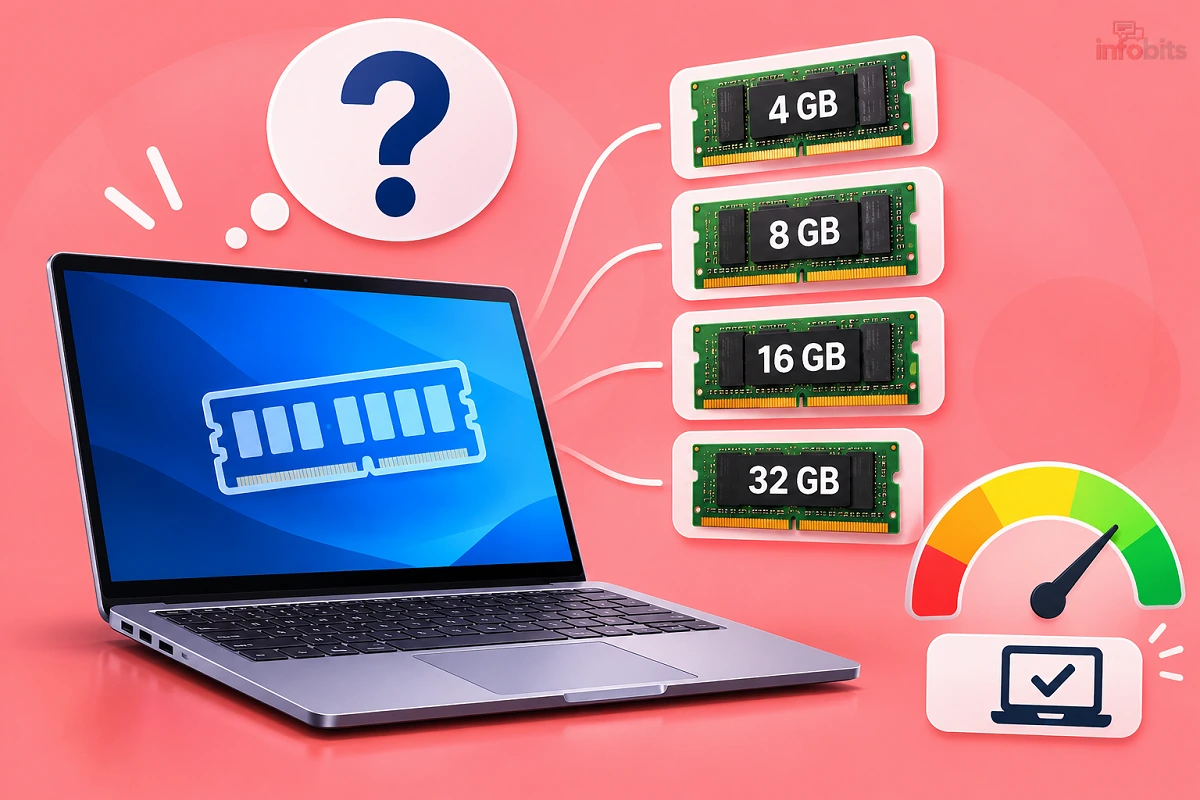
In my personal experience, the immediate answer is that 16GB is the right choice for most people in 2026. Pick 8GB only if your use is truly light. Pick 32GB only if your work is heavy and you can name the reason.
Choosing RAM sounds simple, but it has become harder this year. Memory prices have shot up, and many laptops now have RAM soldered to the board. A wrong choice costs more than it used to.
This guide helps you decide without overspending. It covers what each size does in real life, who needs what, and what to check before you pay.
Quick Answer: 8GB vs 16GB vs 32GB
| RAM | Best for | Verdict in 2026 |
|---|---|---|
| 8GB | Browsing, YouTube, Office, online classes | Fine for light use, but tight. Avoid on Windows if you plan to keep the laptop 4+ years. |
| 16GB | Students, office work, coding, light editing, most gaming | The sweet spot for most buyers. |
| 32GB | Video editing, 3D work, heavy coding, virtual machines, local AI | Worth it only if your work needs it. |
It is better to understand that if you can’t justify why you need 32GB, you don’t need it yet.
What Does RAM Actually Do?
RAM is your laptop’s short-term workspace. It holds everything open right now, like your browser tabs, Excel files, Zoom calls, and Windows itself.
More RAM doesn’t make your laptop faster by itself. It stops your laptop from slowing down when you open too many things. When RAM runs out, Windows moves data to your SSD, and everything starts to lag.
Quick definition: RAM (Random Access Memory) is temporary memory that stores the data your apps are using right now. It clears when you shut down. Storage (SSD) is where your files stay permanently.
Why 2026 Is Different
Three things have changed, and older RAM advice no longer fits.
1. Software is hungrier. Windows 11 itself uses roughly 4GB once it settles in. Add Chrome with a dozen tabs, WhatsApp Web and Teams, and 8GB is nearly gone. Many apps now also run AI features in the background.
2. AI PCs set a higher floor. Microsoft’s Copilot+ PCs need at least 16GB of RAM. That is pushing the whole market towards 16GB as the new normal.
3. RAM has become expensive. AI data centres are soaking up memory chips. IDC India has reported that RAM prices rose 2.5 to 3 times, and laptop prices rose about 10–12 per cent as a result. TrendForce expects DRAM contract prices to climb another 13–18% in the third quarter of 2026.
Prices may not ease until the second half of 2027. So “I’ll just upgrade later” is a costly plan now. That is why getting the right amount at purchase time matters more than before.
Is 8GB RAM Enough in 2026?
Yes, but only for light use. 8GB works if you browse, stream, write documents, join video calls and use a handful of tabs.
It starts to struggle when you keep 15+ tabs open, run Excel with large files, or use Photoshop alongside other apps. You will also feel it after a year or two of Windows updates. The laptop won’t break. It will just feel slower than it should.
Choose 8GB if:
- You only do browsing, email, YouTube and basic documents
- Your budget is tight, and the laptop is for a short period
- You are buying a Mac with Apple Silicon (more on this below)
Skip 8GB if:
- You want a Windows laptop for 4–5 years
- You multitask heavily or keep many tabs open
- You plan to learn coding, editing or design
Is 16GB RAM Enough in 2026?
Yes. For most people, it is the best balance of price and performance. You can keep many tabs open, run Office, Teams and Spotify together, and still have room to spare.
16GB handles coding, light photo and video editing, and most games. It also keeps your laptop usable for 4–5 years. If a retailer offers you 16GB for a modest premium over 8GB, take it.
Choose 16GB if:
- You are a student, working professional or freelancer
- You code, run Android emulators, or edit photos and short videos
- You play popular games like Valorant, BGMI on emulators, or GTA V
- You want one laptop that lasts for years
Even at today’s high prices, the step from 8GB to 16GB is the most worthwhile upgrade you can pay for.
Do You Need 32GB RAM?
Only if your work demands it. Most people won’t notice a difference between 16GB and 32GB in daily use. You pay more and see little benefit.
32GB makes sense for 4K video editing, 3D rendering, large datasets, running virtual machines, Docker with multiple containers, and local AI models. A small AI model can eat 5–8GB on its own before you open anything else.
Choose 32GB if:
- You edit 4K video in Premiere Pro or DaVinci Resolve
- You run virtual machines or several Docker containers
- You do 3D work in Blender or heavy CAD
- You experiment with local AI tools
- You want to keep a high-end laptop for 6+ years
Skip 32GB if: You mostly browse, study or do office work. Spend that money on a better SSD, display or battery instead.
Which RAM Size Fits Your Use?
| If you are a… | Recommended RAM | Why |
|---|---|---|
| School or college student | 16GB (8GB if budget is tight) | Handles online classes, research tabs and presentations |
| Office or work-from-home user | 16GB | Teams, Excel, Chrome and email run together smoothly |
| Casual user (browse, OTT, UPI, bills) | 8GB | Light work doesn’t need more |
| Programmer or learner | 16GB, 32GB for Docker and VMs | IDEs, emulators and browsers add up fast |
| Gamer | 16GB, 32GB for heavy open-world titles | Your GPU matters more than extra RAM |
| Photo editor | 16GB | Lightroom and Photoshop are comfortable here |
| Video editor (1080p) | 16GB | Fine for simple projects |
| Video editor (4K) or 3D artist | 32GB | Large files need headroom |
| Senior citizen or basic use | 8GB | Keep it simple |
Looking at the i5 range? Our guide to the best i5 laptops under ₹50,000 shows what budget laptops typically offer.
What About MacBooks? Does 8GB Mean the Same Thing?
Not quite. Macs with Apple Silicon use “unified memory” that is shared between the CPU and graphics. They manage it more efficiently than most Windows laptops. So 8GB on a Mac often feels better than 8GB on Windows.
Apple’s MacBook Neo is the case to know about. It launched in India with 8GB RAM and starts at ₹69,900. It is fine for students, browsing, documents and basic editing. But you can’t upgrade the RAM later. If you edit video or juggle many heavy apps, go for a Mac with 16GB.
Remember: On any MacBook, RAM is built into the chip. What you pick at checkout is what you keep for life.
You can check the latest price of the Apple 2026 MacBook Neo 13″ on Amazon.
DDR5, LPDDR5X and Soldered RAM: Check This Before You Buy
The type of RAM matters as much as the amount. Here is the simple version.
| Type | Where you find it | Can you upgrade it? |
|---|---|---|
| DDR5 (SODIMM) | Many Windows laptops | Yes, if there is a slot |
| LPDDR5/LPDDR5X | Thin and light laptops, most ultrabooks | No, it is soldered |
| Unified memory | MacBooks | No |
Many thin laptops have RAM soldered to the motherboard. Some have one soldered part and one free slot. Others have two slots.
Dual-channel matters too. Two RAM sticks (for example, 2×8GB) usually perform better than one stick (1×16GB), especially for integrated graphics. A single 8GB stick is a common budget trap.
Planning to upgrade later? If your laptop has a free SODIMM slot, a DDR5 SODIMM kit from a trusted brand, bought through Amazon India, is the simplest way to add memory without sending it to a service centre.
A precision screwdriver set ( available on Amazon) is also worth having before you open the back panel, since cheap bundled tools can strip small laptop screws.
Before you open it: Check your warranty first. In some cases, opening the laptop may void it. Our explainer on what onsite warranty means helps you understand your coverage.
How to Check How Much RAM You Have
On Windows 11:
- Press Ctrl + Shift + Esc to open Task Manager.
- Click Performance, then Memory.
- Check the total at the top. Below it, look at Speed, Slots used and Form factor.
If it says “SODIMM” and “Slots used: 1 of 2”, you have a free slot. If it says “Row of chips”, the RAM is soldered.
On Mac:
- Click the Apple menu, then About This Mac.
- See the Memory line.
- To check usage, open Activity Monitor and watch the Memory Pressure graph. Green is fine. Yellow or red means you need more RAM.
Warning Signs You Need More RAM
- Your laptop slows down when you switch between apps
- Chrome tabs reload when you click back to them
- Memory use stays above 80–85% in Task Manager during normal work
- Apps freeze for a few seconds, then recover
- The disk is busy even when you are not saving anything
- Video calls stutter while other apps are open
If you see two or three of these often, RAM is probably the bottleneck.
Troubleshoot First: Is It Really a RAM Problem?
Slowness isn’t always about RAM. Try these before spending money.
- Restart. A laptop that has run for weeks builds up memory clutter.
- Check startup apps. In Task Manager, open Startup apps and disable what you don’t need.
- Use browser memory savers. Chrome’s Memory Saver and Edge’s Sleeping tabs free up RAM.
- Check storage. A nearly full SSD slows everything down. Keep at least 15–20% free.
- Scan for malware. Hidden miners and adware eat resources. Our guide on computer viruses and their types explains what to look for.
- Update Windows and drivers. Old drivers can cause memory leaks.
After a fresh Windows setup, our guide to things to do after installing Windows 11 also helps trim background load.
Myth vs Fact
| Myth | Fact |
|---|---|
| More RAM always makes a laptop faster | Extra RAM only helps if you actually run out. Beyond that, it does nothing. |
| 8GB is dead | It still works for light tasks. It just leaves little room for the future. |
| 32GB is “future-proof” for everyone | Most users never use it. A balanced laptop beats a RAM-heavy one with a weak screen or battery. |
| High RAM usage means a problem | Windows uses spare RAM for caching on purpose. It frees it when apps need it. |
| RAM size is all that matters | Type, speed, dual-channel and the processor matter too. |
| Phones and laptops need the same RAM | Different operating systems manage memory differently. |
Common Mistakes to Avoid
- Buying 8GB on a Windows laptop with a soldered, non-upgradable slot. You will be stuck.
- Paying extra for 32GB while ignoring SSD size. A 256GB drive fills up fast.
- Ignoring single-channel RAM. One stick can cut integrated-graphics performance.
- Judging by RAM alone. A weak processor can’t use extra RAM well.
- Not reading the spec sheet. Some listings hide whether RAM is soldered.
- Assuming you can upgrade later. With today’s prices, upgrading is costly, and many models can’t be upgraded at all.
Buying Smart When RAM Prices Are High
Memory costs are inflating laptop prices, and some brands are quietly cutting specs. A model that offered 16GB last year may now ship with 8GB at the same price. Read the spec sheet carefully.
A few practical moves:
- Compare RAM and SSD before comparing price. Two laptops at the same price can differ a lot inside.
- Look at older-generation stock. Units built before the price jump often carry older, cheaper RAM.
- Consider refurbished or open-box options from reputable sellers with a warranty. A refurbished laptop with 16GB can beat a new one with 8GB.
- Track the price. Use our guide to Amazon price history in India to see whether a deal is real.
- Watch for sale events. Check Amazon offers and Flipkart offers.
Budget-saving tip: If you must settle for a smaller RAM size now, pairing the laptop with a fast external SSD such as the SanDisk Extreme Portable (available on Amazon) keeps your internal drive free for working files.
Decision Guide: Pick Your RAM in 60 Seconds
Answer these four questions.
- Do you only browse, watch videos and use Office? → 8GB is acceptable.
- Do you multitask, study, code or want the laptop for 4+ years? → 16GB.
- Do you edit 4K video, run VMs or use heavy 3D tools? → 32GB.
- Is the RAM soldered? → Buy more than you think you need today.
Final checklist before you buy:
- [1] RAM size meets your workload
- [2] RAM type (DDR5 or LPDDR5X) is clear
- [3] You know if it is upgradable
- [4] Dual-channel is supported
- [5] SSD is at least 512GB
- [6] Warranty terms are clear
- [7] You have compared the price history
Expert Tips
- When friends ask me for a laptop, I tell them to protect two things: RAM and SSD. You can change a mouse or a bag any time. You can’t easily change soldered memory.
- Buy a little above today’s needs. That gives you a margin of 2–3 years without paying for capacity you won’t use.
- Don’t chase numbers. A balanced 16GB laptop beats a mismatched 32GB one.
- If you use virtual machines, read our comparison of dual boot vs virtual machine first, since VMs are the biggest RAM consumers.
- For better day-to-day comfort, a good wireless mouse under ₹1,000 improves work more than people expect.
- If you plan to use your laptop on a desk for long hours, a laptop stand (available on Amazon) with a separate keyboard improves posture and airflow, and it helps the laptop run cooler under load.
Final Verdict
For most buyers in 2026, 16GB is the best choice. It is affordable, future-ready and enough for studies, office work, coding and gaming.
Choose 8GB only when your use is light or your budget is tight, and be careful with Windows.
Choose 32GB only when your work clearly needs it.
Check whether the RAM is upgradable before you pay. With prices high and soldered memory common, that one check can save you a lot of money and regret.
Frequently Asked Questions
For most people, 16GB. Choose 8GB for light use and 32GB only for heavy work such as 4K video editing or virtual machines.
It is enough for browsing, YouTube, Office and online classes. It gets tight with many tabs or heavy apps, especially on Windows.
Yes. It handles office work, coding, light editing and most gaming for 4–5 years.
For most people, yes. It helps with 4K editing, 3D work, virtual machines and local AI, but gives little benefit for daily use.
16GB lets you run more apps and tabs at once without slowing down. 8GB works for basic use but leaves little spare capacity.
16GB works for most games. 32GB helps with heavy open-world titles and gaming while streaming, but your graphics card matters more.
For basic study use, yes. 16GB is a safer choice if you want to code, edit or keep the laptop through a full degree.
Often yes for light work, because Apple Silicon manages memory efficiently. But it can’t be upgraded, so pick 16GB if you do heavy work.
Only if the RAM isn’t soldered. Check Task Manager or the spec sheet, since many thin laptops and all MacBooks can’t be upgraded.
On Windows, press Ctrl + Shift + Esc, then open Performance and Memory. On Mac, go to the Apple menu, then About This Mac.
AI data centres are using a large share of memory chips, which tightens supply for consumer devices. IDC India reports RAM prices up 2.5–3 times, pushing laptop prices up about 10–12%.
Analysts expect high prices to continue through 2026 and possibly into the second half of 2027.
Only if you were running out of RAM. Beyond that, a faster processor or SSD helps more.
DDR5 is common in upgradable laptops. LPDDR5X is usually soldered and found in thin, power-efficient laptops.
Dual-channel is generally better, especially for integrated graphics, because it moves data faster.
16GB for most development. Choose 32GB if you run Docker, emulators or virtual machines.
16GB for 1080p editing and 32GB for 4K projects.
Not always. Windows uses spare RAM for caching. It is a concern only if the laptop lags while usage stays very high.
If the seller is reputable and gives a warranty, the refurbished 16GB laptop is often better value, especially while memory prices are high.
Slightly. Extra RAM uses a little more power, but the effect is small compared with the display and processor.
We hope you are interested in our articles and consider following our Facebook, Instagram, and Twitter pages for regular updates.
Also, share this article with your friends and relatives. Bookmark this page for future reference.
Subscribe to our free newsletter to get similar articles and regular updates directly in your Email Inbox.
Subscribe to be the first to learn about new information
Disclosure: If you follow our links to a retailer’s website and make a purchase, we will get an affiliate commission on some, but not all, of the items or services we promote. This will cause no price change for you.
You May Be Interested to Read:
- Windows on ARM: Is a Snapdragon Laptop Good for Students in India?
- Core Ultra vs Ryzen AI vs Snapdragon X2 Elite: Which Processor Should You Choose?
- How to Fix Red Tint on Monitor or Laptop Screen (Windows & Mac)
- Is It Safe to Use a Laptop While Charging? Myths vs Facts
- Best Laptops for Students in India: Top 10 Picks Compared