
How to Register and Activate BSNL Wings: Complete Guide
BSNL launched WINGS, India’s first VoIP service, letting you make and receive calls over the internet without a SIM card. Years after launch, it’s still one of the cheapest ways to get a working phone number in India. But the registration and activation process trips up a lot of people, and our own readers’ comments over the years prove it.
This guide walks through the entire process step by step, exactly as it works in 2026: Aadhaar-based registration, payment, PIN activation on the NGN portal, and setting up the Grandstream Wave app so you can actually start making calls.
We’ve also added a troubleshooting section built directly from the most common problems readers report, since the registration flow is where most people get stuck.
Quick answer: Registering for BSNL Wings is free; activating it costs ₹1,099 + GST for a full year of unlimited calling within India. The process has three stages: online registration with Aadhaar eKYC, payment, and PIN activation on the NGN portal, followed by configuring a SIP calling app like Grandstream Wave on your phone or laptop.
What Is BSNL Wings, and Who Is It For?
BSNL Wings is a VoIP (Voice over Internet Protocol) service. It gives you a phone number that works entirely over an internet connection, using any operator’s broadband, Wi-Fi, or mobile data. No SIM card, no cellular network dependency.
It’s particularly useful if:
- You live or work somewhere with a weak mobile signal but a stable Wi-Fi or broadband connection; high-rise buildings, basements, and network-shadow areas are common cases.
- You want a secondary number for calls without buying another SIM.
- You travel internationally often and want to receive calls for free while abroad.
- You want video calling, audio conferencing, and call logging features layered onto a regular phone number.
It’s not the right fit if you need SMS support. Wings is a voice/video calling service only and does not send or receive text messages.
Before You Start: What You’ll Need
Keep these ready before you begin so the process goes through in one sitting:
- Your Aadhaar number (UID) with a mobile number linked to it, since eKYC verification happens through an Aadhaar OTP.
- A working mobile number to receive registration OTPs and updates (this can be any operator, not necessarily BSNL).
- A valid email address. Your activation PIN and account details are sent here.
- A payment method for the ₹1,099 + GST activation fee (UPI, card, or net banking, depending on what’s offered at checkout).
- A stable internet connection throughout. The registration flow has multiple steps, and a dropped connection midway is one of the most common reasons the process fails (more on this in the troubleshooting section).
Step 1: Register for BSNL Wings Online
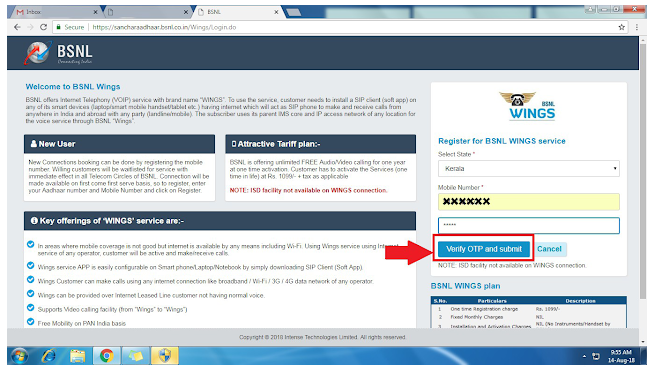
- Go to www.bsnl.co.in and select WINGS Service Booking. This takes you to the registration page at
sancharaadhaar.bsnl.co.in/Wings/Login.do. You can also reach the same registration flow through the BSNL self-care portal. - Select your State, enter your PIN code, email ID, and mobile number, then click Verify Mobile Number.
- Enter the OTP sent to your mobile and click Verify OTP and Submit.
- If you’ve registered this mobile number for Wings before but never completed payment, the portal will show your previous registration details, and you can resume from there instead of starting over.
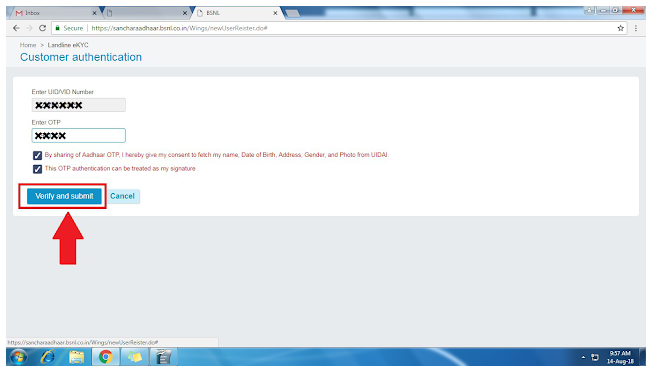
- If you’re a new applicant, you’ll be asked to validate your Aadhaar number. Enter your Aadhaar UID and click Send OTP.
- Enter the OTP sent to your Aadhaar-linked mobile number and click Verify and Submit.
Related: Different Tariff Plans for BSNL Wings
Step 2: Complete the Customer Application Form (CAF) and Pay
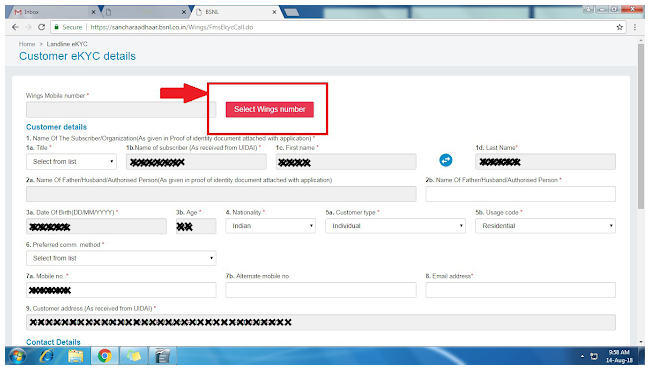
- Once your Aadhaar is verified, you’ll land on an on-screen Customer Application Form (CAF). Most of your eKYC details are auto-filled from Aadhaar. You just need to fill in the rest.
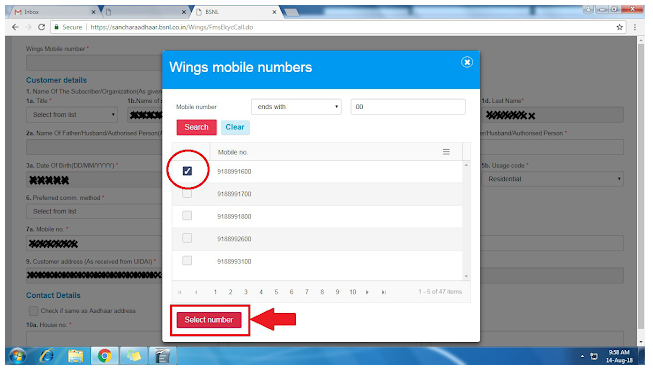
- Select your Wings mobile number. Search the available list of numbers and click Select Number.
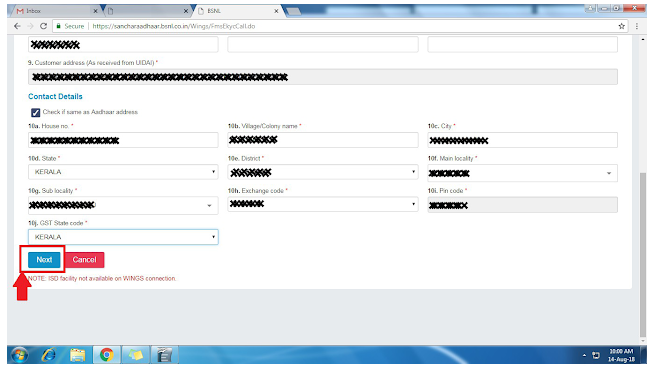
- Fill in every field marked with an asterisk (these are mandatory) and click Next.
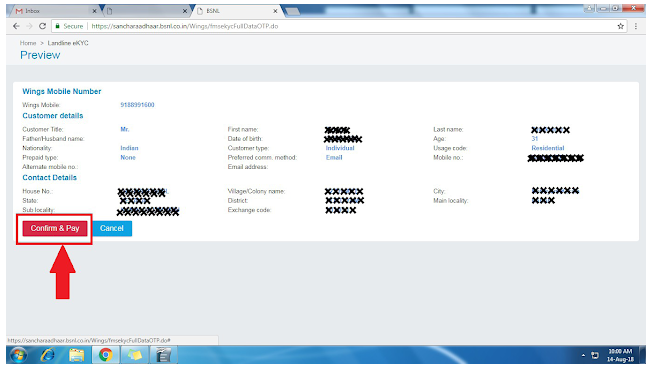
- Review your details on the confirmation screen and click Confirm and Pay.
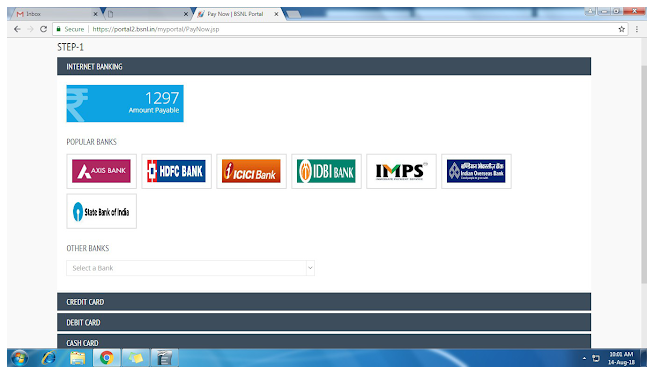
- Choose your payment method and complete the ₹1,099 + GST payment.
On successful registration and payment, you’ll get a confirmation email and SMS with your activation details, including a one-time 16-digit activation PIN. Keep this PIN safe. You’ll need it in the next step, and it’s not always easy to retrieve if you lose it (see the troubleshooting section below).
Step 3: Create Your NGN Portal Account and Activate Your PIN
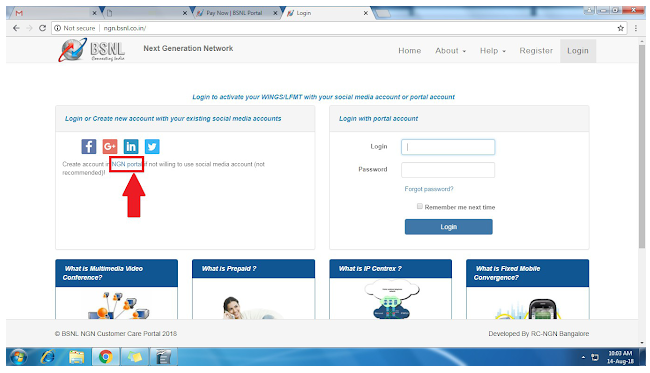
- Visit the NGN Customer Portal at ngn.bsnl.co.in.
- Under Register a New Account, click Create account in NGN portal.
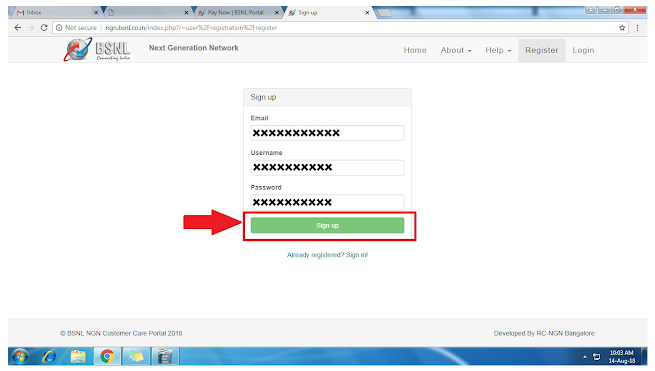
- Enter your email address, choose a username and password, and click Sign Up. You can also sign up using a Google, Facebook, or LinkedIn account if you’d rather skip creating a new password.
- You’ll receive a verification email with your username and password for the NGN portal. Log in using these credentials.
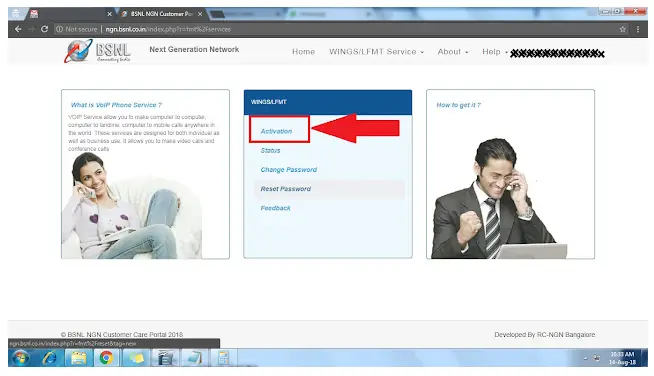
- Under the WINGS/LFMT tab, click Activation.
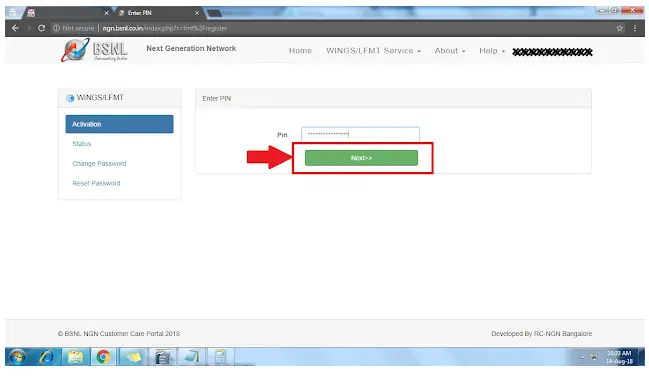
- Enter the 16-digit activation PIN you received earlier and click Next.
- You’ll receive an OTP on your mobile. Enter it to verify, and your registered Wings number will appear on screen once activation is complete.
Keep the password you set here. It’s what you’ll use to log into the Wings service itself. Your username for SIP login is your Wings number, prefixed with +91.
Step 4: Download and Configure the GS Wave App
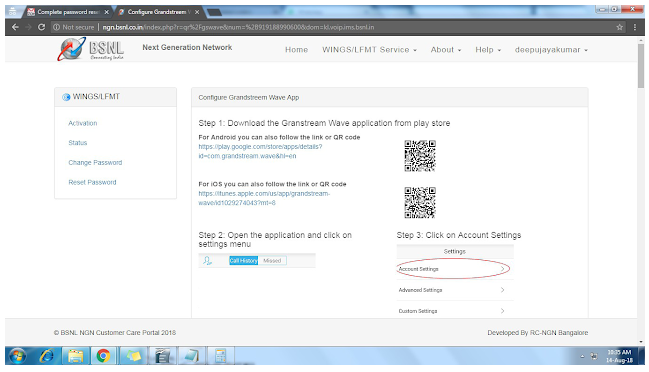
To actually make and receive calls, you need a SIP calling app configured with your Wings credentials. BSNL officially recommends the Grandstream Wave (GS Wave) app, available for both Android and iOS.
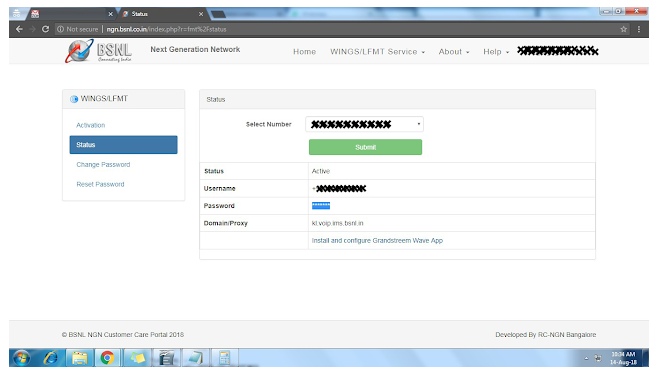
- Download GS Wave from the Play Store or App Store.
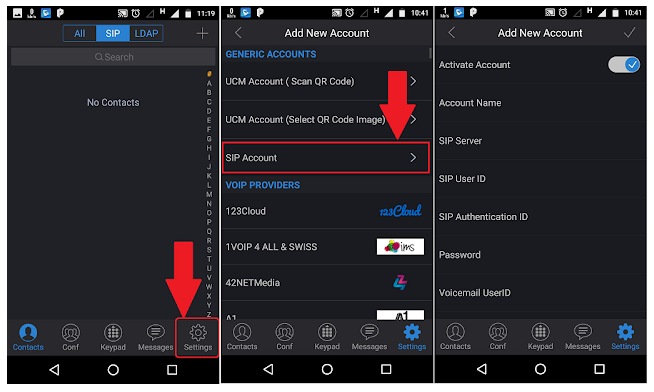
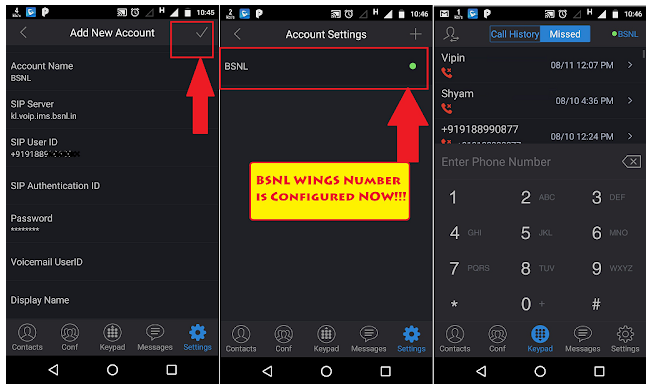
- Open the app, go to Settings, then tap SIP Account.
- Fill in the following details:
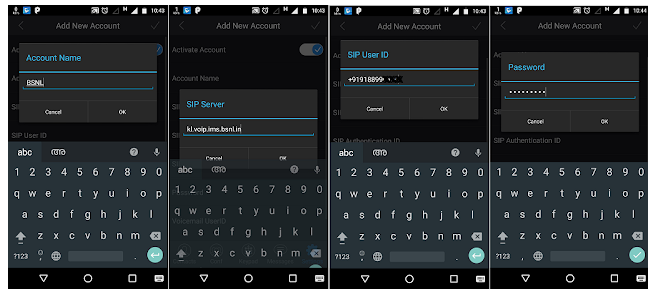
- Account Name: BSNL
- SIP Server:
[circle-code].voip.ims.bsnl.in. For example,kl.voip.ims.bsnl.infor the Kerala circle. Use your own telecom circle’s code; you can find the exact server address listed in your NGN Customer Portal account. - SIP User ID: +91 followed by your Wings number (e.g., +919188990000)
- SIP Authentication ID: Same as the SIP User ID
- Password: The password you set in the NGN Customer Portal after entering your 16-digit PIN
- Under Network Settings, set the Outbound Proxy to your circle’s proxy address (check the NGN portal for the exact value for your circle).
- Save the account. You should see your new “BSNL” SIP account listed with a green status indicator, confirming it’s registered and ready.
Once the account shows green, your Wings number is live, and you can make and receive calls directly through the GS Wave app.
Related: Know About Attractive BSNL Broadband Plans and FTTH Plans
BSNL Wings Tariff Plans and Charges
- Registration: Free.
- Activation (one-time, lifetime): ₹1,099 + GST for most users, which includes one full year of free unlimited audio/video calling to any network within India.
- Discounted deposit: Government employees and existing BSNL BBoWi-Fi users are eligible for a reduced deposit of ₹599 instead of the standard rate. It is worth checking if you fall into either category.
- Renewal: After the first free year, ongoing usage is billed per BSNL’s applicable renewal tariff. Check your NGN portal account or the BSNL Wings tariff plans page for the current renewal rate, since these are periodically revised.
- International calls: Free incoming calls anywhere in the world (international roaming is included at no extra cost for receiving calls). Outgoing international calls cost ₹1.20 per minute.
- ISD deposit: A non-refundable ₹2,000 deposit is required to enable outgoing ISD calling on your Wings number.
Note that VoIP calling isn’t permitted in every country. The UAE, for instance, restricts VoIP services, so Wings calls won’t work if you’re physically there, even though the number itself remains active.
Advantages of BSNL Wings
- No SIM card required. Works over any internet connection.
- Supports both voice and video calling, plus audio conferencing.
- One year of free unlimited calling to any network in India on activation.
- Works over any Wi-Fi network, anywhere.
- Free international roaming for incoming calls, with affordable outgoing ISD rates.
- Compatible with any standard SIP softphone app on mobile, tablet, or laptop.
- Often delivers clearer call quality than a weak mobile signal in poor-coverage areas, since it rides on your internet connection instead of a cell tower.
- You can use your smartphone’s existing contacts, call logs, and recording features for Wings calls just like a regular line.
Common Registration and Activation Problems (and Fixes)
These are the issues readers most frequently report. A few of them show up in the comments on this very article.
“I didn’t receive the 16-digit activation PIN.” This usually happens due to a temporary server or network issue on BSNL’s end, not a problem with your registration. Wait a few hours and check your email (including spam/promotions folders) again. The PIN is sent by email as well as SMS. If it still hasn’t arrived after 24 hours, log a complaint through the NGN portal’s support section rather than repeatedly retrying registration, since a duplicate registration can complicate things further.
“Registration fails to initiate payment, or the form won’t submit.” Try a different browser (Chrome tends to be more reliable with BSNL’s portals than others) and, if possible, a different internet connection. Some users have found switching from mobile data to Wi-Fi (or vice versa) resolves submission failures. Clear your browser cache before retrying, and avoid submitting the form multiple times in quick succession, as repeated attempts can sometimes create duplicate pending applications.
“I can’t use my regular mobile number as my Wings number.” This isn’t possible. Your BSNL Wings number is a separate, distinct number from your personal mobile number, and the two can’t be merged or interchanged.
“My SIP account shows red/offline instead of green in GS Wave.” Double-check the SIP server and outbound proxy values for your specific telecom circle. These are circle-specific and a common source of typos. Also confirm you’re entering the Wings number with the +91 prefix exactly as issued, and that your internet connection is active.
“I’m not getting a response from customer care.” Phone support for VoIP-specific issues can be inconsistent. Your most reliable option is logging a support ticket directly through the NGN portal. BSNL’s support team typically responds or calls back on your registered (non-Wings) mobile number within a few days.
Alternative SIP Apps You Can Use
While Grandstream Wave is BSNL’s officially recommended app, Wings works with any standard SIP softphone, since it’s a standards-based VoIP service. Zoiper and Linphone are both commonly used alternatives, and the setup process is nearly identical.
You’ll enter the same SIP User ID, Authentication ID, password, SIP server, and outbound proxy values in the app’s account settings. This flexibility is useful if you find GS Wave’s interface or call quality isn’t to your liking, or if you want to run Wings from a desktop client.
How to Deactivate BSNL Wings
Unlike activation, deactivation cannot be done online. You’ll need to visit your nearest BSNL customer service centre in person and submit a written cancellation request. Carry your registered ID proof and your Wings number details when you go, since the request needs to be tied to your original registration.
BSNL Wings vs Wi-Fi Calling: What’s the Difference?
It’s easy to confuse the two since both let you make calls over Wi-Fi, but they work differently:
| BSNL Wings | Wi-Fi Calling | |
|---|---|---|
| Requires a SIM? | No | Yes (it’s a feature of your existing SIM) |
| Number type | New, separate VoIP number | Your existing mobile number |
| Works without cellular coverage entirely? | Yes, on any internet connection | Only if your carrier supports Wi-Fi calling in your area |
| Setup | Separate registration, activation fee | Usually a toggle in phone settings, no extra cost |
| Best for | A dedicated secondary number, or areas with genuinely no mobile coverage | Improving call quality on your existing number in weak-signal spots |
If you already have decent mobile coverage but occasionally hit dead zones indoors, Wi-Fi calling (if your carrier supports it) is the simpler fix. If you want an entirely independent number that doesn’t depend on a SIM at all, Wings is the better fit.
Frequently Asked Questions
Registration is free, but activation costs ₹1,099 + GST for most users, which includes one year of free unlimited calling within India. Government employees and existing BBoWi-Fi users get a discounted ₹599 deposit.
After successful registration and payment, you’ll receive a 16-digit activation PIN by both email and SMS on your registered mobile number. Make sure the mobile number you register with is active and can receive SMS.
No. Wings is a VoIP calling service for voice and video calls only. It does not support sending or receiving SMS.
No. Your Wings number is issued separately and is entirely independent of your personal mobile number.
Wait a few hours and check your email spam folder, since delays are usually caused by temporary server load rather than a failed registration. If it still doesn’t arrive, log a complaint through the NGN Customer Portal instead of registering again.
Any standard SIP softphone works, including Zoiper and Linphone, using the same SIP credentials BSNL provides.
Yes. Incoming international calls are free anywhere in the world. Outgoing international calls cost ₹1.20 per minute and require a non-refundable ₹2,000 ISD deposit.
Not always. Some countries restrict VoIP calling. The UAE, for example, blocks VoIP services, so Wings calls won’t connect there even though your number stays active.
Yes. You can install a SIP softphone like GS Wave, Zoiper, or Linphone on Windows, macOS, or Linux and configure it with the same SIP credentials used on mobile.
Deactivation must be done offline. Visit your nearest BSNL customer service centre with your ID proof and Wings number details to submit a cancellation request.
No. Wi-Fi calling uses your existing SIM and mobile number over a Wi-Fi connection. BSNL Wings is an entirely separate VoIP number that doesn’t need a SIM at all.
This is usually a mismatched SIP server or outbound proxy address for your telecom circle, or an incorrect Wings number format. Double-check these values against your NGN portal account details.
No. Wings works over any operator’s internet connection, including broadband, Wi-Fi, or mobile data from any provider.
Typically, the service activates within about 30 minutes of successful payment, though your 16-digit PIN and account setup steps still need to be completed afterwards before you can make calls.
Yes, there’s no restriction on registering more than one Wings connection, and each can be configured as a separate SIP account on your device if needed.
Hope this guide helped you register and activate BSNL Wings without the usual hiccups. If you run into an issue not covered here, drop it in the comments. We update this guide based on reader questions.
Hope you liked this article. If so, do share this information with your friends and relatives.
Also, consider following our Facebook and Twitter pages for regular updates.
Subscribe to our free newsletter so that you will get similar articles and regular updates directly in your Email.
Subscribe to be the first to learn about new information



Can I use my mobile no in place of ten digits of BSNL wings issued
No,as of now it is not possible.Your BSNL Wings ID is different from your mobile number and vice versa.
I have not received 16 digit pin specified in your step “Enter 16 digit PIN got on your mobile number and Click on ‘Next’”. I tried to reach BSNL customer care but no positive outcome yet. Can you please advise, if anything can be done to get 16 digit code SMS on my registered mobile?
It is happening sometimes due to network error or busy BSNL’s server.Try some other time and definitely it will work.
I also didn’t get 16 digit pin, how to proceed now
If your problem persists, please contact BSNL customer service.
I’ve tried to register multiple times during last 2 years, it always fails to initiate payment or upload the wings sheet. Really frustrating, tried different browsers and different internet connections.