Why Do Mobile Phones Blast? Causes, Warning Signs & Prevention
A phone doesn’t “just” explode. In nearly every reported case, a mobile blast starts with the lithium-ion battery going through thermal runaway. It is a chain reaction where heat inside the cell builds faster than it can escape, until the battery ruptures.
It is good to understand that this is one of the most preventable failures in consumer electronics. Once you understand what triggers thermal runaway, avoiding it comes down to a handful of daily habits.
This guide covers why mobile blasts actually happen, the warning signs your phone gives before it fails, what India’s recent incidents tell us, and exactly what to do if you’re ever facing a phone that’s overheating, swelling, or on fire.
Quick Answer: Why Do Phones Blast?
Mobile phones blast when the lithium-ion battery inside overheats to the point of thermal runaway, which is a self-feeding chemical reaction that ruptures the battery casing and releases flammable, toxic gas. This is usually triggered by physical damage, a manufacturing defect, counterfeit charging equipment, or prolonged exposure to heat.
This Is Still Happening in 2026
Mobile blasts aren’t a Galaxy Note 7-era problem that got solved and went away. In August 2026 alone, a man in Greater Noida suffered serious burns when a smartphone reportedly exploded inside his trouser pocket.
That was the fourth such incident involving a major flagship brand reported that year. Cases involving budget and mid-range phones continue to surface across India too, often during charging or after a fall.
None of this means phones are unsafe to use. Out of the hundreds of millions of smartphones sold every year, thermal runaway incidents remain rare. But rare isn’t zero, and knowing the warning signs is what separates a scary story from a real injury.
Why Does a Mobile Blast Occur?
Every modern smartphone runs on a lithium-ion battery because it packs a lot of energy into a small, lightweight cell. That same energy density is exactly what makes failures dangerous when something goes wrong inside the cell.
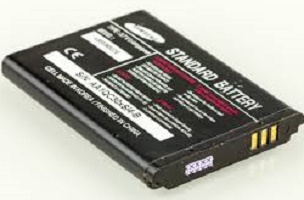
Here’s the actual sequence behind most mobile blasts:
- Heat builds up inside the battery, from the charging circuit, from internal chemical activity, or from physical damage to the cell.
- That heat spreads into the electrolyte, the liquid that lets charge move between electrodes.
- The heated electrolyte expands rapidly, and pressure builds inside the sealed battery casing.
- The casing ruptures. The electrolyte that escapes is highly flammable, and contact with air can ignite it. This is the “blast.”
This is called thermal runaway, and once it starts, it’s very hard to stop. Each cell can keep heating and igniting on its own schedule, which is why a battery fire can flare up again minutes after it looks extinguished.
The 7 Real Causes of a Mobile Blast
1. A Dropped or Physically Damaged Battery
A hard fall doesn’t just crack your screen. The impact can misalign the internal layers of the battery or damage the protective circuit that’s supposed to prevent overcharging and short circuits. Damage like this often doesn’t show up as visible swelling for days or weeks, which is exactly why it’s dangerous.
What to do: After any serious drop, keep an eye on your phone’s battery health and temperature for the next few weeks. If you notice unusual heat or a slower charge, get the battery checked at an authorised service centre.
2. Overheating During Charging or Heavy Use
Gaming for hours, running multiple demanding apps, or leaving your phone in direct sunlight all raise the internal temperature, and charging already adds a bit of heat on top of that. Combine several of these at once, and you’re stacking risk factors.
Simple habits that cut this risk significantly:
- Charge your phone outside its case, so heat can dissipate naturally.
- Don’t charge it under a pillow, blanket, or inside a bag.
- Keep it out of a parked car, especially in direct sunlight.
- Avoid gaming or video calls while it’s plugged in and charging.
3. Low-Quality or Counterfeit Chargers
Your phone’s original charger is calibrated to the exact voltage and current your battery is designed for. A mismatched or counterfeit charger can push too much current into the cell, and that mismatch is one of the most common causes of phones exploding while charging.
If your original charger has worn out, it’s worth replacing it with a manufacturer-certified one rather than the cheapest cable you can find online. The price difference is small next to the risk of a mismatched charger overheating your battery.
4. A Punctured or Compromised Battery Seal
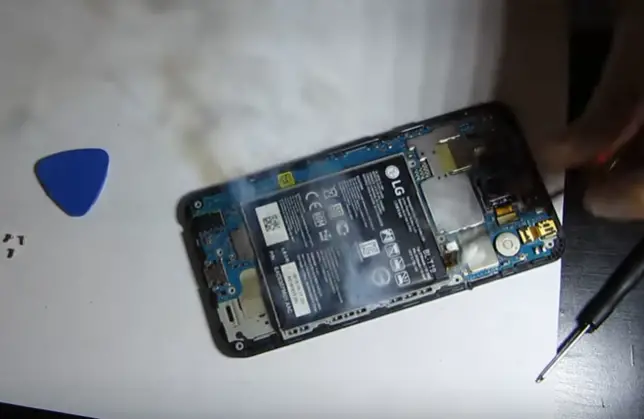
High-quality lithium-ion batteries are sealed to keep lithium away from air and moisture. If that seal fails from a drop, a bend, or manufacturing wear, lithium reacts with whatever gets in, which can range from a faint smell to a full battery fire. This reaction is also why you should never try to puncture, cut open, or disassemble a phone battery yourself.
5. Water Exposure
Even in phones rated water-resistant, a battery that’s already been punctured or aged has a much weaker seal. If water reaches the cell through a damaged seal, the same lithium reaction described above can occur. If your phone has been submerged, don’t charge it until you’re sure it’s completely dry, or better, get it inspected first.
Related: What to Do If You Drop Your Phone In Water?
6. Processor Overload and Poor Thermal Management
Most phones have a built-in thermal sensor that throttles performance or shuts the device down before things get dangerous. But sustained, intense use like hours of high-end gaming, video export, or navigation apps can push past what that protection was designed to handle, especially on budget phones with weaker heat dissipation.
7. An Ageing Battery Nearing End of Life
Lithium-ion batteries degrade after roughly 400–500 full charge cycles, which usually works out to 3–5 years of daily use. As they age, the internal protective circuit becomes less reliable, and the battery is more prone to swelling.
A swollen battery may bulge visibly, or it may just push slightly against the back panel. Check periodically, especially once your phone crosses the 3-year mark.
Warning Signs Your Phone Might Be at Risk
Don’t wait for smoke. These are the signals that show up beforehand, and every one of them means “stop using the device now”:
- The phone or battery area feels unusually hot to the touch, even when idle.
- The back panel or screen bulges, lifts, or separates slightly at the seams.
- You hear a hissing, cracking, or popping sound from inside the device.
- There’s a strange chemical smell, even faint.
- The phone shuts down repeatedly, or the battery drains far faster than usual.
- You see any smoke, however small.
What to Do If Your Phone Is Overheating, Swelling, or on Fire
If your phone is just running hot: Stop using it, remove the case, and let it sit in a cool, ventilated spot. Don’t put it in a fridge or freezer; sudden temperature changes can damage it further.
If the battery looks swollen or the case has separated: Power the phone off and don’t try to remove the battery yourself. Place it in a fireproof or metal container if you have one, and take it to a professional repair centre immediately. Don’t keep using a swollen battery even for “just a little longer.”
If you see smoke or the device catches fire:
- Get yourself and others away from the device immediately. The smoke from a lithium-ion fire is toxic.
- If it’s safe to do so, unplug it from any power source, but don’t linger near it to do this.
- Leave the room and close the door if you’re indoors, or move well away if you’re outside.
- Call your local fire service (dial 101, or 112 for a combined emergency number in India) and tell them it’s a lithium-ion battery fire, since this changes how they respond.
- Don’t try to smother or extinguish it yourself with water or a household extinguisher. Lithium-ion fires can reignite even after they appear to be out, and it’s genuinely a job for trained responders.
This is a sensitive topic involving real injuries, so if you or someone nearby has been burned, treat it as a medical emergency and call for help immediately rather than trying home remedies first.
Should You Worry About a Specific Brand?
Not really. Battery failures have been reported across nearly every major manufacturer like Samsung, Xiaomi, Oppo, Nothing, and others, and the underlying cause is almost always the same handful of factors above, not a single brand’s design flaw.
That said, buying from a manufacturer with a strong service network does make a real difference, because:
- Reputable brands are more likely to run a proper recall or replacement program if a batch does turn out to be defective (as Samsung did with the Galaxy Note 7).
- You’ll have access to authorised service centres for battery checks and swaps, rather than an unregulated local repair shop using unverified parts.
- Certified accessories ( chargers, cables, and replacement batteries) are easier to source.
If you’re due for an upgrade and battery safety is a real concern for you, look for phones that list IS 16046 / BIS certification for their battery pack on the box or spec sheet. It’s a quick way to confirm the battery has passed India’s mandatory safety testing before you buy.
Related: Mobile Buying Guide 2026: How to Select a Mobile Phone?
India’s Battery Safety Rules – What’s Changing
Every lithium-ion battery sold in India is required to carry BIS (Bureau of Indian Standards) certification under IS 16046, which tests cells for resistance to overcharging, short circuits, and thermal stress before they can legally be sold.
In February 2026, the Ministry of Electronics and IT tightened this further, after regulators found batteries with mislabelled capacity ratings in the market. Manufacturers must now verify the actual rated capacity of a battery through lab testing, not just declare it. The new rule takes effect for new product registrations from May 2027.
For you as a buyer, this mostly matters indirectly: it’s a sign that a phone or power bank’s stated specs, and its underlying safety testing, are becoming harder to fake. When you’re comparing devices, an ISI mark or BIS registration number on the battery is worth checking for.
Common Mistakes That Increase Blast Risk
- Using a third-party battery that isn’t from the original manufacturer or an authorised seller, just to save money on a replacement.
- Ignoring a swollen back panel because the phone “still works fine.”
- Leaving the phone charging overnight, every night, especially under a pillow or on a bed.
- Charging with a random cable or adapter you picked up somewhere, instead of a certified one matched to your phone.
- Biting, puncturing, or disassembling a battery, including by children, who may not understand the danger of a battery that looks like a toy or a snack wrapper.
Expert Tips to Extend Battery Life and Reduce Risk
- Keep your battery between roughly 20% and 80% charge for daily use where possible; avoid routinely draining it to 0% or leaving it at 100% for hours.
- Update your phone’s software regularly. Manufacturers often ship battery-management and thermal-safety improvements through updates.
- Check your battery health setting (available on most Android phones and iPhones) every few months, and plan a replacement once it drops meaningfully below its original capacity.
- If you’re storing a spare phone or battery long-term, keep it around 50% charge in a cool, dry place rather than fully charged or fully drained.
Conclusion
A mobile phone blast is rare, but it can cause serious injuries and damage. In most cases, the problem starts with the lithium-ion battery. Physical damage, excessive heat, poor-quality chargers, water exposure, or an ageing battery can increase the risk of thermal runaway.
The good news is that you can reduce this risk with a few simple habits. Use the original or certified charger and avoid cheap, unverified charging accessories. Don’t charge your phone under a pillow, blanket, or inside a bag. It is also better to avoid heavy gaming or other demanding tasks while the phone is charging.
Most importantly, never ignore warning signs. Unusual heating, a swollen battery, a lifted back panel, strange smells, hissing sounds, or smoke can indicate a serious battery problem. Stop using the phone and get it checked by an authorised service centre. Never try to open, puncture, or replace a damaged battery yourself.
If your phone catches fire, move away immediately and keep others away from it. Don’t try to handle the device or put out the fire yourself. Leave the area and contact the emergency services.
A few simple precautions can go a long way. Treat unusual battery behaviour as a warning, not something to ignore.
Related: How to Protect Your Phone from Viruses and Malware?
Frequently Asked Questions
It’s caused by thermal runaway inside the lithium-ion battery. A chain reaction where internal heat builds up faster than it can escape, rupturing the battery casing and igniting the flammable electrolyte inside.
Use only the charger that came with your phone, avoid using it while it’s charging, keep it out of direct sunlight and hot cars, and don’t charge it under a pillow or blanket.
No. A swollen battery has already started to fail internally. Power the phone off, stop using it immediately, and get it checked by a professional rather than continuing to use it.
Excessive heat, a bulging or separating back panel, hissing or cracking sounds, an unusual smell, and rapid battery drain are all warning signs that mean you should stop using the device right away.
Move away from it immediately, don’t try to extinguish it yourself, leave the room or area, and call your local fire service, telling them it’s a lithium-ion battery fire.
Official fire-safety guidance generally advises against trying to extinguish it yourself at all. Lithium-ion battery fires can reignite even after appearing to go out, so the safest step is to evacuate and let trained responders handle it.
No single brand is uniquely prone to this. Incidents have been reported across major manufacturers, and the risk usually comes down to individual battery defects, physical damage, or counterfeit charging accessories rather than the brand itself.
Yes. A charger that doesn’t match your phone’s required voltage and current can overcharge or overheat the battery, which is one of the most common triggers for battery failure.
Yes. A hard fall can damage the internal structure of the battery or its protective circuit, sometimes without any visible sign for days or weeks afterwards.
Most lithium-ion batteries start showing meaningful wear after 400–500 full charge cycles, roughly 3 to 5 years of regular daily use, after which the risk of swelling and failure increases.
It’s not inherently dangerous with a genuine charger and a healthy battery, but avoiding it and never charging under a pillow or blanket removes one more layer of risk, especially with an older or unofficial charger.
BIS (Bureau of Indian Standards) certification under IS 16046 means a battery has passed mandatory testing for overcharging, short-circuit, and thermal-stress resistance before it’s legally sold in India. It’s a useful, quick check when buying a phone or replacement battery.
It’s rare on its own, but prolonged heat exposure, like a phone left in a car on a hot day, can push an already-ageing or slightly damaged battery over the edge into thermal runaway.
It’s generally fine with a genuine charger, but it does add extra heat during use. If your phone gets noticeably warm while charging and in use together, it’s safer to unplug it and let it charge idle.
Turn it off, don’t charge it, and let it dry out completely, ideally with professional inspection, before powering it back on, since a compromised battery seal combined with moisture is a real fire risk.
A case itself isn’t dangerous, but it does trap heat. Removing your case while charging, especially during a long charge session, helps the device dissipate heat more effectively.
Yes. Incidents involving children biting or puncturing loose batteries have caused serious burns. Keep any removable batteries or damaged phones away from young children, and never let them play with a device that shows swelling or damage.
Yes. An unusual smell is one of the clearest early warning signs of battery failure. Power off the device, move it away from flammable materials, and get it checked immediately.
The Bureau of Indian Standards and the Ministry of Electronics and IT set and enforce battery safety standards (IS 16046) and can act against non-compliant products, but individual product recalls are typically issued by the manufacturer, as Samsung did with the Galaxy Note 7.
BIS certification is a genuine baseline safety check, but well-established manufacturers generally offer stronger quality control, authorised service support, and faster recall response if a defect surfaces. Both matter for long-term safety.
We hope you are interested in this article. Please consider liking our Facebook and Twitter pages for regular updates.
Subscribe to our free newsletter so that you will get regular updates directly in your Email.
Also, don’t forget to share this article with your friends and relatives for their information.
Subscribe to be the first to learn about new information
Disclosure: If you follow our links to a retailer’s website and make a purchase, we will get an affiliate commission on some, but not all, of the items or services we promote. This will cause no price change for you.