How to Find a Lost Mobile Phone Using IMEI Tracking (India, 2026)
Quick Answer: You can’t literally “track” a lost phone using its IMEI alone. That requires the police or your network operator’s systems. What you can do immediately is block the phone’s IMEI through the government’s CEIR (Sanchar Saathi) portal, so it becomes unusable on every Indian network, even with a new SIM. Combine this with remotely locking or erasing the phone via Find My Device (Android) or Find My iPhone (Apple), and filing a police complaint, for the best chance of recovery.
Losing your phone is stressful. Not just because of the device’s cost, but because of everything tied to it: banking apps, OTPs, photos, and personal accounts.
Apps like Find My Device are useful, but they stop working the moment the phone loses internet access or gets a factory reset. That’s where IMEI-based blocking comes in; a government system that works independently of the internet, the SIM card, or whether the thief resets the phone.
This guide covers everything. What an IMEI number is, how to find yours, the exact immediate steps to take when a phone goes missing, and how to block (and later unblock) it using India’s official CEIR/Sanchar Saathi system.
What Is an IMEI Number?
IMEI (International Mobile Equipment Identity) is a unique 15-digit number assigned to every mobile phone at the time of manufacture. Network operators use it to identify the physical device on their network, separate from the SIM card or phone number.
Unlike a SIM, which can be swapped or destroyed, the IMEI is permanently tied to the handset. Nobody, not even someone who steals your phone, can change it without specialised, illegal tampering that’s a criminal offence in India.
This is exactly why IMEI is the most reliable way to disable a lost device across every network in the country.
How to Find Your Phone’s IMEI Number
You’ll need your IMEI number before you can block anything, so it helps to note it down before you ever lose your phone. Here’s how to find it:
- Dial
*#06#on the phone itself – the IMEI (or two IMEI numbers, for dual-SIM phones) will display instantly on screen. - Check the phone’s original box – the IMEI is printed on a sticker near the barcode, usually alongside the model and serial number.
- On Android: Go to Settings → About Phone → IMEI/Status, or check your Google Account’s linked devices if you can’t access the phone.
- On iPhone: Go to Settings → General → About, or check appleid.apple.com under your registered devices if the phone isn’t with you.
- On the SIM tray of some phones, the IMEI is printed on the tray itself.
Save both your IMEI and your phone’s purchase invoice somewhere safe – a notes app, email to yourself, or printed copy. So you’re not scrambling to find them after a loss.
Immediate Steps to Take the Moment Your Phone Goes Missing
IMEI blocking should be one part of a fast, layered response, not the only thing you do. Act through as many of these channels as possible, in roughly this order:
- Try to locate it first. Use Find My Device (Android) or Find My iPhone (Apple) from another phone or computer to check its last known location, and trigger a remote lock or “Play Sound” if it’s nearby.
- Remotely lock or erase the device. If it can’t be recovered quickly, use the same Find My Device/iPhone tools to lock the screen with a message, or erase it if it contains sensitive data you can’t risk.
- Call your telecom operator to block the SIM and request a duplicate SIM with the same number. You’ll need this working number to receive the OTP for the CEIR blocking request. Note: as per TRAI rules, SMS on a freshly reissued SIM is typically enabled only after 24 hours.
- Change critical passwords for email, banking/UPI apps, cloud storage, and messaging apps from a different, trusted device, and sign out of active sessions tied to the lost phone.
- File a police complaint (FIR) for a stolen phone, or an online lost-article report for a misplaced one, and keep a copy. You’ll need the complaint number for the CEIR blocking form.
- Block the phone’s IMEI via CEIR/Sanchar Saathi (full steps below) so it can’t be used on any Indian network, even with a different SIM.
- Inform your insurer, if the phone is insured, within the notice period specified by your policy.
Related: How to Lock SIM Card | Why Do You Need to Activate SIM PIN on Your Phone?
How to Block a Lost or Stolen Phone via CEIR/Sanchar Saathi
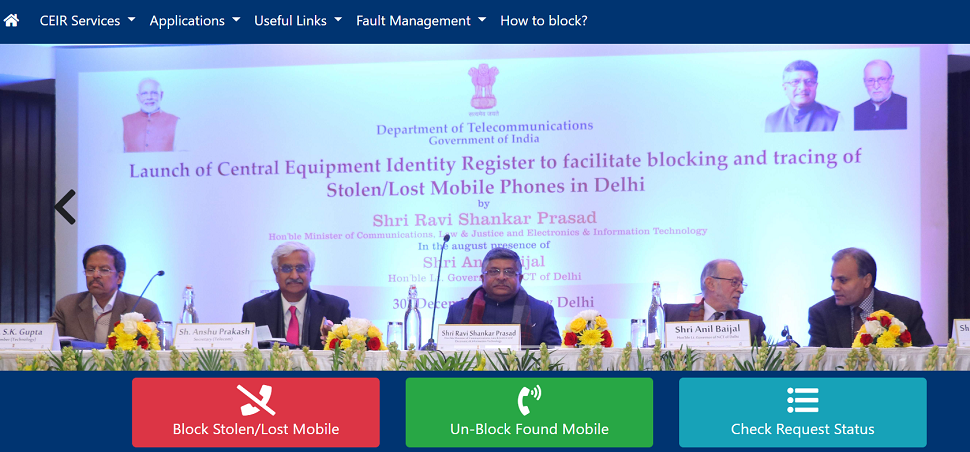
The Central Equipment Identity Register (CEIR), accessible through the Sanchar Saathi portal, is the Indian government’s official system for blacklisting a lost or stolen phone’s IMEI across every network operator in the country; Jio, Airtel, Vi, and BSNL included.
- File a police complaint first and keep a copy of the FIR or complaint acknowledgement. You’ll need to reference it in the CEIR form.
- Get a duplicate SIM for your lost number from your telecom operator, since the blocking request requires OTP verification on that same number.
- Visit ceir.sancharsaathi.gov.in (the current official CEIR portal; older
ceir.gov.inlinks may redirect here) or use the Sanchar Saathi mobile app. - Select “Block Stolen/Lost Mobile” on the homepage.
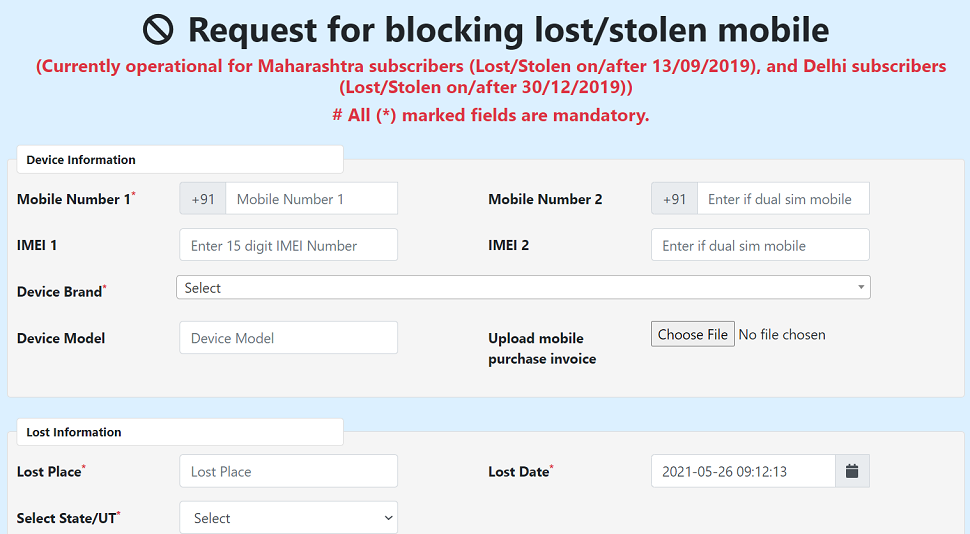
- Fill in your phone number, IMEI number(s) ( both, for dual-SIM phones), and your police complaint details, and upload a scanned copy of the complaint along with your purchase invoice if requested.
- You’ll receive an OTP on the duplicate SIM number to verify the request.
- Once submitted, you’ll be given a Request ID. Save this. It’s used both to track your blocking request and to unblock the phone later if it’s recovered.
- Your phone is typically blocked within 24 hours of submission, after which it stops working on every network in India, even if the thief inserts a new SIM.
Note: If you see a message like “Request already exists for IMEI… with FIR No…,” it means the police have already registered a blocking request for that device on your behalf.
Related: How Do You Fix the “SIM Not Provisioned” Error Message?
What IMEI Blocking Actually Does (and Doesn’t Do)
It’s worth being clear-eyed about what this system achieves, since it’s often misunderstood:
- It does stop the phone from connecting to any mobile network in India; calls, SMS, and mobile data all become unusable on it, even with a different SIM.
- It does flag the device so that if it later connects to a network (before being fully blocked, or if someone tries), the details can be logged and shared with police for tracing.
- It does not give you a live GPS location or map of where your phone currently is; that’s not what CEIR is built for.
- It does not prevent someone from using the phone offline (Wi-Fi calling, offline apps, or as a non-cellular device), though this significantly limits its resale value.
For actual location tracking, Find My Device/Find My iPhone remains your best (and only) option, but only while the phone has an internet connection and hasn’t been reset.
How to Unblock Your Phone When It’s Found
If you recover your blocked phone:
- Go back to the CEIR/Sanchar Saathi portal and select “Unblock Found Mobile.”
- Enter your Request ID from the original blocking request.
- Provide the reason for unblocking and any other requested details.
- Once processed, the IMEI is removed from the blacklist, and the phone can be used normally again.
A blocked phone cannot be used by anyone ( including you) until it’s formally unblocked through this process.
Other Useful Sanchar Saathi / CEIR Services
Beyond blocking lost phones, the same Sanchar Saathi platform offers a few services worth knowing about:
- Check mobile connections in your name (TAFCOP): See how many active mobile numbers are registered against your ID, useful for spotting SIMs fraudulently issued in your name.
- Verify an IMEI before buying a used phone: On the IMEI verification page, enter a phone’s IMEI before purchasing it secondhand to check whether it’s blacklisted, duplicated, or already blocked.
Related: Mobile Buying Guide: How to Select a Mobile Phone?
Myth vs Fact
Myth: Blocking a phone’s IMEI shows you its live location. Fact: CEIR blocking only disables the device on Indian networks. It doesn’t provide GPS tracking. Only Find My Device/Find My iPhone (while the phone is online) can do that.
Myth: A thief can just remove or change the IMEI to bypass the block. Fact: The IMEI is embedded in the device hardware/firmware. Tampering with it is technically difficult, a criminal offence in India, and a blocked IMEI stays blacklisted across networks regardless.
Myth: Once you report your phone lost, it’s gone for good; there’s no point doing anything else. Fact: Combining a police complaint, IMEI block, and remote lock/erase gives you multiple active layers of protection and a real chance at recovery or at least preventing misuse of your data.
Conclusion
Losing a mobile phone can be stressful, but acting quickly can reduce the risk of misuse and improve your chances of getting it back. Remember that IMEI tracking does not give you the phone’s live location. The IMEI is mainly used to identify and block the device on mobile networks. For location tracking, use Find My Device on Android or Find My iPhone on Apple while the phone is still online.
If your phone is lost or stolen, first try to locate and remotely lock it. Then block your SIM, change important passwords, and file a police complaint. You can then use the government’s CEIR/Sanchar Saathi system to block the phone’s IMEI. Once blocked, the device cannot connect to Indian mobile networks, even if someone inserts another SIM card.
Keep your IMEI number, purchase invoice, and police complaint details safely stored. You will need these details when submitting a CEIR request. Also, save the CEIR Request ID because it is required if you recover the phone and want to unblock it.
Most importantly, don’t depend on IMEI blocking alone. Remote locking, account security, SIM blocking, police reporting, and CEIR blocking work best when used together. Taking these steps quickly can help protect your personal data and reduce the chances of your lost phone being misused.
Frequently Asked Questions
It’s a unique 15-digit identifier for a physical mobile device, used by network operators to identify, block, or flag a phone independently of its SIM card.
Check your original phone box, a purchase invoice, your Google Account’s device list (Android), or appleid.apple.com (iPhone) if you registered the device there.
No. IMEI blocking prevents network use but doesn’t provide GPS coordinates. Real-time location tracking requires Find My Device or Find My iPhone, and only while the phone is online.
Typically within 24 hours of submitting a complete blocking request with a verified police complaint and OTP confirmation.
Yes, a police complaint (FIR or lost-article report) with the IMEI number is generally required before submitting a CEIR blocking request.
No. Once IMEI-blocked, the device is blacklisted across every network operator in India, regardless of which SIM is inserted.
Use your saved Request ID on the CEIR portal’s “Unblock Found Mobile” option to have the IMEI removed from the blacklist and restore normal use.
The service now operates primarily under ceir.sancharsaathi.gov.in as part of the unified Sanchar Saathi platform; older ceir.gov.in links typically redirect there.
Yes. Use the IMEI verification tool on the CEIR/Sanchar Saathi website to check whether a phone’s IMEI is blacklisted, duplicated, or already in active use elsewhere.
No. IMEI blocking stops the device from connecting to any Indian mobile network, but it can’t prevent offline use over Wi-Fi. This is why remotely locking or erasing accounts is equally important.
The Sanchar Saathi/TAFCOP service lets you check all active mobile connections issued against your ID proof, helping you spot any issued fraudulently.
Yes. Most CEIR blocking requests require a formal complaint of some kind, and it also creates an official record in case the phone is later found to have been stolen rather than lost.
We hope you are interested in this article about how to find a lost mobile in India using this online IMEI tracker. We always welcome your comments or suggestions.
If this guide helped, share it with someone who might need it, and follow Infobits on Facebook, Instagram, and Twitter for regular updates.
Also, subscribe to our free newsletter so that you will get regular updates directly in your Email.
Subscribe to be the first to learn about new information
Disclosure: If you follow our links to a retailer’s website and make a purchase, we will get an affiliate commission on some, but not all, of the items or services we promote. This will cause no price change for you.