Double NAT Explained: How to Check and Fix It on Indian Broadband
Your internet works. Videos play, WhatsApp loads. But your PS5 says “NAT Type: Strict,” your CCTV app won’t connect from outside, or a game lobby keeps failing.
That’s often a NAT problem. And in India, there are two different kinds. One you can fix in ten minutes. The other you can’t fix with any router setting.
Quick Answer:
Double NAT means two devices in your home are both acting as routers, usually your ISP’s box and your own router. You can usually fix it with bridge mode, or by removing one router.
CGNAT means your ISP is putting you behind its own NAT. No home setting fixes that. You need a public IP, IPv6 or a workaround.
Both look similar on a test. Both can break port forwarding, remote access and gaming. The fix is different, so check which one you have first.
What Is NAT?
Your home has many devices but usually one public IP address. NAT (Network Address Translation) is how your router shares it. It keeps track of which device asked for what, and sends replies to the right one.
Think of a receptionist in an office. Outsiders call one number, and the receptionist routes calls to the right desk.
What Is Double NAT?
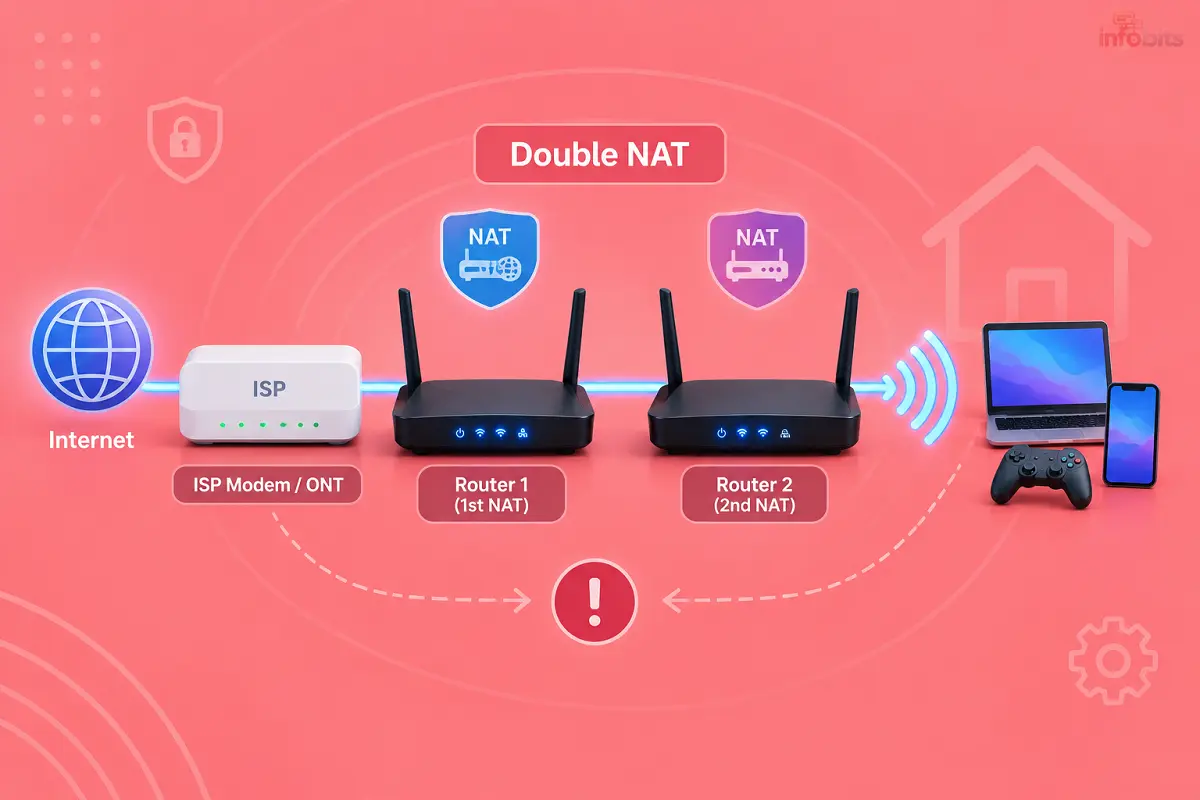
Double NAT happens when two receptionists sit one behind the other.
A typical Indian setup:
- The ISP router or ONT (BSNL, Jio, Airtel) does NAT.
- Your own Wi-Fi router plugged into it also does NAT.
Now every connection is translated twice. Basic browsing still works, which is why most people never notice. Trouble starts when something needs to reach into your network.
What Is CGNAT, and How Is It Different?
CGNAT (Carrier-Grade NAT) is NAT done by your ISP. Many customers share one public IPv4 address. Your router’s “WAN IP” isn’t truly public. It often sits in the range 100.64.0.0 to 100.127.255.255, reserved for this purpose.
| Double NAT | CGNAT | |
|---|---|---|
| Who creates it | You (two routers at home) | Your ISP |
| Can you fix it at home? | Usually yes | No |
| WAN IP on your own router | Private (like 192.168.x.x) | Often 100.64.x.x, or does not match your public IP |
| Typical fix | Bridge mode, AP mode, remove one router | Public IP, static IP, IPv6, or a tunnel |
You can have both at once.
Why Double NAT and CGNAT Matter
Most everyday use is fine. You’ll notice trouble in these cases:
- Online gaming: strict or moderate NAT, failed lobbies, party chat problems
- CCTV and DVR apps: can’t view cameras from outside the home
- Home servers, NAS, Plex or Home Assistant: can’t reach them from outside
- Port forwarding: rules look right but don’t work
- VPN server at home: connection fails
- Video calls: occasional drops on some apps
If none of this applies to you, double NAT may not need fixing. It doesn’t directly slow your speed.
How to Check for Double NAT
You need two numbers: your router’s WAN IP and your public IP.
Step 1: Find your router’s WAN IP
- Log in to your own router’s admin page.
- Open Status, WAN, Internet or Network Status.
- Note the WAN IP / Internet IP address.
Step 2: Find your public IP
On any device connected to that router, search “what is my IP” in Google. Note the address.
Turn off any VPN first, or this test will give the wrong answer.
Step 3: Compare
| What you see | What it means |
|---|---|
| WAN IP equals your public IP | You have a real public IP. No NAT problem from your ISP. |
| WAN IP is 192.168.x.x, 10.x.x.x or 172.16–31.x.x | Private address. You likely have double NAT (or your ISP uses private addressing). |
| WAN IP is 100.64.x.x to 100.127.x.x | CGNAT at your ISP. |
| WAN IP is a public-looking address that differs from your public IP | The ISP is translating again. Treat as CGNAT. |
Optional: Traceroute test
On Windows, open Command Prompt and type tracert -d 8.8.8.8. On Mac or Linux, use traceroute -n 8.8.8.8.
If the first two lines both show private addresses (192.168.x.x or 10.x.x.x), you have double NAT. If the second hop is in 100.64.x.x, that’s CGNAT.
How Double NAT Happens on Indian Broadband
Here are the most common ways:
- BSNL, Jio or Airtel router + your own router. The ISP box is still routing.
- Mesh system or extender added in router mode. The second unit creates another network.
- ISP router + old router used as a “Wi-Fi booster.” Often left in router mode.
- Fibre ONT with built-in router + a second router.
If you’re on BSNL FTTH, our guide to setting up your own router with a BSNL ONT explains bridge mode, and configuring a BSNL FTTH modem covers the ONT side.
How to Fix Double NAT
Pick the first option that works for you, in this order.
Fix 1: Put the ISP device in bridge mode
Bridge mode turns off its routing, so only your own router does NAT.
- Log in to the ISP router or ONT.
- Look for Bridge Mode, Passthrough, or a WAN connection type set to bridge.
- Enable it and save.
- Set your own router’s WAN to PPPoE (with your ISP login) or DHCP, depending on the ISP.
- Restart both devices.
Warning: Many ISP routers hide or lock this option. Some ISPs need to enable it for you. Changing the wrong setting can cut your internet, so note down the original values first. And if your landline, IPTV or set-top box runs through the ISP router, bridging may break them.
Fix 2: Use only one router
If you don’t need your own router, use the ISP’s alone. If you prefer your own, connect it so the ISP box is only a modem or ONT.
Fix 3: Turn your second router into an Access Point (AP mode)
This is the best fix for mesh nodes, extenders and old routers.
- Log in to the second router.
- Find AP Mode, Access Point or Bridge mode.
- Switch to it and save.
- Connect it to the main router with a LAN port to LAN port cable (not the WAN/Internet port). For this purpose, you can use good quality Ethernet cables (Cat6) like FEDUS Cat6 Ethernet Cable, easily available on Amazon.
Your main router now does all the routing. The second one only adds Wi-Fi.
Fix 4: DMZ (last resort)
If bridge or AP mode isn’t available, put your own router’s IP into the ISP router’s DMZ. That forwards all unsolicited incoming traffic to your router.
Use this only if nothing else works. It exposes your router more, so keep its firmware updated and its admin password strong. See WPA2 vs WPA3 for the Wi-Fi side of that.
Fix 5: Verify
Repeat the WAN IP check. If your router’s WAN IP now matches your public IP, double NAT is gone. If it shows 100.64.x.x, you’re behind CGNAT. Keep reading.
What If It’s CGNAT?
Bridge mode won’t help. Your ISP controls the public address.
The truth about CGNAT in India is messy. Whether you get a public IP depends on ISP, city, plan and sometimes the date you joined. Forum reports disagree: some users report public IPs from BSNL or Airtel in certain areas, while others report CGNAT on the same ISPs elsewhere.
Smaller ISPs and mobile or AirFiber-type services are more likely to use CGNAT. So test your own line. Don’t trust a table.
Your options, from simplest to most involved:
- Ask your ISP for a public or static IP. Some give one on request, sometimes for a monthly fee. Ask what it costs today and whether it’s available in your area.
- Try IPv6. If your ISP gives you native IPv6, some services can reach you over it. Check whether your router and the service support it.
- Use a tunnel instead of port forwarding. Tools like Tailscale create a private link to your devices without opening ports. This suits NAS, home servers and remote desktop.
- Use a cloud-based app for CCTV. Many camera brands offer a relay so you can view feeds without port forwarding.
- Use a VPN that supports port forwarding. It’s a paid workaround and works only with some providers.
- Switch connection type or ISP. If remote access matters a lot to you, a plan with a public IP may be worth it. Compare options in our AirFiber vs fibre guide.
Note: Dynamic DNS (DDNS) services won’t help behind CGNAT, because the address they’d point to isn’t reachable from outside.
Fixing “Strict NAT” on PS5, Xbox and PC
Consoles show NAT type in their network test.
- Run the console’s Test Internet Connection / NAT Type check.
- Confirm your network doesn’t have double NAT using the steps above.
- Fix double NAT with bridge or AP mode.
- Turn on UPnP on the router that does the NAT, or forward the ports for your game.
- Re-test.
If you’re behind CGNAT, expect Strict or Moderate NAT to remain. Some games still work fine with it. Wired Ethernet also helps stability more than any NAT tweak.
Does Double NAT Slow Down My Internet?
Not directly. It doesn’t cut your speed or add noticeable lag in normal use. The problem is reachability and compatibility, not bandwidth. If your speed is poor, test it on our speed test page and look elsewhere: Wi-Fi signal, router quality or your plan.
Quick Decision Guide
| Your goal | What to do |
|---|---|
| Better gaming NAT | Check for double NAT, fix with bridge or AP mode |
| View CCTV from outside | Use the camera’s cloud relay or a VPN tunnel; port forwarding needs a public IP |
| Run a NAS or home server | Tailscale or a public/static IP |
| Add Wi-Fi coverage | Use AP mode for the second device |
| Just browse, stream and work | Probably leave it alone |
Common Mistakes
- Putting the second router’s WAN port into the first router’s LAN and leaving NAT on.
- Using an extender or mesh node in router mode.
- Forgetting to restart both devices after changing modes.
- Changing the ISP router without noting the original settings.
- Trying port forwarding behind CGNAT. It will never work.
- Leaving the DMZ enabled after fixing the problem in a better way.
Final Thoughts
Double NAT is easy to cause and easy to fix. CGNAT isn’t your fault and can’t be fixed at home. Start with the two-number test, and everything else follows from it.
If you’re buying a router for a setup like this, our Wi-Fi router buying guide explains which features matter. For picks, see best Wi-Fi routers in India.
A router with proper AP mode and bridge mode support, plus Gigabit LAN ports, like the TP-Link Archer AX10 available on Amazon, makes this setup far easier.
Frequently Asked Questions
Two devices on your network are both doing NAT, usually an ISP router and your own router.
Check your router’s WAN IP. If it’s a private address like 192.168.x.x or 10.x.x.x, you likely have double NAT.
Your ISP shares one public IP among many customers. Your router’s WAN IP often falls in the 100.64.0.0/10 range.
No. Double NAT happens inside your home. CGNAT happens at your ISP.
Not directly. It affects port forwarding, gaming lobbies, remote access and VPNs more than speed.
Put the ISP router in bridge mode, use only one router, or switch your second router to access point mode.
It turns off an ISP router’s routing so your own router handles everything.
Access Point mode makes a router act only as a Wi-Fi extender on a wired link, with no NAT or DHCP.
No. It’s controlled by your ISP. Ask for a public or static IP, or use a tunnel or cloud relay.
It varies by area and plan. Check your own WAN IP against your public IP.
Reports vary by service type and location. Run the comparison test on your own connection.
It can help if your ISP offers native IPv6 and the service you use supports it. Firewalls may still block inbound access.
Common causes are double NAT, CGNAT, a wrong IP or port, or a firewall. Check NAT first.
No. The address it points to is not reachable from the internet.
Remove double NAT, enable UPnP or forward the required ports. Behind CGNAT, results are limited.
Use the camera app’s cloud relay, or a VPN tunnel such as Tailscale to your home network.
It’s less safe than bridge or AP mode because it exposes a device more. Use it only as a last resort.
They can, if a node is set to router mode behind your main router. Use AP or bridge mode on the extra nodes.
Sometimes. Ask your ISP, and expect that some features, such as landline or IPTV, may stop working.
Only if you use gaming, remote access, a home server or a VPN. For browsing and streaming, you can leave it.
We hope you are interested in our articles and consider following our Facebook, Instagram, and Twitter pages for regular updates.
Also, share this article with your friends and relatives. Bookmark this page for future reference.
Subscribe to our free newsletter to get similar articles and regular updates directly in your Email Inbox.
Subscribe to be the first to learn about new information
Disclosure: If you follow our links to a retailer’s website and make a purchase, we will get an affiliate commission on some, but not all, of the items or services we promote. This will cause no price change for you.
You May Be Interested to Read:
- Jio AirFiber vs Airtel Xstream AirFiber: Full Comparison
- How to Protect Your Bank Account From Hackers
- BSNL Copper to Fibre Migration: Process, Charges & Benefits
- How to Increase BSNL Internet Speed: Broadband, FTTH & Mobile Data Fixes
- BSNL Quantum 5G FWA: Plans, Price, Speed, Availability and Is It Worth It?