Best Wi-Fi Routers in India (2026): 8 Tested Picks for Every Budget
Your internet plan may say 300 Mbps. Your phone may crawl in the bedroom. Nine times out of ten, the culprit is the router.
The router your ISP gave you is usually a basic one. A good router fixes dead spots, handles more devices and makes video calls and streaming smoother. This guide picks the best Wi-Fi routers in India for different homes and budgets.
Quick Picks: Best Wi-Fi Routers at a Glance
| Router | Category | Wi-Fi standard | Best for |
|---|---|---|---|
| TP-Link Archer AX53 | Best Overall | Wi-Fi 6 (AX3000) | Most 2–3 BHK homes |
| TP-Link Archer AX23 | Best Value for Money | Wi-Fi 6 (AX1800) | Plans up to 300 Mbps |
| TP-Link Archer AX12 | Best Budget Pick | Wi-Fi 6 (AX1500) | Small flats, tight budgets |
| TP-Link Archer AX73 | Best Performance | Wi-Fi 6 (AX5400) | Big homes, many devices |
| TP-Link Deco X10 (2-pack) | Best Mesh for Multi-Floor Homes | Wi-Fi 6 mesh (AX1500) | Duplexes, dead zones |
| TP-Link Archer BE230 | Best Future-Proof Pick | Wi-Fi 7 (BE3600) | 500 Mbps+ plans |
| TP-Link Archer BE400 | Best Upgrade Pick for Power Users | Wi-Fi 7 (BE6500) | Gamers, VPN users |
| TP-Link Archer BE550 | Best Premium Pick | Wi-Fi 7 (BE9300, tri-band) | 6 GHz and multi-gig homes |
Key Takeaways
- Wi-Fi 6 is the sweet spot for most Indian homes. It’s cheap, fast and works with nearly every device.
- Wi-Fi 7 only pays off if your devices support it. Otherwise, you’re paying for speed you can’t use.
- Home size matters more than headline speeds. A big home needs mesh or a stronger router, not just a bigger number.
- Check the ports. Gigabit ports cap wired speeds at about 1 Gbps. Faster plans need 2.5G ports.
- Buy with an Indian warranty. Grey-market imports can be a headache to repair or replace.
Best Wi-Fi Routers in India
1. TP-Link Archer AX53: Best Overall
For most Indian homes, the Archer AX53 is the sensible choice. It’s a Wi-Fi 6 router with AX3000 speeds, EasyMesh support, gigabit ports and a dual-core processor that handles 20 to 30 devices. That covers a typical family with phones, laptops, a smart TV and a few smart plugs.
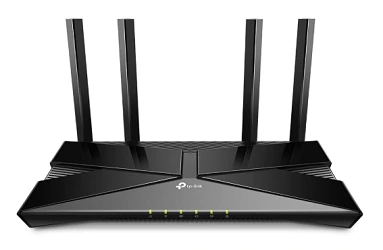
At around ₹5,400, it sits in a sweet spot. It costs far less than Wi-Fi 7 routers, yet it’s fast enough for 300–500 Mbps plans. EasyMesh support means you can add a compatible unit later if you need more coverage.
It’s a dual-band router, so you get the 2.4 GHz and 5 GHz bands. That’s fine for most homes. You won’t get 6 GHz, but you won’t need it unless your devices support it.
Pros
- Strong speed for the price
- EasyMesh for future expansion
- Handles a busy household well
- Easy setup through the Tether app
Cons
- Gigabit ports only
- No 6 GHz band
- Not ideal for very large homes
Who should buy it: families in 2–3 BHK homes with 300–500 Mbps plans.
Who should avoid it: anyone with a 1 Gbps plan or a large multi-floor home.
2. TP-Link Archer AX23: Best Value for Money
The Archer AX23 is the router I’d point most budget buyers towards. It’s an AX1800 Wi-Fi 6 router with OneMesh expandability, four high-gain antennas, beamforming and WPA3 security. That’s a lot of modern tech at a low price.
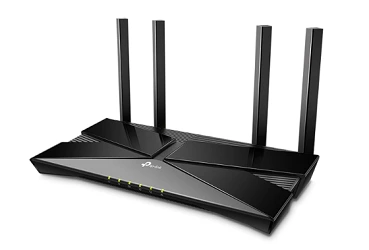
Pricing varies widely. Some listings show it near ₹3,500 and others around ₹5,500, so check the live price. At the lower end, it’s a bargain.
It suits flats and small-to-medium homes. If your plan is up to around 300 Mbps, the AX23 will make full use of it. WPA3 support adds an extra layer of security for your devices.
Pros
- Wi-Fi 6 with WPA3 at a low price
- Four antennas with beamforming
- OneMesh support for expansion
- Good for small and mid-sized homes
Cons
- Not built for 500 Mbps+ plans
- Gigabit ports only
- Coverage is limited in large homes
Who should buy it: students, small families and anyone with a plan up to 300 Mbps.
Who should avoid it: big homes or heavy gamers who need more power.
3. TP-Link Archer AX12: Best Budget Pick
If you only have about ₹3,000 to spend, the Archer AX12 is a smart buy. It gives you Wi-Fi 6 at ₹2,849, almost the same price as older Wi-Fi 5 routers. Other listings show it slightly higher, around ₹3,169.
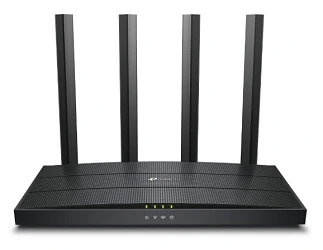
It’s an AX1500 router, so it’s best for smaller homes and moderate plans. Think a 1 BHK or a compact 2 BHK with 100–200 Mbps broadband.
It won’t win any speed contests. But it brings Wi-Fi 6 efficiency, which handles multiple devices better than older routers. That’s a real step up if you’re still using a Wi-Fi 4 or Wi-Fi 5 box.
Pros
- Cheapest way to get Wi-Fi 6
- Fine for small homes
- Easy to set up
- Good upgrade from older routers
Cons
- Limited speed and coverage
- Not suited for heavy households
- No mesh expansion on most setups
Who should buy it: small flats, rentals and first-time upgraders.
Who should avoid it: anyone with a 500 Mbps plan or a large home.
4. TP-Link Archer AX73: Best Performance
When you have a big home and many devices, the Archer AX73 is built for the job. It’s an AX5400 router with a triple-core 1.5 GHz CPU and USB 3.0. That strong processor keeps things smooth when everyone is streaming, gaming and on video calls.
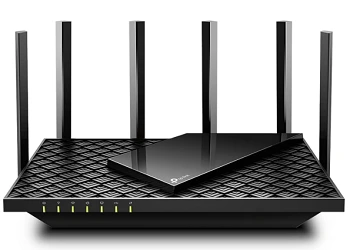
One Indian comparison lists its coverage at about 2,500 sq ft. That suits a larger 3 BHK or a bungalow with a central placement. Prices range from about ₹8,000 to ₹13,000, depending on the seller and season.
The USB 3.0 port lets you share a hard drive across your network. It’s a small bonus, but handy for home media.
Pros
- Powerful processor for heavy use
- Wide coverage for a single router
- USB 3.0 for file sharing
- Great for busy households
Cons
- Dual-band, no 6 GHz
- Gigabit ports only
- Price varies a lot between sellers
Who should buy it: big homes with many connected devices.
Who should avoid it: small flats, where it would be overkill.
5. TP-Link Deco X10 (2-Pack): Best Mesh for Multi-Floor Homes
If your home has dead spots, a single router won’t fix them. A mesh system like the Deco X10 spreads Wi-Fi across several units for steady coverage. One Indian guide lists the 2-pack at ₹6,999, covering up to 3,000 sq ft.

It’s a good fit for duplexes, villas and long apartments. You place one unit near your modem and the other midway. Your devices then hop between them without you noticing.
It’s an AX1500 system, so it suits plans up to around 300 Mbps. That’s enough for most families. Setup is simple through the Deco app.
Pros
- Removes dead zones
- Easy app-based setup
- Good for multi-floor homes
- Seamless roaming between units
Cons
- Not built for very fast plans
- Costs more than a single budget router
- Fewer advanced settings
Who should buy it: duplex and villa owners, or anyone with weak spots.
Who should avoid it: small flats, where one router is enough.
6. TP-Link Archer BE230: Best Future-Proof Pick
The Archer BE230 is one of the most affordable ways into Wi-Fi 7. It’s a BE3600 router with dual 2.5G ports and Multi-Link Operation, priced around ₹11,000. For the exact pricing, you can go through the following Amazon and Flipkart links.

It makes sense if you have a 500 Mbps or faster plan. The 2.5G ports let you use that speed over a wired connection too. That’s useful for a desktop or a NAS.
Be realistic about Wi-Fi 7. You’ll only see the full benefit with Wi-Fi 7 phones and laptops. One reviewer advises getting it only when it costs a little more than a good Wi-Fi 6 router. That’s wise advice.
Pros
- Affordable Wi-Fi 7
- 2.5G WAN and LAN ports
- Multi-Link Operation support
- Good headroom for future devices
Cons
- Dual-band, no 6 GHz
- Few Wi-Fi 7 devices at home today
- Costs more than strong Wi-Fi 6 options
Who should buy it: people with fast plans who plan to keep the router for years.
Who should avoid it: buyers with a 100–300 Mbps plan and older devices.
7. TP-Link Archer BE400: Best Upgrade Pick for Power Users
The TP-Link Archer BE400 is for people who like control. It’s a dual-band Archer BE400 Wi-Fi 7 router with Easy Mesh support. You also get TP-Link’s security tools and a feature-rich admin panel.

In our test review, it reached 1.75 and 1.55 Gbps, but only with Wi-Fi 7 devices on both ends. That’s a reminder that real speed depends on your gadgets. Reviewers also praise its setup wizard and USB port.
Consider it if you want VPN options, parental controls, and Easy Mesh expansion.
Pros
- Rich features and security tools
- Easy Mesh for easy expansion
- 2.5G WAN port
- Strong reviews for performance
Cons
- Indian pricing and stock can be unclear
- Dual-band only
- Features may be more than casual users need
Who should buy it: gamers, remote workers and tinkerers who want control.
Who should avoid it: buyers who want plug-and-play simplicity.
8. TP-Link Archer BE550: Best Premium Pick
If you want the fullest Wi-Fi 7 experience, the Archer BE550 is the pick. It’s a tri-band router with 6 GHz, 320 MHz channels and five 2.5 GbE ports. It’s the one router here that can use the 6 GHz band.

India’s lower 6 GHz band is approved for indoor use. That makes this router a good fit for a modern home with new devices. Five 2.5G ports also suit a home office or gaming setup.
The catch is availability. One reviewer notes stock has been inconsistent and suggests buying only if you can find it around ₹22,000 to ₹24,000 with an Indian warranty. That’s a high price, so only buy if you’ll use the features.
Pros
- Tri-band with 6 GHz
- Five 2.5G ports
- 320 MHz channel support
- Strong choice for a long-term setup
Cons
- Expensive
- Stock can be patchy
- Needs Wi-Fi 6E or Wi-Fi 7 devices to shine
Who should buy it: enthusiasts with new devices and fast plans.
Who should avoid it: most families, who won’t use its full capability.
How We Selected These Routers
I compared routers on six things that matter in Indian homes: coverage for typical BHK sizes, Wi-Fi standard, number and speed of ports, security features, Indian pricing and availability, and brand support in India.
I looked at manufacturer specs and a spread of recent reviews and price guides. Prices and availability were checked against Indian listings. I picked routers that are easy to find and service here.
Why You Can Trust This Guide
We don’t rank routers by commission. A product earns its place only if it fits a clear buyer and budget. If a router has a real weakness, we say so.
We also update this page when prices or availability change. Where a spec or price varied across sources, we’ve said so rather than guessing.
Quick Buying Guide: What to Look For
Wi-Fi 5, Wi-Fi 6 or Wi-Fi 7?
Wi-Fi 5 is old. Skip it unless the price is very low.
Wi-Fi 6 is the best value in India right now. It handles many devices better and costs little more than Wi-Fi 5.
Wi-Fi 7 is the newest standard. It’s worth it if you have a 500 Mbps+ plan and Wi-Fi 7 phones or laptops.
What about the 6 GHz band?
This changed in 2026. On 21 January 2026, the DoT de-licensed half of the 6 GHz band for licence-free Wi-Fi use. That opens the door to Wi-Fi 6E and Wi-Fi 7 on 6 GHz.
Many 6 GHz-capable routers sold in India previously had the band switched off, so firmware updates matter. Only tri-band routers like the Archer BE550 benefit fully. Dual-band Wi-Fi 7 routers don’t have a 6 GHz radio, so check the specs.
Match the router to your plan and home:
| Your situation | What to buy |
|---|---|
| 1 BHK, plan up to 100–200 Mbps | AX1500 or AX1800 Wi-Fi 6 |
| 2–3 BHK, plan 300–500 Mbps | AX3000 Wi-Fi 6 |
| Big home, many devices | AX5400 or a mesh system |
| 500 Mbps–1 Gbps plan, Wi-Fi 7 devices | BE3600 Wi-Fi 7 router with a 2.5G port |
| Duplex or multi-floor | Mesh system |
Check your ports
A gigabit port tops out around 1 Gbps. If your plan or your NAS is faster than that, look for a router with 2.5G ports. The BE230 and BE400 both have them.
Related: Wi-Fi Router Buying Guide for India: How to Pick the Right One
Quick Comparison Table
| Router | Wi-Fi | Speed class | Ports | Coverage | Mesh |
|---|---|---|---|---|---|
| Archer AX12 | Wi-Fi 6 | AX1500 | Gigabit | Small | No |
| Archer AX23 | Wi-Fi 6 | AX1800 | Gigabit | Small–mid | OneMesh |
| Archer AX53 | Wi-Fi 6 | AX3000 | Gigabit | Mid | EasyMesh |
| Archer AX73 | Wi-Fi 6 | AX5400 | Gigabit + USB 3.0 | Large | OneMesh |
| Deco X10 (2-pack) | Wi-Fi 6 | AX1500 | Gigabit | Multi-floor | Yes |
| Archer BE230 | Wi-Fi 7 | BE3600 | 2.5G WAN and LAN | Mid | Yes |
| TP-Link Archer BE400 | Wi-Fi 7 | BE6500 | 2.5G WAN | Mid-large | EasyMesh |
| Archer BE550 | Wi-Fi 7 | BE9300 | Five 2.5G | Mid–large | Yes |
Who Should Buy What? A Quick Guide
Student or small flat: Archer AX12 or AX23.
Family in a 2–3 BHK: Archer AX53.
Big house with many devices: Archer AX73.
Duplex, villa or weak spots: Deco X10 mesh.
Fast plan and new devices: Archer BE230.
Gamer or power user: Archer BE400.
Enthusiast who wants 6 GHz: Archer BE550.
Common Mistakes to Avoid
- Paying for Wi-Fi 7 you can’t use. Check your phone and laptop first.
- Ignoring port speed. Gigabit ports cap wired speeds at about 1 Gbps.
- Buying from unknown sellers. You may lose warranty coverage.
- Hiding the router in a cupboard. Walls and metal block the signal.
- Ignoring your ISP’s setup. Some connections need bridge mode or specific settings.
- Chasing the biggest number. AX5400 on a small flat is wasted money.
Expert Tips for Better Wi-Fi
- Place it centrally and high. A shelf in the middle of the home works best.
- Use the 5 GHz band for speed. Use 2.4 GHz for range and older devices.
- Update the firmware. It improves security and, for some routers, unlocks features.
- Use Ethernet for fixed devices. TVs, consoles and desktops perform better wired.
- Restart occasionally. It clears small glitches.
- Use a strong Wi-Fi password. Pick WPA3 or WPA2 and change the default admin login.
Power cuts can reset your connection. A small router UPS or a power backup adapter keeps your Wi-Fi running during short outages.
A Cat6 Ethernet cable (available on Amazon) is a cheap upgrade for wired devices. Look for one long enough to reach your TV or desktop.
Final Verdict
For most Indian homes, the TP-Link Archer AX53 is the best Wi-Fi router to buy. It balances price, speed and coverage well. If your budget is tight, go for the Archer AX23 or AX12. If your home has dead zones, choose the Deco X10 mesh.
If you have a fast plan and new devices, the Archer BE230 is a good future-proof option. Power users should look at the Archer BE400, and enthusiasts can consider the BE550. Match the router to your home and your plan, not to the biggest number on the box.
Quick Picks Summary:
| Product | Category |
|---|---|
| TP-Link Archer AX53 | Best Overall |
| TP-Link Archer AX23 | Best Value for Money |
| TP-Link Archer AX12 | Best Budget Pick |
| TP-Link Archer AX73 | Best Performance |
| TP-Link Deco X10 (2-pack) | Best Mesh for Multi-Floor Homes |
| TP-Link Archer BE230 | Best Future-Proof Pick |
| TP-Link Archer BE400 | Best Upgrade Pick for Power Users |
| TP-Link Archer BE550 | Best Premium Pick |
Frequently Asked Questions
For most homes, the TP-Link Archer AX53 is the best all-round pick. It balances price, speed and coverage. The Archer AX23 is better if you want to spend less.
Wi-Fi 6 is better value for most people. Wi-Fi 7 helps if you have a 500 Mbps+ plan and Wi-Fi 7 devices.
Yes, partly. In January 2026, the DoT de-licensed the lower 6 GHz band (5925–6425 MHz) for indoor use.
Most homes don’t. Tri-band routers like the Archer BE550 help in busy homes with new Wi-Fi 6E or Wi-Fi 7 devices.
The TP-Link Archer AX23 and AX12 are strong picks, depending on current prices. Both are Wi-Fi 6 and suit small to mid-sized homes.
The Archer AX53 suits most 2–3 BHK homes. For a larger layout, consider the Archer AX73.
For 500 Mbps, the AX53 or BE230 works well. For 1 Gbps, choose a router with 2.5G ports such as the BE230, BE400 or BE550.
It is if you have dead zones, multiple floors or a long layout. For a small flat, a single router is enough.
Usually yes. You may need to set your ISP’s device to bridge mode or enter login details. Check your provider’s guidance.
Yes, though pricing and stock can vary. Check the live listing and confirm Indian warranty before buying.
Only if your plan or devices exceed 1 Gbps. Otherwise, gigabit ports are enough.
A good Wi-Fi 6 router like the Archer AX53 can comfortably handle 20–30 devices. Heavy streaming and gaming lower that number.
Place it in a central, open and elevated spot. Avoid cupboards, thick walls and metal objects.
The cause may be an old router, a poor location, interference or a congested band. Try the 5 GHz band and move closer to the router.
Yes. Imported units can be hard to repair or replace in India.
It can’t exceed your plan’s speed. But it can remove Wi-Fi bottlenecks, so you actually get what you pay for.
Every 4–5 years is reasonable, or sooner if your devices outgrow it.
Mesh usually gives smoother, more consistent coverage. Extenders are cheaper but can cut speeds.
We hope you are interested in our articles and consider following our Facebook, Instagram, and Twitter pages for regular updates.
Also, share this article with your friends and relatives. Bookmark this page for future reference.
Subscribe to our free newsletter to get similar articles and regular updates directly in your Email Inbox.
Subscribe to be the first to learn about new information
Disclosure: If you follow our links to a retailer’s website and make a purchase, we will get an affiliate commission on some, but not all, of the items or services we promote. This will cause no price change for you.