How to Protect Your Phone from Viruses, Malware & Scams
Most phone infections in India today don’t come from a shady website. They arrive as a link on WhatsApp, disguised as your bank, a KYC update, or a gas bill payment app.
Once installed, the app can read your OTPs, watch your screen, and quietly drain your bank account before you notice anything’s wrong.
This isn’t a fringe risk. Kaspersky recorded nearly 2 million mobile malware attacks blocked in a single quarter of 2026 alone, and banking trojans now make up close to a third of all detected mobile threats.
This guide covers exactly how these threats reach your phone, the real warning signs, and what to actually do about it — including the scams that don’t look like “malware” at all but are just as dangerous.
Quick Answer:
Install apps only from the Google Play Store or Apple App Store, never enable installation from “unknown sources” for an app someone sent you directly, keep your OS updated, avoid clicking links in unexpected messages, and never install a remote-access app like AnyDesk or TeamViewer because someone on a call told you to. These five habits block the overwhelming majority of real-world phone infections and scams.
What’s Actually Attacking Phones in 2026
The threat landscape has shifted a lot from generic “viruses.” Here’s what’s actually circulating right now:
- Banking trojans are the single most common mobile threat, accounting for roughly a third of all detected malicious mobile apps globally in 2026.
- WhatsApp and Telegram APK sharing has become the dominant delivery method in India specifically. Fraudsters send an APK file directly ( not a Play Store link ), disguised as a KYC update, gas or electricity bill app, or a bank’s own “security” app.
- Fake apps that hide their icon after installation, so the app keeps running in the background even though you can’t find it to delete it.
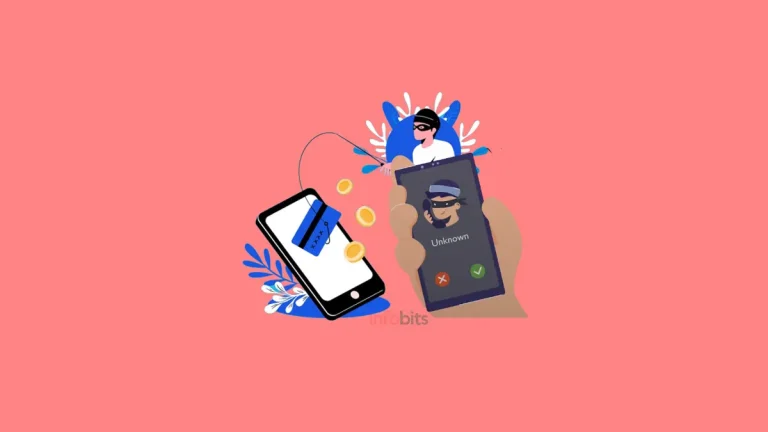
- Screen-sharing and remote-access scams, where a caller posing as bank support or tech support talks you into installing AnyDesk, TeamViewer, or RustDesk, giving them live access to everything on your screen, including OTPs as they arrive.
- “Digital arrest” scams, where callers impersonate police, CBI, or RBI officials, claim you’re under investigation, and pressure you into transferring money while staying on a video call so you can’t consult anyone. Indians have lost over ₹2,000 crore to this specific scam in the last two years.
None of this requires a “sophisticated hacker.” Nearly all of it depends on you installing something you were talked into installing, or trusting a caller who sounds official.
Related: Best Free Antivirus Apps for Android in 2026
What Is Malware, Really?
Malware is any software built to damage, exploit, or steal from a device without proper consent. On phones, it usually falls into a few categories:
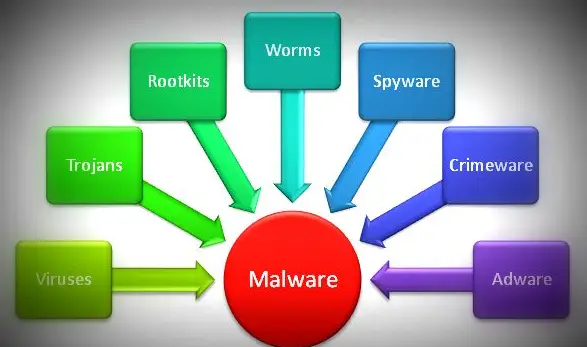
- Trojans disguise themselves as a legitimate app (a bank, a bill-payment tool, a government service) to trick you into installing them.
- Spyware quietly monitors your activity, messages, and location and sends that data to whoever planted it.
- Adware floods your device with intrusive ads, often as a side effect of a shady app rather than the main threat.
- Ransomware locks your device or encrypts your files and demands payment to restore access.
- Banking trojans specifically target financial apps, often by reading your SMS messages to intercept OTPs.
A virus technically refers to code that replicates itself by attaching to other programs; a specific type of malware. In everyday use, most people say “virus” to mean any malicious app, and that’s fine for practical purposes.
How Malware Actually Gets Onto Your Phone
Nearly every real-world infection traces back to one of these:
- Sideloaded APKs shared directly through WhatsApp or Telegram: this is now the leading vector for Android malware in India specifically, exploiting the platform’s massive user base.
- Fake apps that closely mimic real ones: a fraudulent banking or utility app with a near-identical name and logo to the genuine one.
- Malicious links in SMS or email (“your KYC has expired,” “your parcel is held at customs”) that lead to a fake login page or trigger an automatic download.
- Abuse of Accessibility Services: some malware asks for Accessibility permissions during setup, which (if granted) lets it read your screen, log what you type, and interact with other apps on your behalf.
- Public Wi-Fi interception, though this is less common than app-based infection for most users today.
Google has been tightening its response to this; starting in 2026, it’s rolling out restrictions on installing apps from unverified or unknown developers on many Android devices, specifically to cut down on this kind of sideloaded malware.
Related: How to Make Your Android Phone Faster: 15 Easy Steps
Warning Signs Your Phone Might Be Infected
Malware often runs quietly in the background, so early signs are subtle rather than dramatic:
- Your phone is noticeably slower or overheats more than usual, especially when idle.
- Apps crash frequently or take longer to open than they used to.
- Your battery drains much faster than your normal usage pattern would explain.
- You’re getting pop-up ads even when your browser is closed – a strong sign of adware.
- There are apps on your phone you don’t remember installing.
- Your data usage or phone bill has spiked without a clear reason.
- You notice an app icon has disappeared, but the app is still listed as installed in Settings.
One or two of these on their own can just mean your phone is ageing, or storage is full. Several together, especially alongside an unfamiliar app, is worth investigating properly.
How to Check Your Phone for Malware
On Android: Open the Google Play Store, tap your profile icon, go to Play Protect, and run a scan.
Play Protect runs in the background automatically, but a manual scan is worth doing if you suspect something. For a more thorough check, a reputable antivirus app like Kaspersky (available on Amazon) can scan more broadly than Play Protect alone.
On iOS: Apple’s sandboxing makes traditional malware much rarer on iPhones, but it’s not impossible, especially on a jailbroken device.
If your iPhone is behaving strangely, check Settings > Screen Time > See All Activity for unfamiliar app usage, and check for unrecognised configuration profiles under Settings > General > VPN & Device Management.
If you want a second opinion beyond your phone’s built-in protection, a well-reviewed mobile security app that includes real-time scanning (not just a one-time scan) is worth the subscription if you regularly install apps outside the Play Store or handle sensitive banking on your phone.
Related: Why Google Banned Fake Loan Apps in India: Full Update & Safety Guide
How to Remove Malware From Your Phone
If you suspect an infection, act in this order:
- Disconnect from the internet (turn on Aeroplane Mode) to stop the malware from sending data out or receiving further instructions.
- Boot into Safe Mode on Android: press and hold the power button, then long-press the Power Off option until you’re prompted to reboot into Safe Mode. This disables third-party apps temporarily so you can safely remove the suspicious one.
- Uninstall the suspicious app through Settings > Apps. If it won’t uninstall normally, force-stop it first, then try again.
- Check for other recently installed apps you don’t recognise, and remove those too; malware often installs companions.
- Run a full antivirus scan to confirm nothing remains.
- Change your important passwords ( banking, email, and UPI PINs) from a different, clean device, since the compromised phone may have already captured them.
- If banking details or OTPs were exposed, contact your bank immediately and consider a factory reset once you’ve backed up your genuinely safe data.
If none of this resolves the issue, or you suspect financial fraud has already occurred, a factory reset is the most reliable way to guarantee the device is clean. Back up your photos and contacts first, but not your apps, since reinstalling a backup can occasionally restore the same malware.
The Scams That Don’t Look Like “Malware” At All
Some of the most damaging phone-based fraud in India right now doesn’t involve malicious code at all. It relies entirely on convincing you to hand over access yourself.
Screen-Sharing and Remote-Access Scams
A caller claims to be from your bank’s support team, a courier company, or tech support, and talks you through installing an app like AnyDesk, TeamViewer, or RustDesk “to fix an issue.”
Once it’s installed and you grant permissions, the caller can see your entire screen in real time, including OTPs the moment they arrive.
No legitimate bank or company will ever ask you to install a remote-access app to resolve an issue. If you’re asked to do this, hang up.
Digital Arrest Scams
Scammers impersonate police, CBI, ED, or RBI officials, claim you’re under investigation for something serious like money laundering, and pressure you to stay on a video call ( often for hours ) while instructing you to transfer money to a “verification” or “safe” account.
They deliberately isolate you from family or colleagues during the call to prevent you from getting a second opinion.
No Indian law enforcement agency conducts arrests, investigations, or financial verification through WhatsApp, Zoom, or a phone call. This is fabricated pressure designed purely to panic you into transferring money.
Prepaid Task Scams
You’re offered easy money for small tasks like liking YouTube videos or rating hotels, receive a few genuine small payouts to build trust, and are then convinced to “invest” a much larger amount, which disappears entirely.
Related: Fake Video Call Using AI: How to Spot a Deepfake Call
If You’ve Already Been Scammed: What to Do Immediately
Time matters enormously here. In India:
- Call the national Cyber Crime Helpline at 1930 as soon as possible; reporting within the first couple of hours significantly improves the chance your bank can freeze the money before it’s withdrawn.
- File a complaint at cybercrime.gov.in, the National Cyber Crime Reporting Portal.
- Contact your bank directly to report the fraudulent transaction and request an immediate freeze or dispute.
- If you were made to install a remote-access app, uninstall it, change every important password from a different device, and consider a factory reset.
- Check your credit report (CIBIL or equivalent) within the following weeks, since some scams also involve fraudulent loan applications taken out in your name.
This is a sensitive and often distressing situation, particularly for scams that involve prolonged psychological pressure like digital arrest fraud. Acting quickly and calmly, rather than continuing to engage with the caller, is the most protective thing you can do.
How to Protect Your Phone Going Forward
1. Only Install Apps From Official Stores
Stick to the Google Play Store and Apple App Store. Never install an APK file someone sent you directly through WhatsApp or Telegram, no matter how official it looks. This is now the leading source of Android malware infections in India.
2. Keep Your OS and Apps Updated
Security patches specifically close the vulnerabilities that malware exploits. Turn on automatic updates for both your operating system and your apps rather than relying on remembering to do it manually.
3. Review App Permissions Carefully
Before installing, check what an app is asking to access. A flashlight app requesting access to your contacts, SMS, or Accessibility Services is a red flag. Legitimate apps only request permissions relevant to their actual function.
4. Never Install Remote-Access Apps on a Stranger’s Instruction
AnyDesk, TeamViewer, RustDesk, and similar tools have legitimate uses, but installing one because someone on a call told you to is one of the most common paths to a drained bank account in India right now.
5. Use Strong, Unique Passwords and Two-Factor Authentication
Combine a strong password with biometric authentication where available, and enable two-factor authentication on your banking, email, and UPI apps wherever it’s offered.
6. Be Sceptical of Urgent Messages
Messages claiming your KYC has expired, a parcel is stuck at customs, or you’re under investigation are almost always designed to make you act before you think. Verify independently, call your bank’s official number, not one provided in the message, before doing anything.
7. Avoid Public Wi-Fi for Sensitive Transactions
If you must use public Wi-Fi, avoid banking or entering passwords, and use a reputable VPN if you need a more secure connection. Stick to HTTPS sites, since non-secure connections are more vulnerable to interception.
A reputable VPN subscription like Bitdefender built-in VPN (available on Amazon) is a worthwhile investment if you regularly work from cafes, airports, or co-working spaces on public Wi-Fi. Look for one with a clear no-logs policy rather than the cheapest option available.
8. Back Up Your Data Regularly
Link your phone to Google Drive or iCloud for automatic, encrypted backups, so a lost, stolen, or infected device doesn’t mean losing your photos, contacts, and documents.
9. Don’t Root or Jailbreak Your Device
Rooting or jailbreaking removes several built-in security protections and can prevent your device from receiving standard security updates properly, leaving it more exposed to exactly the kind of malware described above.
Related: Mobile Buying Guide: How to Choose the Right Smartphone in India
Common Mistakes That Lead to Infections or Fraud
- Installing an APK sent directly over WhatsApp, even from someone you know. Their account may itself be compromised.
- Granting Accessibility permissions to an app without checking why it needs them.
- Assuming a caller is legitimate because they already know some of your personal details. Scammers often have partial information from previous data leaks.
- Continuing a call while someone pressures you not to hang up or consult family.
- Reusing the same password across banking, email, and social media apps.
Conclusion
Protecting your phone from viruses, malware, and scams is not as difficult as it may seem. Most threats can be avoided by following a few basic habits. Install apps only from the Google Play Store or Apple App Store.
Avoid APK files shared through WhatsApp or Telegram, especially when they claim to be banking, KYC, electricity, or government apps. Keep your phone and apps updated, and review permissions before giving an app access to sensitive information.
You should also stay alert to scams that don’t require any malware. Never install AnyDesk, TeamViewer, or similar remote-access apps because an unknown caller asks you to.
Be equally careful with calls claiming to be from the police, CBI, RBI, or other government agencies. Genuine authorities will not ask you to transfer money during a video call or conduct a so-called digital arrest.
If you notice unusual battery drain, overheating, pop-up ads, unknown apps, or strange phone behaviour, investigate it promptly. If you have already lost money to a scam, call 1930 and report it at cybercrime.gov.in without delay.
Remember, your best protection is a combination of updated software, trusted apps, strong passwords, and common sense. A few seconds of caution can save you from a much bigger problem later.
Frequently Asked Questions
It’s much rarer than on Android due to Apple’s app sandboxing and review process, but it’s not impossible, particularly on jailbroken devices or through sophisticated targeted spyware. Standard security precautions still apply.
Watch for a combination of signs: unusual slowness, faster battery drain, apps crashing often, unexpected pop-up ads, unfamiliar apps you didn’t install, or a spike in data usage. One sign alone isn’t conclusive, but several together are worth investigating.
Malware is the broader term for any malicious software. A virus is technically a specific type of malware that replicates by attaching itself to other programs. In everyday conversation, people often use the terms interchangeably.
No. Directly shared APK files are currently the leading method of spreading Android malware in India, often disguised as banking, KYC, or utility apps. Only install apps from the Google Play Store or App Store.
Hang up. No legitimate bank or company will ask you to install a remote-access app to resolve an account issue. This is one of the most common scam tactics currently targeting Indian phone users.
It’s a fraud where callers impersonate police or government officials, falsely claim you’re under investigation, and pressure you, often while staying on video call, to transfer money. No Indian law enforcement agency conducts investigations or arrests via video call or WhatsApp.
Disconnect from the internet, boot into Safe Mode, uninstall the suspicious app through Settings, run a full antivirus scan, and change your important passwords from a separate device. A factory reset is the most reliable option if the infection persists.
Google Play Protect and Apple’s built-in protections cover the basics for most users. A dedicated antivirus app adds real-time scanning and extra protection, and is worth considering if you frequently install apps outside official stores or handle sensitive financial transactions.
Call the national Cyber Crime Helpline at 1930 as soon as possible, and file a complaint at cybercrime.gov.in. Reporting within the first couple of hours significantly improves the chance of recovering the money.
Yes. Many banking trojans specifically request SMS access so they can intercept OTPs and complete fraudulent transactions without you noticing. This is why unexplained SMS or Accessibility permission requests are a major red flag.
It’s best avoided. Public Wi-Fi networks are more vulnerable to interception. If you must use one, avoid banking transactions and use a reputable VPN if possible.
Accessibility Services are a legitimate Android feature designed to help users with disabilities interact with their phone. Malware abuses this same permission to read your screen, log keystrokes, and interact with other apps on your behalf, which is why an app requesting it without a clear accessibility-related purpose is a serious warning sign.
Generally, no, unless you have a specific technical need and understand the risks. Rooting and jailbreaking remove built-in security protections and can interfere with receiving proper security updates, increasing your exposure to malware.
Only download financial and utility apps directly from the Google Play Store or App Store, and double-check the developer name matches the official company. Fake apps often use near-identical names and logos to the real thing.
Call 1930 and contact your bank immediately. Reporting within the first couple of hours gives the best chance of the bank freezing the destination account before the money is withdrawn.
It catches a significant share of known threats by scanning apps before and after installation, but it isn’t foolproof, especially against newer or sideloaded threats. Combining it with cautious installation habits offers much stronger protection than relying on it alone.
The initial small payouts are real, specifically to build trust before you’re asked to “invest” a much larger sum, which is then stolen entirely. Treat any offer of easy money for simple online tasks with serious scepticism.
Roughly every six months for sensitive accounts like banking and email, and immediately if you suspect any account may have been compromised. Using a password manager makes frequent unique passwords far more practical.
We hope you are interested in this article, and please share it with your friends and relatives.
Also, consider following our Facebook and Twitter pages for regular updates.
Subscribe to our free newsletter so that you will get regular updates directly in your Email.
Subscribe to be the first to learn about new information
Disclosure: If you follow the links in this article to a retailer’s website and make a purchase, we will get an affiliate commission on some, but not all, of the items or services we promote without affecting your price.