
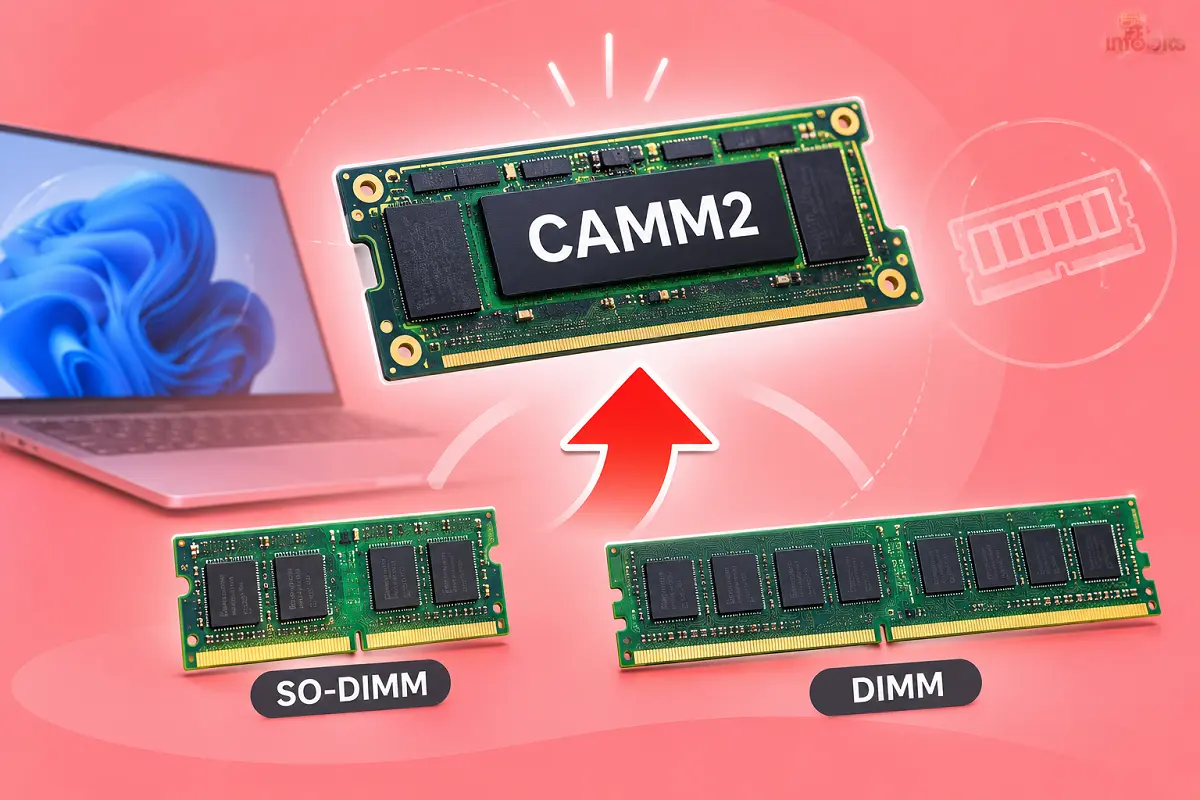
CAMM2: The New RAM Format Set to Replace SO-DIMM (and Maybe DIMM)
Open up an older laptop, and you will find two RAM sticks sitting at a slight angle. Pop them out, slot in new ones, done. That simple upgrade has survived for over 25 years.
Then laptops got thin. Makers started soldering RAM straight onto the board, and the upgrade option vanished. CAMM2 is the industry’s attempt to bring it back.
This guide explains what CAMM2 is, how it differs from the RAM you know, which laptops use it today, and whether you should care before your next purchase. I have kept it practical, with the real-world catch on the price.
Quick answer: what is CAMM2?
CAMM2 (Compression Attached Memory Module 2) is a flat RAM module that screws down onto contact pads on the motherboard instead of clicking into an angled slot. It is thinner than SO-DIMM and can fill a 128-bit memory bus on its own. It stays replaceable, unlike soldered RAM.
In 2026, it is real but still niche. You will find it mostly in business laptops and a handful of enthusiast desktop boards. SO-DIMM and standard DIMM are not going away soon.
What is CAMM2?
CAMM2 is a memory module standard published by JEDEC, the body that sets memory specifications. It defines modules for both DDR5 and LPDDR5/LPDDR5X memory.
The idea began at Dell. Its engineers built an early version called CAMM for the Precision 7670 workstation in April 2022. JEDEC then standardised the improved CAMM2 so that any brand could build compatible parts.
The benefit of a standard is simple. You are not locked to one laptop maker’s proprietary module.
CAMM2 full form
CAMM2 stands for Compression Attached Memory Module, version 2. “Compression” refers to how it connects. The module is pressed against a grid of contacts and held there by screws.
CAMM2 vs LPCAMM2: what is the difference?
The names confuse many people. Here is the short version.
- CAMM2: the overall standard. DDR5 versions are designed for desktops and some laptops.
- LPCAMM2: the low-power version using LPDDR5X memory. It is built mainly for thin laptops.
- CAMM (original): Dell’s earlier, proprietary design. It is not interchangeable with CAMM2.
When a laptop review says “upgradeable LPCAMM2 memory”, it means the low-power laptop version.
How does CAMM2 work?
A SO-DIMM sits in an edge connector. Signals have to travel across that connector, and at high speeds the connection loses signal quality.
CAMM2 replaces the edge connector with a land grid array. Many more contact points press flat against the board, and trace lengths stay short and even. That makes high speeds easier to reach.
Three design choices matter most.
- Flat mounting. The module lies parallel to the motherboard. This cuts height by about 57% compared with SO-DIMM.
- A wider bus. One CAMM2 module carries a 128-bit bus, double the 64-bit bus of a single SO-DIMM. So one module can behave like a dual-channel pair.
- Screw fixing. Four screws hold the module down with even pressure. No clips, no angled insertion.
Some versions also move power management onto the module itself. Crucial’s LPCAMM2 parts, for example, include on-module SPD and PMIC chips, which help efficiency.
Why SO-DIMM is running out of road
SO-DIMM has served laptops since 1997. It is cheap, familiar and widely available. But it has limits.
JEDEC’s DDR5 SO-DIMM tops out at 6400 MT/s. Pushing past that through a connector gets messy. Thin laptops also struggle to fit two vertical sticks and still leave room for cooling or battery.
That is why most premium ultrabooks moved to soldered LPDDR5X. It is fast and compact, but you are stuck with whatever capacity you bought on day one. CAMM2 aims for the best of both worlds.
CAMM2 vs SO-DIMM vs DIMM vs Soldered RAM
| Feature | SO-DIMM (laptop) | DIMM (desktop) | Soldered RAM | CAMM2 / LPCAMM2 |
|---|---|---|---|---|
| Upgradeable | Yes | Yes | No | Yes |
| Mounting | Angled slot | Vertical slot | On the board | Flat, screwed down |
| Height | Tall | Tall | Lowest | Low (about 57% thinner than SO-DIMM) |
| Bus per module | 64-bit | 64-bit | Built in | 128-bit |
| Typical speed today | Up to about 6400 MT/s (DDR5) | DDR5 desktop speeds | 7500 to 9600 MT/s (LPDDR5X) | LPDDR5X around 7500 to 8533 MT/s shipping |
| Availability in 2026 | Very wide | Very wide | Very wide | Limited |
| Price | Lowest | Lowest | Built into laptop price | Highest of the upgradeable options |
If you want to understand the memory generations behind these formats, our guide on the difference between DDR2, DDR3, DDR4 and DDR5 RAM is a good companion read.
What are the real benefits of CAMM2?
Slimmer laptops without giving up upgrades. The lower profile frees space for a bigger battery or better cooling.
Soldered-class speed. The first LPCAMM2 laptop, the Lenovo ThinkPad P1 Gen 7, ran Micron’s 7500 MT/s modules at 7467 MT/s. That is firmly in soldered-memory territory.
Lower power use. Lenovo claims its LPCAMM2 setup uses about 61% less power and up to 64% less space than DDR5 SO-DIMMs. Treat vendor numbers as best-case, but the direction is clear.
One module, dual-channel. You do not need to buy matched pairs. One module does the job.
Longer laptop life. If you keep laptops for five years or more, being able to swap the module later is the real win.
What CAMM2 does not fix
In my research for writing this article, I found that this is where most articles go soft, so let me be direct.
- Cost. CAMM2 modules cost far more than SO-DIMM sticks, and the 2026 memory shortage has made it worse.
- One module only. Today’s laptops use a single module. You cannot add a second one later. You replace the existing module, much like swapping both sticks at once.
- Limited choice. It is concentrated in business and premium laptops. Budget machines still use soldered RAM or SO-DIMM.
- Not interchangeable. CAMM2 will not fit a SO-DIMM slot, and LPCAMM2 will not fit a DDR5 CAMM2 socket.
- Careful installation. Screws must be tightened properly. It is easy, but not “click and done”.
Which laptops use CAMM2 (LPCAMM2) in 2026?
Lenovo went first. The ThinkPad P1 Gen 7 launched in April 2024 as the first commercially available laptop with LPCAMM2. Newer ThinkPad P-series and T-series models have followed, including the P1 Gen 8 and Gen 9, P14S Gen 7 and an AMD-based P16S Gen 5.
Dell joined in 2026. The Dell Pro 5 14 and Pro 5 16 offer an LPCAMM2 option with Intel Core Ultra Series 3 (Panther Lake) chips, up to 64 GB. Dell’s Pro Precision lines list it too.
Framework brought it to a more enthusiast audience. The Framework Laptop 13 Pro, announced in April 2026, offers LPCAMM2 on its Intel Core Ultra Series 3 version. The AMD Framework 13 models still use SO-DIMM.
India note: I could not confirm which LPCAMM2 configurations are sold in India or at what price. Before you buy, check the exact spec sheet on Lenovo India or Dell India, and confirm the memory type in the configurator.
If you are shopping on a tighter budget, our list of the best i5 laptops under ₹50,000 shows what is realistic today. You should note that none of them will have CAMM2.
What about desktops?
Desktop CAMM2 exists, but it is early.
MSI showed the first desktop board with CAMM2, the Z790 Project Zero Plus, paired with a Kingston module. Gigabyte has a Z890 Aorus Tachyon Ice CAMM2 board. G.Skill also showed a 64 GB module stable at DDR5-10000 on a custom ASUS ROG Z890 board.
As of mid-2026, though, standard DDR5 DIMM remains the better-supported choice. If you are building a PC now, do not wait for CAMM2. Pick your motherboard first, then the RAM it supports.
One desktop point is worth remembering. At the same factory speeds and timings, CAMM2 performs no differently from DIMMs. The gains come from trace design and overclocking headroom, not magic.
The price reality: why CAMM2 is expensive right now
Timing is unlucky. AI data centres are soaking up memory supply, and DRAM prices have roughly doubled during 2026.
In December 2025, Micron announced it was exiting its Crucial consumer brand, with shipments ending by February 2026. Crucial had been the main retail source of LPCAMM2 upgrade modules. Samsung and SK Hynix do not sell to consumers directly.
The result is stark. Framework’s 64 GB LPCAMM2 module launched at $849 and rose to $1,600 by July 2026. Its 32 GB module climbed to about $800. These are US prices, and they do not include shipping, duty or GST for India.
My advice: do not treat “upgrade later” as a money-saver this year. Buy the capacity you need today.
Myth vs Fact
Myth: CAMM2 will make all laptop RAM upgradeable. Fact: Most thin laptops still solder their RAM. CAMM2 is a choice makers must opt into.
Myth: CAMM2 is faster than every other RAM. Fact: LPCAMM2 matches good soldered LPDDR5X. It beats DDR5 SO-DIMM at standard speeds, but it is not a speed leap over soldered memory.
Myth: You can add a second CAMM2 module later. Fact: Current laptops take one module. Upgrading means replacing it.
Myth: CAMM2 will replace DIMMs on desktops next year. Fact: Desktop support is early and limited. DIMMs will be around for years.
Should you buy a laptop with CAMM2? A simple decision guide
Choose a CAMM2/LPCAMM2 laptop if:
- You keep laptops for five years or more.
- You work in a business or workstation setting where RAM needs may grow.
- Repairability matters to you, or your company supports hardware repairs.
Skip it (for now) if:
- You replace your laptop every two or three years.
- Your budget is under about ₹80,000 or so. CAMM2 is rare at that level.
- You are fine with a standard SO-DIMM laptop and want more model choice.
Pre-purchase checklist
- Confirm “LPCAMM2” (not just “LPDDR5X”) on the official spec sheet.
- Check the maximum supported capacity.
- Ask what the replacement module costs and who sells it in India.
- Check whether opening the back panel affects your warranty.
- Compare against a SO-DIMM model at the same price.
How to check if your laptop has CAMM2
- Read the official spec sheet. Search your exact model number on the maker’s site and look for “LPCAMM2”.
- Open Task Manager. Press Ctrl + Shift + Esc, go to Performance, then Memory. The “Form factor” line gives a clue. “Row of chips” usually means soldered. Newer module types can show up differently, so always confirm against the spec sheet.
- Check with a tool like CPU-Z. Its memory and SPD tabs show module type, speed and capacity.
- Only open the laptop if the manual says so. Some models keep the module under a service panel. Others void the warranty if opened.
How to replace an LPCAMM2 module safely
This is general guidance. Always follow your laptop maker’s service manual, because screw order and torque vary.
- Power off, unplug the charger and disconnect the battery if the manual says so.
- Remove the back panel. A set of plastic opening picks and a good driver help here. A decent precision screwdriver set makes this much safer than using a mismatched driver.
- Touch bare metal or wear an anti-static strap before handling the module. An inexpensive ESD wrist strap is cheap insurance on dry days.
- Unscrew the module’s screws evenly and lift it by the edges.
- Place the new module flat on the contact area, aligned with the guide pins.
- Tighten the screws gradually and evenly. Do not overtighten.
- Refit the panel and boot. Check the new capacity in Task Manager or BIOS.
Common mistakes
- Buying the wrong type, such as an LPCAMM2 module for a DDR5 CAMM2 board.
- Ordering a speed or capacity your laptop does not support.
- Tightening one screw fully before the others, which can tilt the module.
- Touching the contact pads or the underside of the module.
- Skipping a BIOS update when the maker recommends one for new memory.
Troubleshooting
- Laptop will not turn on after install: Reseat the module. Loosen all screws, align again and tighten evenly.
- Wrong capacity shown: Check the BIOS and re-seat. Confirm the module is on your laptop’s supported list.
- Random crashes or blue screens: Run a memory test. Check the maker’s support page for BIOS or firmware updates.
- Slower than expected: Check the supported speed. Some laptops run modules below their rated speed.
Heat and battery behaviour also change with hardware swaps. If you worry about battery wear, our explainer on using a laptop while it charges is useful.
If your current laptop still has standard SO-DIMM slots, you can often upgrade cheaply with a DDR5 or DDR4 SO-DIMM kit from a reputed brand ( see the options on Amazon), as long as it matches your model’s supported type.
What comes next: DDR6 and beyond
CAMM2 is widely seen as the likely path for future memory generations. The reason is simple. Connector-based SO-DIMM struggles with very high speeds, and a compression-mounted module is better suited.
Other variants are emerging too. SOCAMM2, a smaller form factor developed by Micron and Nvidia, targets AI servers rather than your laptop.
For consumers, the realistic timeline is gradual. Expect SO-DIMM and CAMM2 to coexist for several years.
Conclusion
CAMM2 is a smart fix for a real problem. It keeps RAM replaceable while matching the speed and thinness of soldered memory.
But it is not a bargain today. Prices are high, choice is limited, and desktop support is early. If you keep laptops for five or more years, LPCAMM2 is worth looking for. If you upgrade often, standard laptops are still the sensible pick.
Before you buy anything, check the exact memory type on the spec sheet. That one step prevents most expensive mistakes.
Want to understand RAM better? Read our guide to DDR RAM generations and our walkthrough on dual boot vs virtual machine, which shows how much RAM your workload really needs.
Frequently Asked Questions
CAMM2 is a flat memory module that screws onto the motherboard’s contact pads. It is a JEDEC standard built to replace SO-DIMM in laptops and, over time, DIMMs on some desktops.
Compression Attached Memory Module, version 2. It is “compression attached” because the module is pressed onto contacts and held by screws.
Probably over time, but not quickly. SO-DIMM and CAMM2 are expected to coexist for several years because SO-DIMM is cheap and widespread.
Not soon. Desktop CAMM2 boards exist from brands such as MSI and Gigabyte, but standard DDR5 DIMMs remain the better-supported choice in 2026.
CAMM2 is the overall standard, with DDR5 versions for desktops and laptops. LPCAMM2 uses low-power LPDDR5X memory and is designed mainly for thin laptops.
Yes, it supports higher speeds. DDR5 SO-DIMM tops out around 6400 MT/s, while shipping LPCAMM2 modules run at roughly 7500 to 8533 MT/s.
Not at equal factory speeds and timings. Any gain comes from shorter traces and higher overclocking potential, not from the format alone.
No. The shapes and connections are completely different. A laptop is built for one format or the other.
Yes, in most cases. You unscrew the old module and fit the new one, but check your laptop’s service manual and warranty terms first.
Not in today’s laptops. They use a single module, so you replace it with a higher-capacity one.
LPCAMM2 is designed to. Lenovo claims about 61% less power than DDR5 SO-DIMM, though real savings depend on the laptop and workload.
About 57% thinner than a SO-DIMM, according to figures from Dell and JEDEC announcements. It can also use up to about 64% less space than two DDR5 SO-DIMMs.
Examples include the Lenovo ThinkPad P1 Gen 7 and later P and T models, Dell Pro 5 14 and 16 (LPCAMM2 option) and the Framework Laptop 13 Pro (Intel version). Always verify the exact configuration.
I could not confirm Indian availability for specific LPCAMM2 configurations. Check Lenovo India and Dell India configurators for the memory type before ordering.
It is new, produced in small volumes and uses LPDDR memory, which has risen sharply in price during the 2026 AI-driven shortage. Crucial’s exit from consumer memory has also reduced retail supply.
It is worth it if you keep laptops five or more years and value repairability. If you replace laptops every two to three years, a standard laptop gives you more choice.
It is widely expected that future memory generations will move to CAMM-style modules, because connector-based SO-DIMM struggles at very high speeds. Nothing is final for consumer DDR6 yet.
Check the official spec sheet for your exact model. Task Manager’s Memory tab shows a form factor line that hints at the type, but the spec sheet is the reliable source.
We hope you are interested in our articles and consider following our Facebook, Instagram, and Twitter pages for regular updates.
Also, share this article with your friends and relatives. Bookmark this page for future reference.
Subscribe to our free newsletter to get similar articles and regular updates directly in your Email Inbox.
Subscribe to be the first to learn about new information
Disclosure: If you follow our links to a retailer’s website and make a purchase, we will get an affiliate commission on some, but not all, of the items or services we promote. This will cause no price change for you.
You May Be Interested to Read:
- Why Are RAM Prices So High in 2026? The AI Memory Shortage Explained
- Is My CCTV Camera Legal in India? STQC Certification Explained
- Windows on ARM: Is a Snapdragon Laptop Good for Students in India?
- SATA SSD vs NVMe SSD: Which Should You Buy?
- Core Ultra vs Ryzen AI vs Snapdragon X2 Elite: Which Processor Should You Choose?