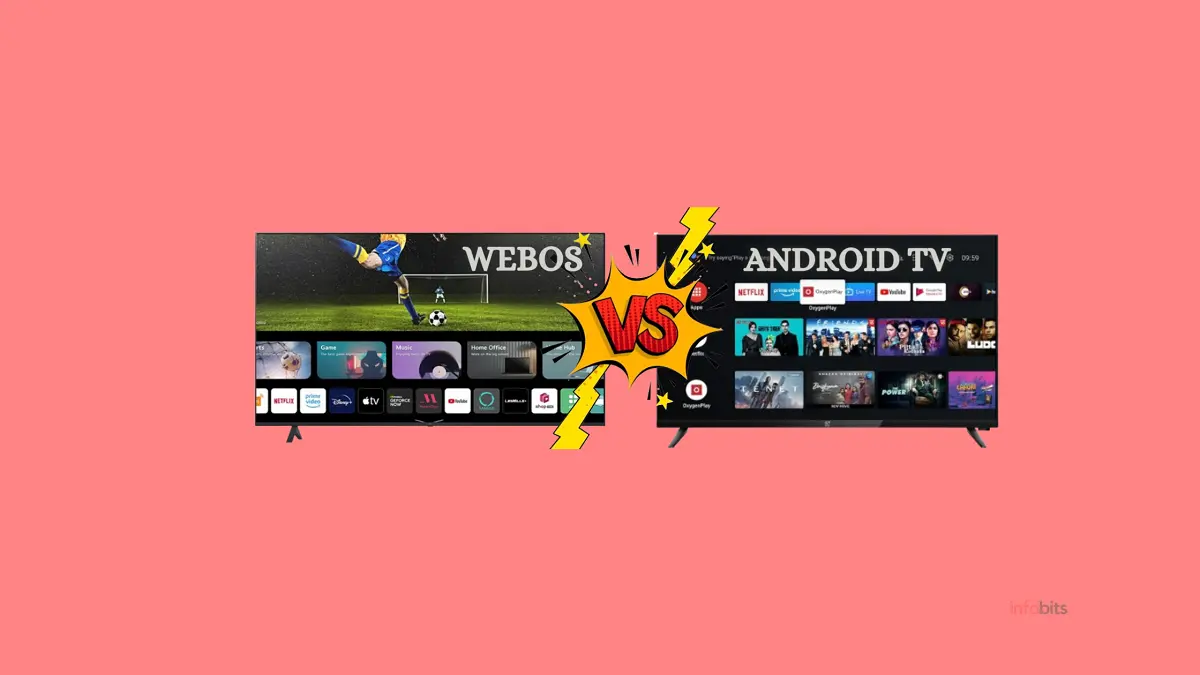
WebOS vs Android TV: Which Smart TV OS Is Best for Your TV?
If you’re shopping for a smart TV in India right now, you’ll keep running into the same fork in the road: LG’s webOS on one side, Android TV (or its newer cousin, Google TV) spread across nearly every other brand on the other.
They look superficially similar; both have app rows, both stream Netflix and JioHotstar, both respond to voice commands. But the experience of actually living with each one day-to-day is genuinely different, and so is what you’re buying into long-term.
This guide breaks down exactly how webOS and Android TV differ, which brands use which platform in India, and, more usefully than most comparisons, which one actually fits your specific situation.
Quick Answer: webOS is LG’s own smart TV operating system, used exclusively on LG televisions. It’s known for a clean, card-based interface, smooth performance because LG controls both the hardware and software, and the Magic Remote with pointer and voice control.
Android TV is Google’s smart TV platform, used across many brands , Sony, TCL, Hisense, Xiaomi, Philips, and more. It offers the largest app library through the Google Play Store, deep Google Assistant integration, and far more device choice across every price range.
webOS wins on polish and consistency; Android TV wins on app selection, brand variety, and value at the budget end. Neither is objectively “better” , the right choice depends on whether you want LG specifically or want to shop freely across brands and price points.
Correcting a Common Misconception First
Before going further, it’s worth clearing up something that trips up a lot of people researching this topic, including some older articles still circulating online.
Android TV was not a rename of an earlier product called “Google TV.” Google did launch an experimental product called Google TV back in 2010, but that early platform was discontinued, and Android TV (launched in 2014) was a fresh platform built on Android, not a rebrand of the 2010 product.
Separately, in 2020, Google launched what we now call Google TV, a completely different, modern product that is actually a software layer built on top of Android TV, adding a unified content-discovery home screen.
So today, “Android TV” and “Google TV” are related (Google TV runs on the Android TV foundation) but are not interchangeable terms, and neither is simply “the old version” or “the new name” for the other in a renaming sense.
For this comparison, when we say “Android TV,” we’re referring to the broader Google smart TV ecosystem, both classic Android TV and its Google TV evolution, since both compete directly against webOS in the Indian market.
Related: Google TV vs Android TV: What’s the Real Difference?
What Is webOS?
webOS is LG’s proprietary smart TV operating system, built exclusively for LG televisions. Its origin story is genuinely interesting: webOS began as Palm OS, the operating system used on Palm PDAs and smartphones in the 2000s.
HP acquired Palm in 2010, and when HP’s webOS-based hardware efforts failed, LG bought the rights to webOS in 2013 and rebuilt it specifically for smart TVs.
Since then, LG has owned the entire stack. Designing the TV hardware, the processor (LG’s own α/Alpha AI processor series), and the software that runs on top. This vertical integration is the foundation of webOS’s biggest strength: everything is built to work together, because one company controls every layer.
webOS has gone through frequent naming and version updates.
webOS 6.0 (2021), webOS 22, webOS 23, webOS 24, webOS 25, and so on, generally following an annual naming convention tied to the release year, alongside meaningful interface redesigns at various points (the 2021 update, for instance, replaced the old bottom launch bar with a full-screen card-based home interface).
What Is Android TV?
Android TV is Google’s smart TV operating system, built on the Android codebase and designed to bring Android’s app ecosystem to the television.
Unlike webOS, Android TV is licensed to multiple TV manufacturers. Sony, TCL, Hisense, Xiaomi, Philips, OnePlus, and many others all build TVs running Android TV (or its newer Google TV interface) on their own hardware.
This licensing model is the core structural difference from webOS. Google builds the software, but dozens of different manufacturers build the hardware it runs on, with wildly varying processors, RAM, and build quality depending on price point.
Google TV, launched in 2020, is the newer, more refined interface that sits on top of Android TV’s foundation, adding a unified “For You” content discovery feed across all your streaming apps, multiple user profiles, and deeper personalisation.
Many current-generation Android TV devices in India, especially from Sony, TCL, and Hisense, now ship with the Google TV interface rather than classic Android TV.
webOS vs Android TV: Full Comparison
| Feature | webOS (LG) | Android TV (Google, multi-brand) |
|---|---|---|
| Available on which brands | LG exclusively | Sony, TCL, Hisense, Xiaomi, Philips, OnePlus, VU, and many more |
| Hardware-software integration | Fully integrated (one company, both layers) | Varies by manufacturer; Sony/TCL premium models perform well; budget brands vary |
| Home screen style | Card-based, full-screen launcher with content rows | App grid (classic) or unified “For You” feed (Google TV interface) |
| App store | LG Content Store | Google Play Store for TV |
| App library size | Smaller, but covers all major Indian streaming apps | Larger overall, covers virtually every app plus more niche/regional options |
| Voice assistant | LG ThinQ AI (built-in) + Google Assistant + Amazon Alexa support | Google Assistant (deeply integrated) |
| Remote control | LG Magic Remote, pointer-based navigation, motion control, voice mic | Standard remote with Google Assistant button; varies by manufacturer |
| Performance consistency | Very consistent, same software across the whole LG range | Varies significantly by hardware tier; budget models can feel sluggish |
| Update frequency | Reliable on premium/recent models; less consistent on older/budget LG sets | Frequent for flagship Sony/TCL Google TV models; inconsistent for budget Android TV brands |
| Casting support | Miracast + AirPlay (LG TVs support both) | Built-in Chromecast |
| Smart home integration | LG ThinQ ecosystem + Google Home + Amazon Alexa devices | Deep Google Home integration; works well with any Google Assistant device |
| Gaming features | Improving (Game Optimiser mode on recent LG TVs) | Stronger overall, wider Play Store game selection, Android-based game streaming support |
| Price range in India | ₹17,000–₹3,00,000+ (LG only, no true budget tier) | ₹10,000–₹2,50,000+ (covers every budget, including very cheap options) |
| Brand choice flexibility | None, locked into LG | Total, shop any brand at any price point |
User Interface: How They Actually Feel to Use
webOS: Consistent, Card-Based, Predictable
LG’s webOS home screen presents a row of large content cards, apps, recommendations, and inputs that you scroll through horizontally. The interface has been refined annually for over a decade, and it shows: animations are smooth, menus load instantly, and there’s very little visual clutter.
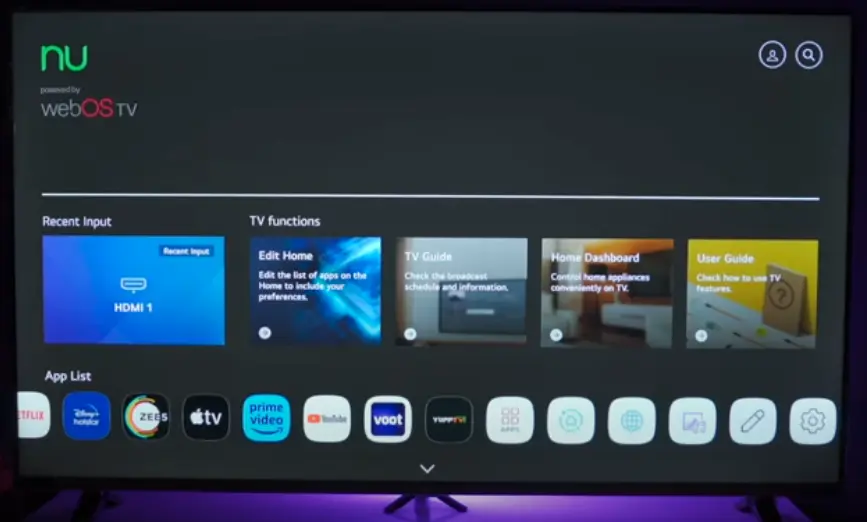
Because LG controls both the chip and the software, even LG’s mid-range TVs tend to run webOS smoothly. You don’t see the same performance cliff between “cheap LG TV” and “expensive LG TV” that you sometimes see across different Android TV brands.
Android TV: Variable, But Increasingly Strong with Google TV
Classic Android TV’s interface is the more traditional app-grid layout. Functional, but as the platform aged, it started to feel cluttered compared to newer competitors. This is genuinely one of the criticisms that has stuck to Android TV over the years.
However, the Google TV interface (now standard on most current Sony, TCL, and Hisense premium and mid-range models) addresses this directly with its unified, content-first “For You” home screen, which many reviewers now consider on par with or better than webOS for content discovery, since it pulls recommendations from every streaming app you have installed into one feed.
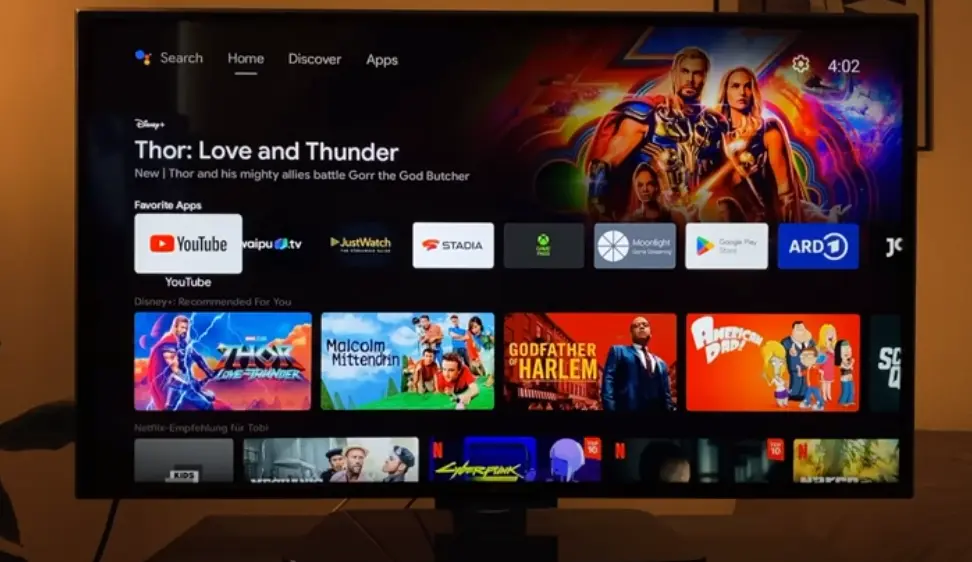
The honest 2026 take: If you’re comparing webOS against classic Android TV (common on older or budget devices), webOS generally feels cleaner.
If you’re comparing webOS against the Google TV interface (common on current Sony and TCL models), the gap narrows considerably, and which one you prefer becomes much more a matter of taste than a clear technical advantage.
App Availability: Does It Actually Matter for Indian Viewers?
Both platforms support every major Indian streaming service: Netflix, Amazon Prime Video, JioHotstar (Disney+ Hotstar), Zee5, SonyLIV, YouTube, JioTV+, Alt Balaji, Sun NXT, and the regional OTT apps most Indian households actually use.
Where the difference shows up:
- Android TV’s Google Play Store has a substantially larger total app catalogue, including more niche apps, regional language content apps, smaller streaming services, and games.
- webOS’s LG Content Store covers all the apps that matter for 95%+ of Indian viewers, but the long tail of smaller or newer apps sometimes takes longer to arrive on webOS, or never arrives at all.
Practical verdict: For mainstream Indian streaming, the apps everyone actually subscribes to on both platforms are functionally equivalent.
The difference matters mainly if you’re chasing a specific niche app, a particular regional content service, or want to use your TV for casual gaming through downloadable Android games.
Voice Control and Remote: A Genuine webOS Strength
This is one area where LG has a real, tangible advantage that’s worth calling out specifically.
LG’s Magic Remote
LG’s Magic Remote is not a standard button-and-D-pad remote. It includes:
- Pointer control: point at the screen and a cursor moves, like a wireless mouse, making menu navigation faster for many users
- Scroll wheel: physical scroll wheel for fast list navigation
- Built-in microphone for voice commands (ThinQ AI, with Google Assistant and Amazon Alexa support also built in on most models)
- Motion-based gesture control for some interactions
This remote is consistently cited as one of LG’s most differentiating features, and it’s exclusive to webOS TVs. You can’t buy a Magic Remote separately for a non-LG television.
Android TV’s Remote Situation
Android TV remotes vary by manufacturer. Sony, TCL, and Hisense each design their own remotes with their own button layouts, quick-launch app buttons (typically Netflix, Prime Video, YouTube as physical buttons), and a Google Assistant microphone button.
Quality and feel vary. Sony’s remotes on premium Bravia models are well regarded; some budget brand remotes feel cheap and basic.
For voice assistant capability specifically: Google Assistant on Android TV is more broadly recognised as the more powerful and widely-used assistant, with extensive third-party smart device compatibility.
LG’s ThinQ AI is genuinely capable for TV-specific commands and also supports Google Assistant and Alexa as alternatives. So webOS users aren’t locked out of the Google ecosystem; they just have additional/alternative options layered on top.
Related: Configure Mi TV Remote Controller with Any Cable/DTH Set Top Box
Smart Home Integration
Both platforms integrate well with smart home devices, but through different primary ecosystems:
webOS: Built around LG’s own ThinQ ecosystem (for LG’s other smart appliances, ACs, refrigerators, washing machines) while also fully supporting Google Home and Amazon Alexa device control.
If you already own other LG ThinQ-connected appliances, webOS gives you a unified control dashboard, which is a genuine convenience few competitors offer as cleanly.
Android TV: Built natively around Google Home, which means it works seamlessly with the broader universe of Google Assistant-compatible smart devices; far more third-party brands support Google Home than support LG ThinQ directly.
If your smart home setup already revolves around Google Nest, Google Home speakers, or Google Assistant-compatible lights and plugs (a very common setup for Indian households who started their smart home journey with affordable Google-compatible devices), Android TV integrates more naturally.
For Indian users specifically: Many budget Indian smart home devices (smart plugs, bulbs from brands like Wipro, Syska, and others) are built primarily around Google Assistant/Google Home compatibility rather than LG ThinQ.
This tips smart home convenience slightly toward Android TV for most Indian households, unless you specifically own LG appliances.
Performance and Stability: The Hardware Reality
This is the section where most generic comparisons get a little too simplistic, so let’s be precise about it.
webOS’s consistency advantage is real, but it comes from hardware control, not software magic. Because LG designs the chip and tunes the software specifically for it, even mid-tier LG TVs tend to run smoothly without the lag that can plague budget Android TV devices running on underpowered, generic processors with too little RAM.
Android TV’s variability is also real, and it cuts both ways. A flagship Sony Bravia running Google TV (view on Amazon) with a powerful modern processor and 4GB+ RAM performs excellently, arguably better than equivalent-price LG TVs in raw responsiveness.
But a ₹15,000 budget Android TV from a lesser-known brand, running on 1–1.5GB RAM and an older chip, will feel noticeably sluggish after a year or two of app updates piling up.
The practical rule: With webOS, you get fairly predictable performance regardless of which LG TV you choose (within reason).
With Android TV, performance depends heavily on which specific brand and model you choose, so check the RAM and processor specs carefully rather than assuming “Android TV” alone tells you anything about speed.
Updates and Long-Term Support
webOS: LG has historically provided reliable updates on recent and premium models, including the annual webOS version naming (webOS 22, 23, 24, 25, etc.) alongside meaningful feature additions.
However, very old or budget LG TVs sometimes stop receiving major version updates after a few years, a limitation shared with most smart TV platforms, not unique to LG.
Android TV: Google provides regular OS-level updates. But, critically, the actual rollout to your specific TV depends on the manufacturer, not just Google. Sony and other premium brands tend to roll out updates promptly.
Lesser-known or budget brands sometimes lag significantly behind or stop updates entirely after a year or two, leaving the device on an older Android TV version with potential security and compatibility gaps.
The takeaway: Update reliability on Android TV is a brand-specific bet, not a platform-wide guarantee. Update reliability on webOS is more uniform because there’s only one manufacturer to track.
Pricing and Availability in India (2026)
This is genuinely one of the most decisive practical differences, and it deserves to be front and centre rather than buried at the end.
webOS: LG Only, No True Budget Tier
Since webOS is exclusive to LG, your price range is whatever LG currently offers, and LG does not really compete in India’s budget smart TV segment (₹10,000–₹18,000), which is dominated by other brands.
LG’s webOS TVs in India typically start around ₹17,000–₹30,000 for entry 32–43 inch LED models and scale up significantly for QNED and OLED ranges, reaching ₹1,00,000–₹3,00,000+ for premium OLED sets.
If your budget is under ₹16,000, webOS is generally not an option at all; you’ll be choosing among Android TV brands by default.
Android TV: Every Price Point Covered
Android TV (and Google TV) spans the entire Indian market:
- Budget (₹10,000–₹20,000): Xiaomi, Hisense, VU, basic TCL models; Android TV dominates this segment entirely
- Mid-range (₹20,000–₹45,000): TCL, Hisense premium lines, Xiaomi premium models; often with Google TV interface
- Premium (₹45,000+): Sony Bravia (Google TV), TCL flagship Mini-LED/QLED models
This breadth is Android TV’s single biggest practical advantage for the Indian market: whatever your budget, there’s a credible Android TV (or Google TV) option, while webOS only enters the conversation once you’re ready to spend ₹25,000+ specifically on an LG.
Related: The Ultimate Guide to Choosing the Best 32 Inch Smart TV in India
Which Should You Choose? A Decision Guide
Choose webOS (LG) if:
- Your budget is ₹25,000+, and you’re specifically drawn to LG’s picture quality reputation (especially LG’s OLED range, widely regarded as best-in-class)
- You want the most consistent, polished day-to-day software experience and don’t want to compare specs across different brands
- You already own LG smart appliances and want unified ThinQ control
- You like the idea of a pointer-based remote for navigation
- You’re buying once and want minimal fuss for years; LG’s hardware-software integration reduces the chance of getting a “slow TV” surprise
You can find the best webOS LG TV on Amazon at an affordable price.
Choose Android TV (across brands) if:
- Your budget is under ₹25,000. This is simply where the value options exist in India
- You want the widest possible app selection, including regional/niche apps and casual gaming
- You already have a Google Home smart home setup and want tight integration
- You want to shop across brands and prices freely rather than being locked into one manufacturer
- You’re comfortable checking specs (RAM, processor) before buying, to avoid underpowered budget models
But nowadays most of the brands are upgrading their smart TV lineup from Android TV to Google TV. So it’s better to have a Google TV (view the latest options on Amazon) instead of Android TV when you’re deciding to purchase a new one.
Choose Google TV specifically (Android TV evolution) if:
- You want Android TV’s brand flexibility AND a more polished, webOS-competitive interface
- You’re looking at mid-range to premium Sony, TCL, or Hisense models in the ₹30,000+ range
- You subscribe to multiple streaming services and want unified cross-app content discovery
Remember: Samsung Uses Neither
If Samsung is also on your shortlist, note that Samsung TVs run Tizen OS, a completely separate platform from both webOS and Android TV, with its own interface and app store (though it carries the same major streaming apps).
This guide’s comparison doesn’t directly apply to Samsung; it’s a genuinely different ecosystem.
Related: Best Mi TVs in India: Which Is the Right One for You?
Myths vs Facts
| Myth | Fact |
|---|---|
| “Android TV was originally called Google TV before being renamed in 2014” | Google’s original 2010 “Google TV” product was a separate, discontinued effort. Android TV (2014) was a new platform. Today’s “Google TV” (2020) is a different, current product built on top of Android TV, not a renaming of the old one |
| “webOS can be installed on any TV brand” | No, webOS is exclusive to LG televisions. You cannot install it on a Sony, Xiaomi, or Samsung TV |
| “Android TV always has more lag and bugs than webOS” | This depends entirely on the specific hardware. A flagship Sony Google TV model can outperform a mid-tier LG webOS TV. The variability comes from the multi-brand hardware ecosystem, not an inherent software weakness |
| “You can’t use Google Assistant on an LG TV” | You can; most current LG webOS TVs support Google Assistant and Amazon Alexa alongside LG’s own ThinQ AI |
| “Samsung TVs run Android TV” | No; Samsung uses its own Tizen OS, completely separate from both webOS and Android TV |
| “All Android TV apps are also available on webOS” | Not necessarily. While all major streaming apps are on both, the total app catalogue on Google Play Store for TV is larger than LG’s Content Store, so some niche or newer apps may be Android TV/Google TV exclusive |
Related: WebOS vs Fire TV Which Is Best for You
Common Mistakes Indian Buyers Make
Mistake 1: Comparing webOS against a classic Android TV demo unit, not Google TV. Many showroom demo units still run older Android TV software. If you’re seriously comparing platforms, ask specifically whether the Android TV model you’re looking at runs the newer Google TV interface; it changes the comparison considerably.
Mistake 2: Assuming “Android TV” means consistent performance across all brands. This is the single biggest practical mistake. A ₹12,000 Android TV from an unfamiliar brand and a ₹45,000 Sony Google TV are both “Android TV,” but the experience is worlds apart. Always check RAM (2GB+ recommended) and processor generation, not just the OS name.
Mistake 3: Ruling out webOS because of price without checking LG’s actual current range. LG does occasionally offer reasonably priced webOS TVs in the 32–43 inch range during sale periods (Big Billion Days, Amazon Great Indian Festival). Don’t assume webOS is permanently out of reach if your budget is borderline.
Mistake 4: Forgetting that Samsung is a third, separate option. If picture quality and smart home ecosystem matter most to you, don’t narrow your decision to just webOS vs Android TV; Samsung’s Tizen-powered QLED and Neo QLED range is a legitimate third contender worth cross-shopping.
Mistake 5: Not checking update history for budget Android TV brands before buying. Search for the specific model and “software update” to see if the manufacturer has a track record of keeping older models current. Some budget brands stop meaningful updates within a year of launch.
Conclusion
There isn’t a universally “better” answer between webOS and Android TV; both are mature, capable platforms in 2026, and the comparison genuinely depends on your priorities and budget.
webOS rewards you with consistency: because LG controls the entire stack, you largely know what you’re getting regardless of which LG model you pick, backed by a genuinely excellent Magic Remote and (especially on LG’s OLED range) some of the best picture quality available.
Android TV rewards you with choice: the widest price range in the Indian market, the largest app catalogue, and, through the modern Google TV interface, an experience on premium Sony and TCL models that now genuinely rivals webOS for polish.
If your budget is under ₹25,000, the decision is effectively made for you; Android TV is where the value lives.
Above that price point, it becomes a real choice between LG’s consistency and the broader Android TV ecosystem’s flexibility. Either way, you’ll get every major Indian streaming app and a perfectly capable smart TV experience.
Frequently Asked Questions
webOS is LG’s proprietary smart TV operating system, exclusive to LG televisions, known for a polished card-based interface and the Magic Remote with pointer navigation. Android TV is Google’s smart TV platform, licensed to many brands including Sony, TCL, Hisense, and Xiaomi, offering a larger app library through the Google Play Store and deep Google Assistant integration. webOS offers more consistent performance because LG controls both hardware and software; Android TV offers far more brand and price flexibility.
Neither is universally better; it depends on your priorities. webOS offers more consistent day-to-day performance and a refined remote experience, but is exclusive to LG and has no true budget tier. Android TV (and its modern Google TV interface) offers the widest price range in India, the largest app catalogue, and strong Google ecosystem integration, but performance varies significantly depending on which brand and hardware tier you choose.
Not exactly. Google launched an early, separate product called Google TV in 2010, which was discontinued. Android TV (2014) was a new platform, not a direct rename of that earlier product. Confusingly, Google later launched a different, current product also called “Google TV” in 2020; this is a modern interface layer built on top of Android TV, not a renaming of the 2010 product.
webOS is exclusive to LG. No other television manufacturer uses webOS; it cannot be licensed or installed on TVs from Sony, Samsung, Xiaomi, TCL, or any other brand.
Many brands use Android TV (or its Google TV interface) in India, including Sony, TCL, Hisense, Xiaomi, Philips, OnePlus, VU, Kodak, Thomson, and iFFALCON. This wide brand availability is one of Android TV’s biggest advantages; you can find it across virtually every price segment in the Indian market.
No. Samsung uses its own proprietary platform called Tizen OS, which is completely separate from both webOS and Android TV. If you’re comparing smart TV platforms and Samsung is on your list, it’s a genuinely different ecosystem with its own interface and app store, though it supports the same major streaming apps.
Yes. The Magic Remote, with its pointer-based navigation, scroll wheel, and voice microphone, is exclusive to LG’s webOS televisions. You cannot purchase or use a Magic Remote with a non-LG television.
Android TV has a larger overall app catalogue through the Google Play Store for TV. However, both platforms support all major streaming services used in India: Netflix, Amazon Prime Video, JioHotstar, Zee5, SonyLIV, and YouTube. The difference mainly affects access to niche, regional, or newer apps, where Android TV typically has broader coverage.
Yes. Most current LG webOS televisions support Google Assistant and Amazon Alexa as voice control options, in addition to LG’s own built-in ThinQ AI assistant. You are not limited to LG’s assistant alone.
Android TV is licensed by Google to many different television manufacturers, each of which builds its own hardware; processors, RAM, and build quality vary significantly by brand and price tier. A flagship Sony or TCL model with a powerful processor and 4GB+ RAM runs smoothly, while a budget model with 1–1.5GB RAM and an older chip can feel sluggish. webOS doesn’t have this variability because LG controls both the hardware and software for every model.
Generally no. Since webOS is exclusive to LG, and LG does not heavily compete in India’s sub-₹20,000 budget smart TV segment, webOS TVs typically start around ₹25,000–₹30,000 for entry-level 32–43-inch models. For budgets under ₹20,000, Android TV brands like Xiaomi, Hisense, and VU dominate the market.
Google TV is a newer interface, launched in 2020, that runs on top of the Android TV foundation. It replaces the traditional app-grid home screen with a unified “For You” feed that aggregates content recommendations from all your installed streaming apps in one place. Many current Sony, TCL, and Hisense models in India now ship with the Google TV interface rather than classic Android TV, offering a more polished, content-first experience that’s often compared favourably to webOS.
Yes. LG’s webOS supports both Miracast (for Android screen mirroring) and AirPlay (for iPhone/iPad screen mirroring and casting). Android TV uses built-in Chromecast support, which works seamlessly with Android phones and many casting-enabled apps on iPhones as well.
It depends on your existing smart home ecosystem. webOS integrates tightly with LG’s own ThinQ ecosystem (for LG appliances) while also supporting Google Home and Amazon Alexa devices. Android TV is built natively around Google Home, giving it broader compatibility with the wider range of Google Assistant-compatible smart devices commonly used in Indian homes (smart plugs, bulbs, and similar accessories from various brands).
Both platforms receive regular updates, but reliability differs. LG provides fairly consistent updates across its webOS lineup, particularly on recent and premium models. Android TV update reliability depends heavily on the specific manufacturer; premium brands like Sony tend to roll out updates promptly, while some budget Android TV brands slow down or stop providing updates within a year or two of launch.
No. webOS is proprietary to LG and cannot be installed on televisions from other manufacturers. If you want a webOS experience, you must purchase an LG television.
Android TV generally offers a stronger casual gaming experience than webOS, with a wider selection of downloadable Android games through the Google Play Store and growing support for cloud gaming services. LG has been improving webOS’s gaming features with tools like Game Optimiser mode on recent models, but Android TV’s broader game library remains an advantage for casual gamers.
Android TV’s larger overall app catalogue through the Google Play Store generally provides better coverage of smaller or newer regional Indian streaming and content apps. Both platforms support the major national apps (JioHotstar, Zee5, SonyLIV, Sun NXT) equally well, but Android TV has an edge for niche or recently launched regional services.
LG does periodically offer competitively priced webOS TVs in the 32–43 inch range during major sale events like Amazon Great Indian Festival and Flipkart Big Billion Days. If your budget is borderline (around ₹20,000–₹25,000), it’s worth checking sale pricing before assuming webOS is out of reach, though for budgets significantly below this, Android TV brands remain the more realistic option.
Before buying any Android TV device, check the RAM (2GB or more is recommended for smooth performance) and the processor generation/model. Read recent reviews specifically mentioning day-to-day responsiveness, since spec sheets alone don’t always reveal real-world performance. Also check whether the model ships with the newer Google TV interface, which generally performs and feels more modern than classic Android TV on similar hardware.
We hope you enjoy our articles and will consider following our Facebook, Instagram, and Twitter pages for regular updates.
Also, share this article with your friends and relatives. Bookmark this page for future reference.
Subscribe to our free newsletter to get similar articles and regular updates directly in your Email Inbox.
Subscribe to be the first to learn about new information
Disclosure: If you follow our links to a retailer’s website and make a purchase, we will get an affiliate commission on some, but not all, of the items or services we promote. This will not change the price for you.