Budget Home Theatre Setup Guide for India: TV, Soundbar & Projector Picks
You don’t need a dedicated room, a bank loan, or a wall full of black boxes to get a proper home theatre feel in your Mumbai flat or Coimbatore bungalow. Most Indian homes already have 80% of what you need: a wall, a sofa, and a power socket. What’s usually missing is a plan.
This guide gives you that plan. We’ll walk through exactly what to buy, in what order, at what price, so you land a setup that actually sounds and looks like a theatre; not a compromise.
Quick Answer: What Will a Budget Home Theatre Cost You?
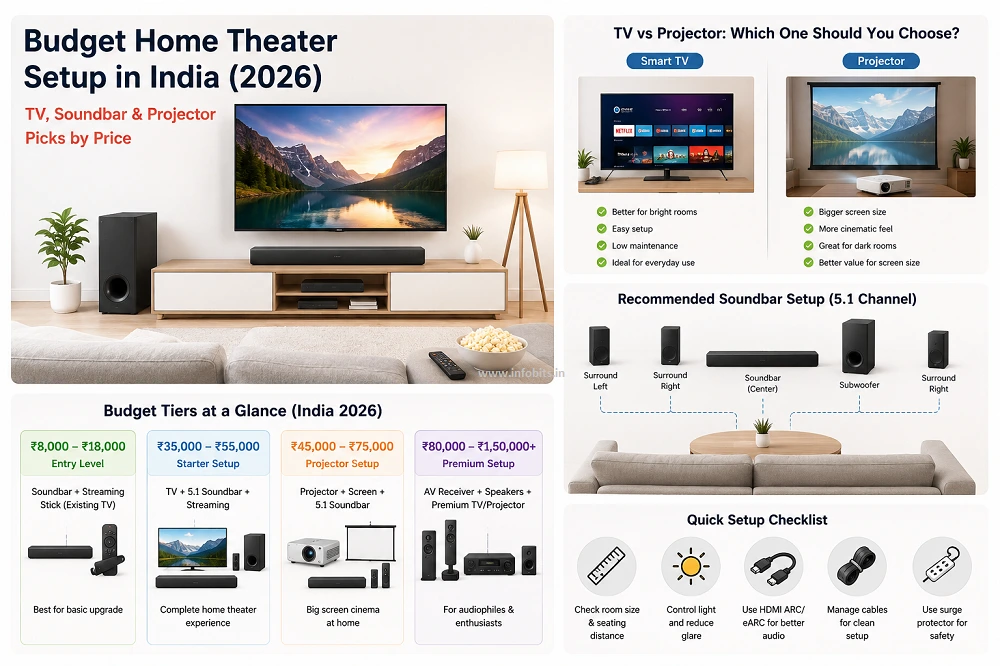
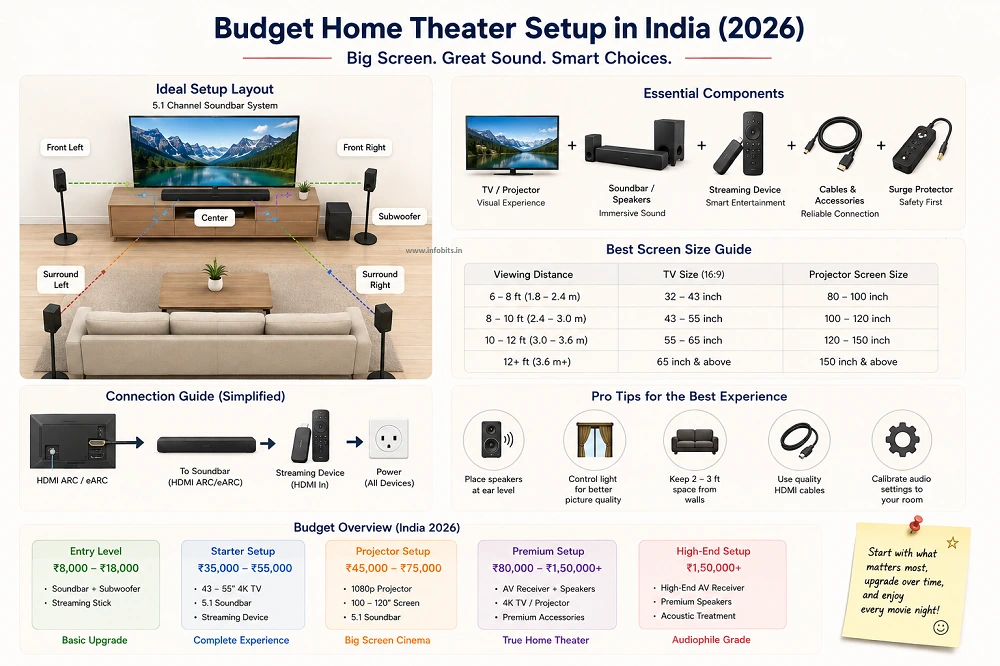
If you’re in a hurry, here’s the short version. A usable upgrade over your TV’s built-in speakers starts around ₹8,000–₹18,000 (soundbar + streaming stick, using your existing TV). A complete starter setup with a new TV, a real 5.1 soundbar, and proper streaming runs ₹35,000–₹55,000. A projector-based cinema room with a decent screen size lands at ₹45,000–₹75,000. Anything with an AV receiver and matched surround speakers moves into the ₹80,000–₹1,50,000 range. We’ll break down exactly what goes into each tier below.
Step 1: Pick the Right Space Before You Buy Anything
The single biggest home theatre mistake in Indian homes is buying gear before checking the room. A ₹15,000 soundbar in a bad room sounds worse than a ₹5,000 soundbar in a good one.
Room size and layout
Match your screen size to your seating distance, not the other way around. As a rough rule for Indian living rooms, a 43-inch TV works comfortably for viewing distances of 6–10 feet, while anything closer starts to strain the eyes and anything much farther makes the screen feel small.
If your room runs 150–300 sq. ft., the size of a typical Indian hall, this is your sweet spot. Smaller bedrooms and study rooms do better with 32–40-inch screens or a portable projector you can pack away.
Watch for door swings, window glare, and furniture that blocks the sound path between your speakers and the seating area. A theatre built around these obstructions from day one saves you from re-wiring later.
Acoustics and lighting
Bare walls and tile floors bounce sound around and make dialogue mushy. A rug, curtains, or even a fabric sofa placed correctly absorbs enough of that reflection to noticeably clean up the audio. You don’t need acoustic foam panels to get most of the benefit, though they help if your room is unusually echoey.
For the screen, room darkening matters more for projectors than TVs, but even a bright TV panel looks flat under direct sunlight. Blackout curtains (find on Amazon) or simply dimmable bulbs go a long way toward making evening movie nights feel cinematic.
Step 2: Choose Your Screen – TV or Projector?
This is the decision that shapes your entire budget, so it’s worth getting right first.
| Smart TV | Budget Projector | |
|---|---|---|
| Best for | Living rooms with daylight, multi-purpose spaces | Dark or semi-dark rooms, dedicated movie nights |
| Typical budget entry point | ₹18,000–₹28,000 (43-inch FHD/4K) | ₹15,000–₹20,000 (1080p native, up to ~120″) |
| Setup effort | Plug and play | Needs distance, a wall or screen, and some darkening |
| Daytime viewing | Excellent | Weak; most budget models wash out in daylight |
| Screen size for the money | Fixed, smaller for the price | Much larger for the same spend |
| Maintenance | Minimal | Lamp/LED life, dust on lens, occasional refocusing |
If your room gets daylight and doubles as a living space ( the reality for most Indian apartments), a TV is the safer, lower-hassle pick. If you have a room you can darken (a spare bedroom, a study, even a garage), a projector gets you a genuinely bigger screen for less money, which is where the “cinema” feeling actually comes from.
Budget TV options worth knowing
At the entry level, 43-inch Full HD smart TVs from budget-focused brands sit around ₹18,000–₹20,000, while mainstream brands with 4K resolution and better app support (Google TV or webOS rather than a no-name OS) run ₹27,000–₹33,000.
If your budget stretches slightly further, some 55-inch QLED models from newer entrants now undercut 43-inch models from legacy brands. It is worth comparing on a per-inch basis before you decide.
If you prefer Fire TV OS, the Xiaomi 43-inch FX Pro QLED Ultra HD 4K Smart Fire TV is a good option. If you prefer Google TV, consider the PHILIPS 43-inch 8100 Series 4K Ultra HD Smart QLED Google TV. Both models are available on Amazon.
A quick gut-check before buying any TV in this range: confirm it runs Google TV or webOS rather than an unbranded “smart” OS; app support and software updates dry up fast on the latter.
Related: Google TV vs Android TV: What’s the Real Difference?
Budget projector options worth knowing
Under ₹20,000, look for native 1080p resolution (not just “4K support,” which usually means downscaled input), auto-focus and auto-keystone correction so you’re not manually squaring the image every time, and at least basic smart TV functionality with pre-loaded OTT apps.
Several models in this range now claim projection sizes up to 120 inches and brightness figures in the thousands of lumens. Treat the brightness numbers with healthy scepticism, since budget projector marketing tends to overstate them; a well-lit room will still wash out the image regardless of the number on the box.
The E GATE Atom 4X+ Fully Automatic Projector 4K Ultra HD is a good budget option available on Amazon. It is worth considering if you want a 4K projector without spending too much.
Common mistake: buying a projector without checking that your wall or ceiling has a clean, flat, plain-colored surface within the right throw distance. A textured or colored wall will noticeably dull picture quality no matter how good the projector is; budget for a ₹3,000–₹6,000 pull-down or fixed-frame screen if you don’t have one.
Step 3: Choose Your Sound System
Sound is where most budget theatres actually earn the word “theatre”. A great screen with tinny built-in speakers still feels like watching TV, not a movie.
Related read: Dolby Atmos vs DTS X: Which Surround Sound Tech is Right for Your Home
Soundbar vs full 5.1 system
For a genuinely budget setup, a soundbar is almost always the right call. It installs in minutes, needs one HDMI or optical cable, and modern models have closed the sound-quality gap with basic surround setups considerably.
A true 5.1 system with an AV receiver and separate speakers does sound noticeably more immersive and lets you upgrade component-by-component later, but it needs real wiring, speaker placement planning, and a bigger day-one budget. Usually ₹1 lakh and up once you include a receiver and matched speakers.
Rule of thumb: if this is your first home theatre, start with a soundbar. You can add a receiver-based 5.1 system as a second phase once you know how much you actually use the space.
Related read: Soundbar vs Home Theatre: Which Is the Best Audio System?
What to look for in a budget soundbar
Not everything labelled “5.1” actually is. Some low-cost soundbars use software processing on a single bar to simulate surround sound rather than shipping physical rear speakers. Check the box contents, not just the label, if true surround matters to you.
HDMI with ARC or eARC support is worth prioritising over optical or Bluetooth-only connections, since it gives you one clean cable to the TV and lets your TV remote control the volume. You can refer to our detailed soundbar buying guide for more details.
In 2026, useful reference points across price bands:
- Under ₹5,000: Compact 2.0/2.1 bars from boAt and similar brands give a real step up over TV speakers. This is good for a bedroom or secondary screen, limited in power and bass.
- ₹9,000–₹12,000: This is the sweet spot for a genuine 5.1 experience with a wired subwoofer and real rear satellite speakers, HDMI eARC, and Dolby Audio support. The segment has improved a lot recently. Related read: Best Soundbars Under 10000 in India: Tested Picks
- Around ₹15,000: Look for a dedicated centre channel speaker, which noticeably improves dialogue clarity. It is usually the single biggest complaint with cheaper 2.0/2.1 setups.
- Up to ₹23,000–₹25,000: A few models add a genuine physical up-firing driver for real (not virtual) Dolby Atmos height effects. Related read: Best Soundbars in India: Tested Picks for Every Budget & Room Size
Step 4: Pick Your Media Source
Your screen and speakers are only as good as what’s feeding them content.
- Streaming stick or box: A Fire TV Stick, Google TV streamer, or Android TV box turns any HDMI port into a full smart TV experience with Netflix, Prime Video, JioHotstar, and YouTube. The easiest and cheapest upgrade in this whole guide.
- Built-in smart TV apps: If your TV already runs Google TV or webOS, you may not need a separate streaming device at all. Check before buying one.
- Physical media: A Blu-ray or DVD player still makes sense if you have a disc collection or want the highest possible picture and audio quality without depending on your internet speed.
Related read: Top 5 Streaming Devices to Turn Any TV into a Smart TV
Step 5: Set a Realistic Budget by Tier
Rather than a single number, plan your spend in the tier that matches your room and ambition.
| Tier | Total Budget | What You Get |
|---|---|---|
| Upgrade Only | ₹8,000–₹18,000 | Keep your existing TV. Add a soundbar (₹5,000–₹12,000), a streaming stick (₹2,000–₹4,000), and basic cable management. |
| Starter Home Theatre | ₹35,000–₹55,000 | New 43-inch smart TV, a genuine 5.1 soundbar with Dolby Audio, a streaming stick, and a voltage stabiliser. |
| Projector Cinema Room | ₹45,000–₹75,000 | Budget smart projector, a proper projector screen, a 5.1 soundbar, and blackout curtains. |
| Enhanced 5.1 Setup | ₹80,000–₹1,50,000 | Larger 4K TV or projector, an entry AV receiver, matched 5.1 speakers with subwoofer, acoustic panels, and upgraded seating. |
Identify your priorities first
Before you spend a rupee, decide what matters most to you, considering screen size, sound quality, or ambience. Because your first purchase should go toward whichever one you’ll notice missing every single day.
Most people underspend on sound and overspend on screen size; audio is usually the better place to prioritise your budget once you have any working screen at all.
Where to actually save money
Look for open-box or previous-generation models during sale events (Big Billion Days, Amazon sales), since last year’s flagship soundbar often beats this year’s budget model at the same price.
Read verified buyer reviews rather than relying on brand name alone, and don’t be afraid of solid budget-focused Indian brands. Several now compete directly with global names on spec sheets at a fraction of the price.
Where NOT to save money
Don’t cut corners on the subwoofer or the centre channel if you’re going the 5.1 route. A weak subwoofer makes the whole system feel underpowered, and a missing centre channel is the most common complaint about “cheap surround sound.”
Also budget for a voltage stabiliser like V-Guard Effino (available on Amazon) for your TV or projector. Power fluctuations are common enough across Indian cities that skipping this is a false economy.
Step 6: Installation and Setup
Positioning your screen and speakers
Centre the screen at eye level for a seated viewer, and check for glare from any window or bulb directly opposite it before you finalise wall placement.
For a 5.1 setup, keep front left and right speakers roughly equidistant from the main seating position, angle them slightly inward, and place the subwoofer where it doesn’t rattle a cupboard or thin wall. Corner placements often overload the bass in small rooms.
Related: Best Stereo Amplifiers in India: How to Choose the Right One
Managing cables
A tidy setup isn’t just cosmetic. Loose cables near a TV stand are a real tripping and pet-chewing hazard. Cable raceways, adhesive clips, and a simple cable sleeve (see on Amazon) keep everything contained for a few hundred rupees.
Test every connection before you consider the job done. A loose HDMI cable is still the most common reason for a “broken” soundbar or TV that turns out to be nothing but a bad connection.
Step 7: Improve Seating and Ambience
Comfortable seating changes how long people actually stick around for movie night. Indian furniture brands now offer theatre-style recliners with cup holders (get from Amazon)and USB charging starting around ₹25,000, though a good sectional sofa with cushions works just as well on a tighter budget.
Dark, matte-finish walls or curtains reduce light reflection and help the screen pop, and a simple LED strip behind the TV (bias lighting) reduces eye strain during long viewing sessions without washing out the picture.
Checklist: Before You Buy
- [1] Measured your room and seating distance
- [2] Decided TV vs projector based on daylight in the room
- [3] Confirmed HDMI ARC/eARC support on your TV and soundbar
- [4] Checked the soundbar actually ships with physical rear speakers if “5.1” matters to you
- [5] Budgeted for a voltage stabiliser
- [6] Checked wall color/texture if going the projector route
- [7] Planned cable routing before mounting anything
Common Mistakes to Avoid
- Buying a soundbar before checking your TV’s HDMI ports – older TVs may lack ARC/eARC, forcing you onto a lower-quality optical connection.
- Trusting projector lumens claims at face value – real-world brightness in a lit room is usually far lower than advertised.
- Skipping the stabiliser to save ₹2,000, then risking a ₹25,000 TV to a power surge.
- Over-indexing on screen size while ignoring sound – most people notice bad audio faster than they notice a slightly smaller screen.
- Mounting speakers symmetrically without checking the room – a bookshelf on one side and a bare wall on the other will make “balanced” speaker placement sound anything but balanced.
Myth vs Fact
Myth: You need Dolby Atmos for a “real” home theatre. Fact: Dolby Atmos adds height/overhead effects that are genuinely impressive, but a well-set-up 5.1 or even 2.1 system in a good room will outperform a poorly placed Atmos setup in a bad one.
Myth: A bigger soundbar wattage number always means louder, better sound. Fact: Wattage figures on budget soundbars are often inflated or measured under best-case conditions. Real channel count, subwoofer quality, and room fit matter more than the number on the box.
Myth: Projectors are always cheaper than TVs for the same screen size. Fact: True for very large screens, but once you add a proper screen, blackout curtains, and accept the daylight limitations, a projector setup often costs about the same as a TV of a size that suits your actual room.
Expert Tips
- Test soundbar dialogue clarity with a talk show or news clip, not a trailer. Action scenes hide weak vocal reproduction.
- If budget allows only one upgrade this year, choose sound over screen; the human ear is far more sensitive to poor audio than the eye is to a slightly smaller screen.
- Keep your projector’s throw distance and screen size compatibility in mind. Most budget models have a fixed usable range, and going outside it hurts focus and brightness both.
- Re-check speaker placement after furniture changes. A new sofa or bookshelf can change your room’s acoustics more than you’d expect.
Troubleshooting Common Issues
No sound from the soundbar despite a connected HDMI cable: Check that HDMI-CEC/ARC is enabled in your TV’s settings menu. It’s disabled by default on several TV brands.
Picture looks washed out on a projector: This is almost always ambient light, not the projector’s fault. Add blackout curtains before assuming the hardware is defective.
Soundbar Bluetooth keeps disconnecting: Older Bluetooth versions (5.0 and below) are more prone to drops. A wired HDMI/optical connection avoids the issue entirely for TV audio.
Rear surround speakers sound weaker than the front: Check the subwoofer/speaker distance settings in the soundbar’s setup menu. Most systems let you manually balance channel levels, and this is skipped during a rushed first setup.
The Bottom Line
A budget home theatre setup in India can start from around ₹8,000 if you already have a TV. Adding a good soundbar and streaming device can give you a noticeable improvement without replacing your existing setup. For a complete home theatre with a new TV, 5.1 soundbar, and accessories, a budget of around ₹35,000–₹55,000 is a practical starting point.
Choosing between a TV and projector depends mainly on your room. A TV is better for Indian living rooms with daylight and regular family use. A projector is a better choice if you can control the light and want a much larger screen for movie nights.
For most buyers, a 5.1 soundbar with a subwoofer offers the best balance of price, surround sound, and easy installation. Look for HDMI ARC or eARC and check whether the soundbar includes physical rear speakers if you want genuine 5.1 surround sound.
You don’t have to buy everything at once. Start with the component that needs the biggest upgrade and improve the setup over time. Whether your budget is ₹15,000, ₹50,000, or ₹1 lakh+, room size, sound quality, screen choice, and proper installation matter more than simply buying expensive equipment.
With the right planning, even a budget home theatre can deliver a much better movie, sports, and OTT viewing experience.
Frequently Asked Questions
You can meaningfully upgrade your existing TV’s sound with a soundbar and streaming stick for roughly ₹8,000–₹12,000. A complete new setup with a TV included realistically starts around ₹35,000.
A soundbar is the better starting point for most first-time buyers. It is easier to install, cheaper, and good enough that most people don’t notice the difference in daily use. A full 5.1 receiver-based system is a worthwhile second step once your budget and confidence grow.
Choose a TV if your room gets daylight or serves multiple purposes. Choose a projector only if you have a room you can reliably darken. Otherwise, the picture quality will disappoint you regardless of the projector’s specs.
No. A soundbar handles everything a receiver would in a budget setup, without the extra wiring and cost. Consider a receiver only when you’re ready to invest in a true, expandable 5.1 or 7.1 system.
For most rooms with 6–10 feet of viewing distance, a 43-inch screen is the standard sweet spot. Larger rooms benefit from 50–55 inches; smaller bedrooms do better with 32–40 inches.
Budget ₹9,000–₹15,000 for a genuine 5.1 experience with a wired subwoofer and real rear speakers. Going below ₹5,000 is fine for a bedroom upgrade but won’t deliver true surround sound.
Generally no. Most budget projectors under ₹20,000 wash out significantly in daylight. Plan on using them in the evening or in a room you can darken.
Dolby Atmos adds height-channel, overhead sound effects for a more three-dimensional audio experience. It’s a nice-to-have, not a must-have, for a first budget setup. Prioritise a solid 5.1 or 2.1 system first.
Any current-generation Fire TV Stick, Google TV streamer, or similar Android TV device works well for Indian OTT apps. If your TV already runs Google TV or webOS natively, you likely don’t need a separate device.
Yes, especially outside major metros where voltage fluctuations are more common. A ₹1,000–₹3,000 stabiliser is cheap insurance for a TV or projector costing many times that.
A rug, curtains, and a fabric sofa absorb far more unwanted echo than most people expect, often at zero extra cost if you already own them. Acoustic foam panels help further but aren’t essential for a budget setup.
Dolby Digital is the baseline surround format found on most content. Dolby Audio is a step up used on many budget-to-mid soundbars for cleaner separation. Dolby Atmos adds overhead height effects and needs both the right content and up-firing or ceiling speakers to actually deliver on it.
Yes. Bedrooms are actually easier to darken than living rooms, making them a good candidate for a projector-based setup, provided you have enough wall or ceiling space for the projected image.
A 5.1 system works best in rooms of at least 150 sq. ft., so the rear speakers have enough distance from the seating area to create a real surround effect rather than an overwhelming one.
Wireless refers only to the subwoofer connection in most soundbars. The main bar still connects to your TV via HDMI or optical for the best quality. Bluetooth-only audio connections introduce a small delay that can cause lip-sync issues, so prefer HDMI ARC/eARC where available.
Spending almost the entire budget on the screen and leaving next to nothing for sound. A large TV with weak audio still feels like watching regular television, not a movie.
Buying separately almost always gives better value and lets you upgrade one component without replacing the other. All-in-one combos are convenient but rarely competitive on a per-component basis.
Use cable raceways along the wall or TV stand, cable ties for loose runs, and route power cables separately from HDMI/audio cables to avoid interference. Plan the routing before mounting your TV, not after.
In almost all cases, yes. Any TV with an HDMI ARC/eARC port, optical output, or even just a 3.5mm audio jack can connect to a modern soundbar. Check your TV’s rear panel before buying to confirm which connection type you’ll use.
It can make sense for big-ticket items like a 4K TV or an AV receiver if the EMI is genuinely no-cost, but for smaller purchases like a soundbar or streaming stick, financing charges usually outweigh the convenience.
We hope you are interested in our articles and consider following our Facebook, Instagram, and Twitter pages for regular updates.
Subscribe to our free newsletter to get similar articles and regular updates directly in your Email Inbox.
Also, share this article with your friends and relatives. Bookmark this page for future reference.
Subscribe to be the first to learn about new information
Disclosure: If you follow our links to a retailer’s website and make a purchase, we will get an affiliate commission on some, but not all, of the items or services we promote. This will cause no price change for you.