Optical vs HDMI ARC for Soundbars: Which Is Better for Your TV?
You have unboxed the soundbar. Now two ports are staring back at you: Optical and HDMI ARC. Which cable should you use?
Quick answer: Use HDMI ARC if both your TV and soundbar support it. Use optical if either one does not. For normal TV and stereo sound, you will hear almost no difference. HDMI ARC supports more audio formats and offers more convenience.
This guide explains the difference in plain words. You will also see what works best in Indian homes, with DTH set-top boxes, Fire TV sticks and budget smart TVs. If something goes wrong after setup, the troubleshooting section will help.
HDMI ARC or Optical?
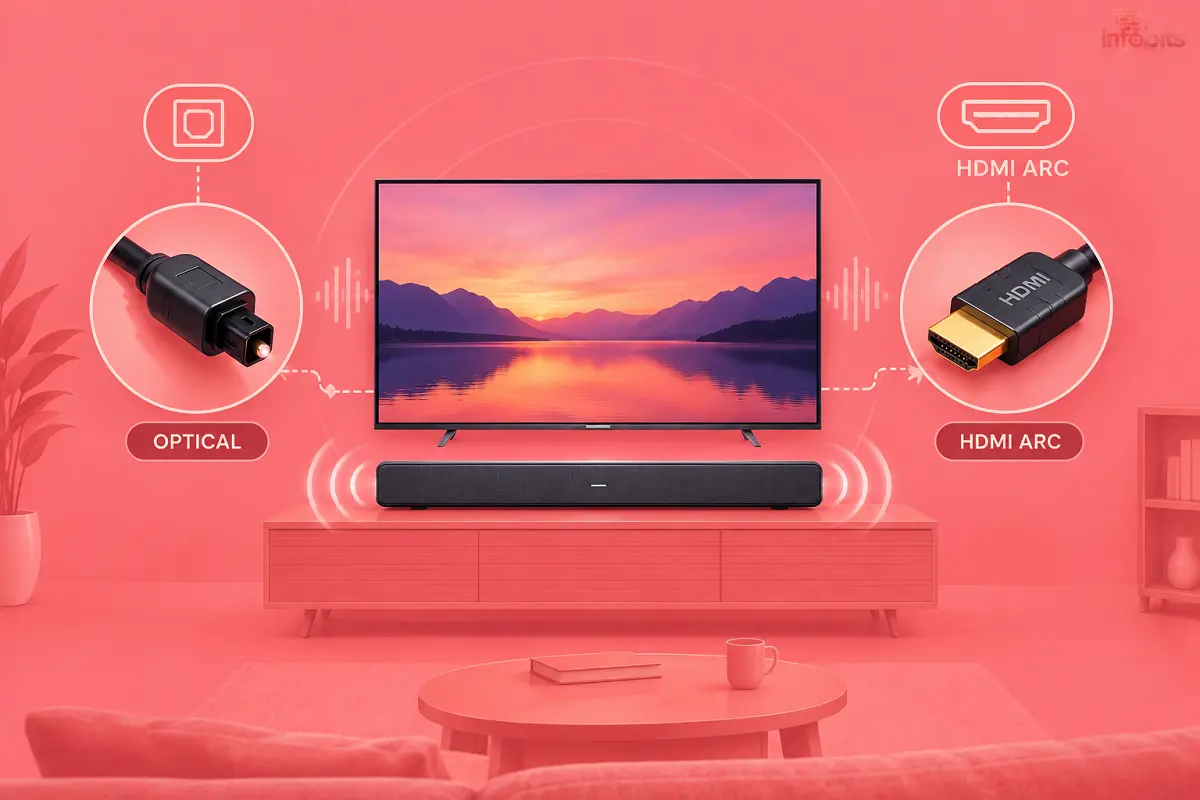
HDMI ARC is better for most people. It carries more audio formats, lets your TV remote control the soundbar volume, and can switch the soundbar on and off with the TV. Optical is the dependable fallback for older TVs or soundbars without ARC.
- Choose HDMI ARC if your TV has a port marked ARC or eARC, and your soundbar has an HDMI OUT (ARC) port.
- Choose optical if either device lacks ARC, or if ARC keeps cutting out.
- Choose eARC only if you own lossless sources, such as a 4K Blu-ray player, and both devices support it.
What Is HDMI ARC?
ARC stands for Audio Return Channel. It lets sound travel from your TV back to the soundbar through the same HDMI cable. That means one cable between the two devices.
Only one HDMI port on your TV supports it. Look for the label ARC or eARC beside the port. ARC arrived with HDMI 1.4 and works with about 1 Mbps of audio bandwidth.
What Is Optical (TOSLINK) Audio?
Optical audio, also called TOSLINK or Digital Audio Out, sends sound as pulses of light through a thin fibre cable. It carries audio only. There is no video and no control signal.
The port is a small square socket, often with a flap or cap. It has been around for decades. That is why even old TVs and cheap soundbars have it.
What Is eARC?
eARC is the upgraded version of ARC and comes with HDMI 2.1. It offers roughly 37 Mbps, enough for lossless formats like Dolby TrueHD and DTS-HD Master Audio. Both your TV and soundbar must support it.
If only one of them does, the connection quietly falls back to normal ARC. For most Indian households that stream and watch DTH, regular ARC is enough.
Related: HDMI ARC vs eARC: Which Do You Need for a Soundbar?
Optical vs HDMI ARC: Side-by-Side Comparison
| Feature | Optical (TOSLINK) | HDMI ARC |
|---|---|---|
| What it carries | Audio only | Audio from TV to soundbar over HDMI |
| Stereo (PCM) | Yes | Yes |
| Dolby Digital 5.1 | Yes | Yes |
| DTS 5.1 | Depends on TV and soundbar | Depends on TV and soundbar |
| Dolby Digital Plus (used for streaming Atmos) | No | Usually yes, if TV and soundbar support it |
| Lossless (Dolby TrueHD, DTS-HD) | No | No (needs eARC) |
| TV remote controls soundbar volume | Not by itself | Yes, through HDMI-CEC |
| Soundbar powers on and off with TV | Rarely | Usually |
| Works with older TVs | Yes | Only if the TV has an ARC port |
| Uses an HDMI port on the TV | No | Yes, the ARC port |
| Electrical link between devices | None; it is light only | Yes, it is a copper connection |
| Cable handling | Fragile, avoid sharp bends | Sturdy |
Does HDMI ARC Sound Better Than Optical?
Not always. Both send digital audio, so the cable itself adds no hiss or noise. If you play plain stereo or Dolby Digital 5.1, they sound the same.
The gap appears with newer formats. Streaming apps like Netflix and Disney+ deliver Dolby Atmos inside a Dolby Digital Plus stream. Optical cannot carry that, so you fall back to ordinary 5.1 or stereo. HDMI ARC can usually pass it through, if your TV app and soundbar both support it.
So the real question is not which cable has better quality. It is which formats you want to hear.
Dolby Atmos: What Works Over Each Connection
| Connection | Dolby Atmos support |
|---|---|
| Optical | No |
| HDMI ARC | Yes, in compressed form (Dolby Digital Plus), when TV and soundbar support it |
| HDMI eARC | Yes, including lossless Dolby TrueHD Atmos |
Most OTT Atmos is the compressed type, so ARC handles it fine. Lossless Atmos mainly comes from 4K Blu-ray discs and some premium sources. Unless you own those, eARC will not change much for you.
You should note that some TVs skip certain formats, especially DTS. Check your TV and soundbar spec sheets before assuming everything passes through.
Related: Dolby Atmos vs DTS:X in India: Which Surround Format Actually Matters for You
Features Only HDMI ARC Gives You
- One remote for volume. Your TV remote can change the soundbar volume and mute it.
- Automatic power. The soundbar can wake up when you switch the TV on.
- One cable. Less clutter behind the TV.
- More formats. Dolby Digital Plus support is the big one.
These features run on HDMI-CEC, and every brand names it differently. Samsung calls it Anynet+, LG calls it SimpLink, Sony calls it BRAVIA Sync, Philips calls it EasyLink, and Sharp calls it Aquos Link. If it is off, ARC will misbehave.
When Optical Is the Better Choice
- Your TV or soundbar has no ARC. Optical is then your best wired option. Bluetooth usually adds more delay.
- ARC keeps failing. ARC depends on a digital handshake between devices. Optical has no handshake, so it simply works.
- You want to save a TV HDMI input. On a TV with only two or three HDMI ports, the ARC port is precious.
- You live in a lightning-prone area. Optical uses light, so there is no electrical path between the two devices.
Indian Setups: What to Do in Real Homes
TV with a DTH set-top box
Most people connect the Tata Play or Airtel box to the TV by HDMI. The TV then sends sound to the soundbar through ARC or optical. That works well for everyday viewing.
Some set-top boxes also have a digital audio output. That lets you feed the soundbar directly. Check the back of your box before buying extra cables.
Related: IPTV vs DTH in India: Which One Should You Buy in 2026?
Fire TV Stick or Chromecast
These sticks plug into the TV. Their sound reaches the soundbar only if the TV passes it on through ARC or optical. So the stick on its own cannot talk to a soundbar.
If you use a stick, confirm the TV’s ARC port is working. Also check the stick’s audio output setting.
Budget smart TVs
Many affordable TVs have just one ARC port. Some budget models skip the optical output altogether. Always read the port list before you buy a soundbar.
Power cuts and lightning
HDMI links two powered devices electrically. HDMI ports are a common casualty of surges and lightning. Optical cannot carry a surge between devices, though it does not replace proper earthing.
A surge-protected power strip for the TV, set-top box and soundbar is a sensible add-on.
How to Connect a Soundbar With HDMI ARC
- Find the ARC or eARC port on your TV. It is usually labelled next to the port.
- Find HDMI OUT (ARC) or HDMI TO TV on your soundbar.
- Connect the two with one HDMI cable.
- Turn both devices on.
- Switch on HDMI-CEC in the TV settings (Anynet+, SimpLink, BRAVIA Sync and so on).
- Set the TV sound output to Audio System, HDMI ARC or your soundbar’s name.
- Set the soundbar input to ARC or TV.
- Set Digital Audio Out to Auto or Bitstream. If you get silence, try PCM as a test.
- Play a show with surround sound and check that the soundbar responds.
A regular High Speed HDMI cable is fine for ARC. For eARC, choose a certified Premium High Speed or Ultra High Speed cable like the UGREEN HDMI 2.1 Cable available on Amazon. It costs little and avoids random dropouts.
How to Connect a Soundbar With Optical
- Find Optical Out or Digital Audio Out on your TV.
- Find Optical In on your soundbar.
- Remove the protective caps from both ends of the cable.
- Push each end in straight until it clicks. It should sit snugly.
- On the TV, set the sound output to Optical or Digital Audio Out. Turn the TV speakers off.
- Set Digital Audio Out to Auto. If sound is missing, try Dolby Digital or PCM.
- Select the OPTICAL input on the soundbar.
- Use the soundbar remote for volume.
Handle the cable gently. Sharp bends can damage it and cause dropouts. If your TV is wall-mounted, a braided cable with right-angle connectors like the BlueRigger Premium Digital Optical Audio Toslink Cable available on Amazon survives tight spaces better.
Which One Should You Choose? A Quick Decision Guide
| Your situation | Best choice | Why |
|---|---|---|
| TV and soundbar both have ARC | HDMI ARC | One cable, remote control, more formats |
| Older TV with no ARC port | Optical | The only good wired option |
| Soundbar has optical but no ARC | Optical | Simple and reliable |
| You want Atmos from Netflix or Disney+ | HDMI ARC | Optical cannot carry it |
| ARC cuts out or behaves oddly | Optical | No handshake to fail |
| You own a 4K Blu-ray player with lossless audio | HDMI eARC | Lossless needs the extra bandwidth |
| Fire TV Stick or Chromecast setup | HDMI ARC | Easiest path from TV to soundbar |
| Surge-prone area | Optical, plus surge protection | No electrical link between devices |
Common Mistakes to Avoid
- Plugging the soundbar into a normal HDMI port instead of the ARC port.
- Leaving HDMI-CEC switched off.
- Forgetting to turn off the TV speakers.
- Leaving the dust cap on the optical cable.
- Bending the optical cable sharply behind the TV.
- Choosing Bitstream when your soundbar cannot decode that format.
- Expecting Atmos over optical. It will not happen.
- Plugging in both cables and wondering which one is playing.
Myth vs Fact
| Myth | Fact |
|---|---|
| Optical sounds worse because it is older. | For stereo and 5.1, the two sound the same. Formats are the difference. |
| Any HDMI port will work for a soundbar. | Only the port marked ARC or eARC works. |
| ARC gives you full Dolby Atmos. | ARC carries compressed Atmos. Lossless needs eARC. |
| Expensive cables improve sound. | It is digital. For ARC, a decent cable is enough. For eARC, use a certified one. |
| Optical lets my TV remote change volume. | Optical carries sound only. It does not carry control signals. |
| Connecting both cables gives better sound. | The soundbar plays one input at a time. |
Troubleshooting: Fix Common Soundbar Problems
No sound over HDMI ARC. Check that the cable is in the ARC port and that HDMI-CEC is on. Make sure the TV output is set to the soundbar, not TV speakers. Then set Digital Audio Out to PCM as a test.
Only stereo, no surround. Digital Audio Out may be set to PCM, or the app may not send multichannel sound. Switch to Auto or Bitstream and confirm the source offers 5.1.
Atmos not working. Optical cannot carry it. On ARC, the TV must pass Dolby Digital Plus, and the app must offer Atmos. Check the soundbar’s format indicator.
Lip-sync is off. The TV’s video processing is usually the cause. Open the TV’s audio delay setting and adjust it in small steps. On Samsung, it sits under Sound, Expert Settings. On LG, look for AV Sync Adjustment. On Sony, look under Audio Output, A/V Sync. The path varies by model.
TV remote will not change the soundbar volume. CEC may be off, or you may be using optical. Optical cannot pass control signals. Use the soundbar remote or a universal remote.
Random cutouts. Reseat the cable, try another HDMI cable, and update the firmware on the TV and soundbar. If it still drops, switch to optical. If optical works perfectly, the problem is in your ARC or CEC setup.
No sound over optical. Check the cap is off and the plug is fully seated. Confirm the TV output is set to Optical and the soundbar is on its OPTICAL input. Try Dolby Digital or PCM if Auto fails.
Expert Tips
- Test with optical first when ARC misbehaves. It isolates the problem fast.
- Start with Auto. Change the audio format only if something breaks.
- Keep a spare optical cable. It is a cheap backup when HDMI acts up.
- Update firmware. Many sync and handshake bugs are fixed this way.
- Do not chase eARC for streaming. ARC already covers what OTT apps send.
- Use optical for amplifiers and DACs too. Many have an optical input.
Related: Best Stereo Amplifiers in India: How to Choose the Right One
Checklist Before You Buy a Soundbar
- Does my TV have an ARC or eARC port?
- Does my TV have an optical output?
- Does the soundbar have HDMI OUT (ARC) and optical in?
- Do I want Dolby Atmos from streaming apps?
- Is my HDMI cable long enough and in good condition?
- Do I have a spare HDMI port if the ARC port is used?
Not sure what else to look for? You may please go through our soundbar buying guide and curated list of the best soundbars in India. Building a full setup? It is better to read our budget home theatre setup guide.
Frequently Asked Questions
Yes, in most cases. It supports more audio formats, lets your TV remote control the soundbar, and needs only one cable. Optical is better only when your TV or soundbar lacks ARC, or ARC is unreliable.
For stereo and Dolby Digital 5.1, no. Both are digital, so the cable adds no noise. The difference shows up with formats like Dolby Digital Plus and Atmos, which optical cannot carry.
No. Optical handles stereo and compressed formats like Dolby Digital 5.1. Atmos from streaming apps needs HDMI ARC or eARC.
Yes, in compressed form. Streaming apps send Atmos inside Dolby Digital Plus, which ARC can usually pass if your TV and soundbar support it. Lossless Atmos needs eARC.
eARC is the newer version with far more bandwidth, about 37 Mbps against about 1 Mbps. It carries lossless formats like Dolby TrueHD and DTS-HD Master Audio. Both devices must support it, or it falls back to ARC.
You can plug both in, but the soundbar plays one input at a time. Pick the one you want using the soundbar remote. Optical is a handy backup if ARC fails.
A regular High Speed HDMI cable works for ARC. For eARC, use a certified Premium High Speed or Ultra High Speed cable. Always plug it into the TV’s ARC or eARC port.
Use the optical output if your TV has one. If it has neither, you may have to use the headphone or AUX output or Bluetooth. Bluetooth often adds a noticeable delay.
Yes, through HDMI ARC if both devices support it. Check the TV’s spec sheet, since some budget models skip the optical port.
The usual causes are the wrong HDMI port, HDMI-CEC switched off, or the TV still set to its own speakers. Fix those, then try PCM as the digital audio format.
The TV adds video processing delay. Use the audio delay setting in the TV sound menu, turn off extra sound effects, and try PCM output.
Not directly, because optical carries sound only. Some TVs and soundbars can learn infrared commands or use Bluetooth. Otherwise, use the soundbar remote.
Only a little. The signal is digital, so a basic cable works if it is undamaged. Kinks, sharp bends and loose plugs cause dropouts.
Yes. Connect the box to the TV by HDMI, then connect the TV to the soundbar by ARC or optical. Some boxes also have a digital audio output, so check yours.
Yes. The stick plugs into the TV, and the TV passes sound to the soundbar through ARC or optical. Check the stick’s audio output setting too.
Usually not. It matters only if the soundbar supports lossless formats and you own a source like a 4K Blu-ray player. For streaming and DTH, ARC is enough.
Final Verdict: HDMI ARC First, Optical as Backup
Here is the rule I would follow. If both devices have ARC, use HDMI ARC and switch CEC on. If either lacks it, use optical and be happy. You are not losing sound quality for normal TV.
Keep an optical cable in the drawer as a backup. It will save you the day when ARC acts up. And if you are still choosing a soundbar, start with the ports on your TV.
We hope you are interested in our articles and consider following our Facebook, Instagram, and Twitter pages for regular updates.
Also, share this article with your friends and relatives. Bookmark this page for future reference.
Subscribe to our free newsletter to get similar articles and regular updates directly in your Email Inbox.
Subscribe to be the first to learn about new information
Disclosure: If you follow our links to a retailer’s website and make a purchase, we will get an affiliate commission on some, but not all, of the items or services we promote. This will cause no price change for you.
You May Be Interested to Read:
- Sony SA-D40M2 Review (2026): Read This Before You Connect It to a TV
- 7 Best Soundbars Under 10000 in India [2026]: Tested Picks
- Core Ultra vs Ryzen AI vs Snapdragon X2 Elite: Which Processor Should You Choose?
- WebOS vs Fire TV (2026): Which Smart TV Platform Is Right for You?
- Google TV vs Android TV: What’s the Real Difference?