Zebronics Zeb-PixaPlay 18 Review 2026: Can It Really Replace a Smart TV?
A large-screen TV is expensive, and a projector promising the same 200-inch experience for a fraction of the price is a genuinely appealing pitch.
The Zebronics Zeb-PixaPlay 18 is one of the more popular budget Android projectors, making that case in India. But does it actually hold up against a smart TV for daily use, or is that a marketing question with an uncomfortable answer?
Here’s an honest look at what this projector actually offers, including one practical limitation most reviews of budget Android projectors skip entirely.
Quick Answer:
The Zeb-PixaPlay 18 is a genuinely good value pick for occasional big-screen movie nights in a dark or dim room, but it’s not a real smart TV replacement for daily use. Its built-in Android 9 apps very likely can’t stream Netflix or Prime Video in HD (more on why below), so you should budget for a Fire TV Stick or Chromecast alongside it. If you want a screen size that no TV in this budget can match and mostly watch in low light, it’s a strong pick. If you want bright-room daily viewing with reliable native streaming, a smart TV, or this projector paired with a proper streaming stick, will serve you better.
Key Specifications
| Spec | Detail |
|---|---|
| Native Resolution | 1920×1080 (Full HD) |
| Max Supported Resolution | 1080p |
| Brightness | Manufacturer-listed as 3800–8200 lumens (LED lumens; see details below ) |
| Screen Size | Up to 508 cm (200 inches) |
| Processor | Quad-core |
| RAM / Storage | 1 GB RAM / 8 GB internal storage |
| Operating System | Android 9 (AOSP-based, not Google TV/Android TV certified) |
| Connectivity | Dual-band Wi-Fi (2.4GHz & 5GHz), Bluetooth 5.1, twin HDMI, USB, 3.5mm AUX |
| Audio | Built-in speakers with Dolby Audio support |
| Lamp Life | Rated up to 30,000 hours |
| Focus | Electronic focus (E-focus) via remote |
| Price (2026) | Roughly ₹22,000–₹39,000 depending on retailer and ongoing offers |
The Brightness Number Is More Confusing Than It Looks
Zebronics’ own marketing lists this projector’s brightness anywhere from 3800 to 8200 lumens, depending on where you check, and that inconsistency is itself worth understanding rather than dismissing.
Budget Indian projector brands commonly quote “LED lumens,” a marketing-friendly figure that doesn’t measure brightness the same rigorous way as ANSI lumens (the standard used for projectors reviewed internationally, and implicitly for TVs’ brightness in nits) does.
Many budget projectors are advertised with brightness figures in LED lumens. However, these numbers can be misleading. In a bright room, their actual performance is often closer to what a projector with only a few hundred ANSI lumens would deliver.
This is not a problem limited to Zebronics. Many budget Android projectors sold in India use similar brightness claims. In comparison, smart TVs measure brightness in nits, which is a standard and more reliable unit. They also perform much better in bright rooms or during the daytime.
Practical takeaway: plan to watch in a dim or dark room, with curtains drawn, for this projector to look its best. If your main viewing room gets significant daylight and you can’t control that, a smart TV will look noticeably better at the same time of day.
The Streaming Problem Most Reviews Don’t Mention
This is the single most important practical detail missing from most coverage of budget Android projectors, and it directly bears on the question this article is asking.
The Zeb-PixaPlay 18 runs Android 9 without confirmed Google TV or Android TV certification, which almost always means it lacks Widevine L1 DRM certification. This hardware-level content protection Netflix, Prime Video, and Disney+ require before they’ll stream in HD.
Devices without this certification (commonly stuck at Widevine L3) either can’t run these apps’ official versions at all, or cap playback at a blurry 480p regardless of the projector’s actual 1080p capability.
In practice, this means: don’t assume you’ll open Netflix natively on this projector and get a crisp Full HD picture. Many budget Android projectors in this category simply don’t support it properly out of the box.
The straightforward fix: connect a certified streaming device like a Fire TV Stick 4K, Chromecast with Google TV, or similar, to one of the projector’s two HDMI ports.
This bypasses the built-in Android apps entirely and gives you the same certified, HD-capable streaming experience a smart TV provides, at an added cost of roughly ₹3,000–₹6,000 depending on the stick you choose.
Once factored in, this closes most of the practical gap with a smart TV. But it’s an extra step and an extra cost that the marketing doesn’t mention.
Build, Design, and Audio
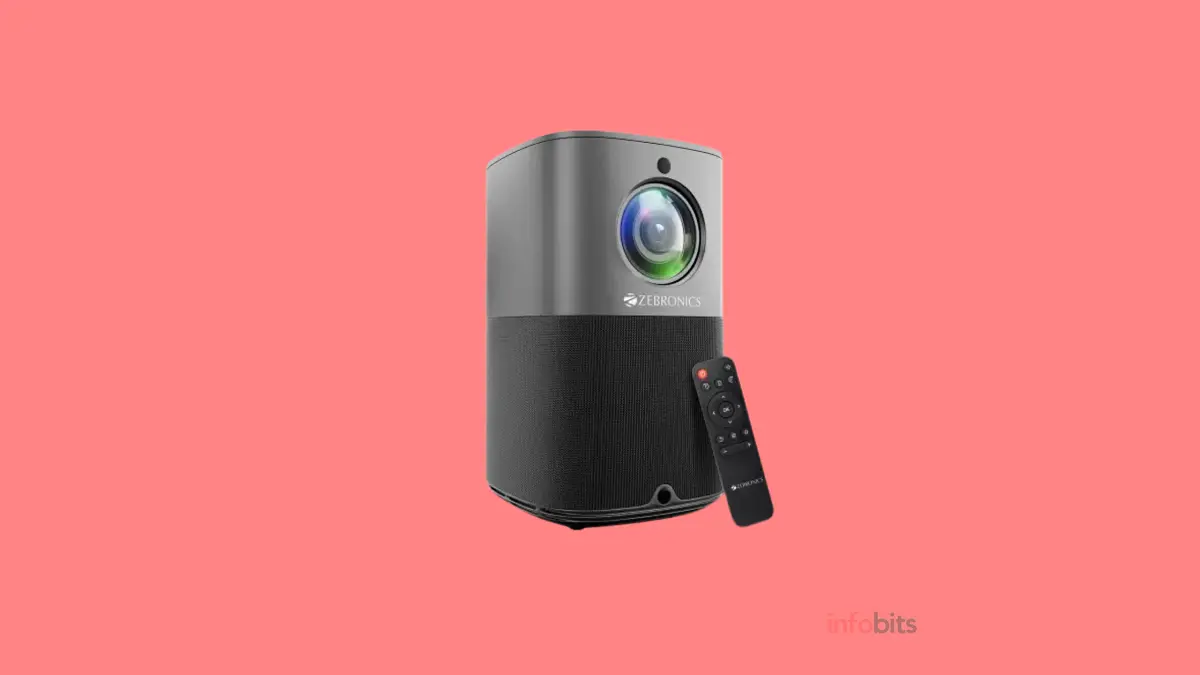
The vertical mounting design is a genuine point of difference from typical box-shaped projectors, and it’s a reasonably compact, living-room-friendly form factor that doesn’t look out of place sitting on a console or shelf.
Twin built-in speakers with Dolby Audio support handle casual viewing reasonably well, and the 3.5mm AUX output means upgrading to a proper soundbar later is simple if you want more from the audio side.
Electronic focus via remote is a genuinely convenient touch. You don’t need to physically walk up to the unit to sharpen the image, which is a common annoyance on cheaper manual-focus projectors.
Connectivity
Dual-band Wi-Fi (2.4GHz and 5GHz) and Bluetooth 5.1 cover the basics well, including wireless keyboard/mouse pairing and Bluetooth audio output if you’d rather skip the built-in speakers entirely.
Twin HDMI ports are genuinely useful in practice, one for a streaming stick (recommended above), and a second free for a set-top box, gaming console, or laptop, without needing to swap cables.
Pros and Cons
Pros:
- Screen size up to 200 inches, no TV in a comparable budget gets close to this
- Electronic focus via remote is a genuine convenience upgrade over manual-focus budget projectors
- Dual-band Wi-Fi and Bluetooth 5.1 cover modern connectivity needs
- Twin HDMI ports allow a streaming stick and another device to be used simultaneously
- Dolby Audio and AUX output for straightforward sound upgrades
- Long rated lamp life (30,000 hours)
Cons:
- Built-in Android 9 apps likely can’t stream Netflix/Prime in HD without a separate certified streaming stick
- Brightness figures are marketing-friendly LED lumens, not directly comparable to a TV’s nits rating
- Needs a dim or dark room to look its best; daytime or bright-room viewing is a real limitation
- 1GB RAM and Android 9 make the built-in smart interface feel dated compared to a modern smart TV’s OS
- Image quality, black levels, and colour accuracy still trail even a mid-range smart TV panel of a similar price
So, Can It Actually Challenge a Smart TV?
For the specific thing it’s genuinely best at, an occasional, big-screen, movie-night experience in a room you can darken. Yes, and at a price no equivalent-sized TV gets close to.
For everyday, all-conditions, plug-and-play viewing with reliable native streaming, no, not without pairing it with a proper streaming stick, and even then, a smart TV panel will still generally outperform it on colour accuracy, black levels, and bright-room visibility.
The honest framing: this is a genuinely capable big-screen supplement to your existing setup, or a budget-conscious primary display for a dedicated, darkened media room; not a like-for-like smart TV replacement for a normal living room used throughout the day.
Who Should Buy This Projector
Buy it if: you want an occasional cinema-style big-screen experience, have a room you can reasonably darken, and are comfortable adding a ₹3,000–₹6,000 streaming stick to get reliable HD Netflix/Prime playback.
Skip it if: your main viewing room has significant daylight you can’t control, you want native app streaming without an extra device, or colour accuracy and black levels matter more to you than screen size.
Conclusion
The Zeb-PixaPlay 18 delivers real value for what it’s actually good at: an oversized, movie-theatre-style picture at a price no smart TV can match.
Its weak spot isn’t the hardware. It’s the built-in Android 9 smart platform, which almost certainly can’t give you proper HD Netflix or Prime Video without pairing it with a separate streaming stick.
Budget that extra step and cost in from the start, keep your expectations realistic about bright-room performance, and this projector is a genuinely solid pick for the specific job of turning a darkened room into a home theatre. Just don’t expect it to replace a smart TV outright.
Frequently Asked Questions
Likely not in HD through its built-in apps, since it isn’t confirmed to carry Widevine L1 certification. Connecting a certified streaming device like a Fire TV Stick or Chromecast with Google TV through its HDMI port is a reliable way to get proper HD streaming.
Not directly. The advertised lumens figure is typically “LED lumens,” a less standardised measurement than the ANSI lumens or nits ratings used for more rigorous brightness comparisons. Expect real-world brightness to feel dimmer than the number suggests, especially in a lit room.
Not strictly required, but strongly recommended. Image quality and visible detail drop noticeably in a bright room, so a space you can dim or darken with curtains will give you the best experience.
It’s enough for basic navigation and casual app use, but don’t expect the snappy performance of a modern smart TV’s more powerful processor. especially if you plan to rely on the built-in Android interface rather than an external streaming stick.
It’s rated for up to 30,000 hours of use, which, at a few hours of daily viewing, translates to many years before a replacement bulb becomes a consideration.
If screen size and occasional big-screen movie nights in a darkened room are your priority, and you’re comfortable adding a streaming stick, this is a genuinely good value option. If you want an all-conditions daily display with reliable native streaming and better picture quality, a smart TV remains the more dependable choice at a similar price point.
If you feel this information is useful, don’t forget to share this article with your family and friends.
Also, follow us on Facebook, Instagram, and Twitter for regular updates, or via WhatsApp.
Also, subscribe to our free newsletter so that you will get regular updates, informational ebooks, and the latest deals& offers directly in your Email.
Subscribe to be the first to learn about new information
Disclosure: If you follow our links to a retailer’s website and make a purchase, we will get an affiliate commission on some, but not all, of the items or services we promote.
You May Be Interested to Read:
- Best 32-Inch Smart TV in India: What Should You Look for in a Good Smart TV?
- 11 Best Soundbars in India
- Best Amplifier for Home in India | How to Choose a Good Stereo Amplifier?
- Obage HT 144 Review: Is This 2.1 Home Theatre Speaker System a Good Buy?
- Important Considerations When Buying A Soundbar for TV