Should You Buy a Laptop Now in the Diwali Sale 2026? The Memory Price Problem Explained
Laptop sales look the same as every year. The banners are the same, and the “up to 40% off” tags are back. But the prices underneath aren’t the same.
In 2026, the cost of memory chips, meaning the RAM and SSD inside every laptop, has jumped sharply. That changes what a “good deal” means. Here’s what’s going on, what it means for your wallet, and how to decide.
Quick answer: Buy in the Diwali sale if you need a laptop in the next few months, the price is genuinely low for the spec, and you get at least 16GB RAM. Don’t buy just because it’s on sale. Memory prices aren’t expected to fall soon, so waiting won’t reliably save money. But panic buying is also a mistake.
Note: Prices and forecasts below come from analyst commentary and trade reports as of October 2026. Sale prices change daily, so check the live price before you buy.
What Is the Memory Price Problem?
Every laptop has two memory parts. RAM is the fast, temporary memory that runs your apps. SSD is the storage that holds your files. Both use memory chips.
In 2025 and 2026, those chips became much more expensive. The main reason is AI.
Why Is Memory So Expensive Right Now?
Big memory makers, including Samsung, SK Hynix and Micron, have been moving production toward a special type of memory for AI data centres. It’s called high-bandwidth memory (HBM), and it earns them far more per chip than the memory used in laptops and phones.
That leaves less supply for everyone else. Demand from laptops, phones and servers keeps growing, but supply isn’t keeping up. IDC expects DRAM and NAND supply to grow only about 16–17% in 2026, which is well below what demand needs.
Another change made things tighter. Micron announced in December 2025 that it was leaving the consumer memory business, and it wound down its Crucial retail brand. That leaves fewer big suppliers of consumer-grade memory.
Related: Why Are RAM Prices So High in 2026? The AI Memory Shortage Explained
How Bad Have Prices Gotten?
Different analysts give different numbers, but all point in the same direction.
| What | Reported change |
|---|---|
| DRAM contract prices, Q1 2026 | Up about 90–98% (one analysis) |
| DRAM contract prices, Q2 2026 | Up about 58–63% (same analysis) |
| DRAM contract prices, Q3 2026 | Slower growth, about 15–18% (same analysis) |
| RAM prices in India (IDC India) | About 2.5 to 3 times earlier levels |
| A 32GB DDR5 kit in India | Roughly ₹8,000 a year ago, now ₹25,000–30,000 (one analysis) |
These are mostly component prices. Laptops use memory in smaller amounts, so the effect on a finished laptop is smaller but still real.
What Does This Mean for Laptop Prices in India?
IDC India’s Bharath Shenoy said RAM price rises had pushed laptop and desktop prices up about 10–12%, with another 8–10% expected.
Other reports put the rise for mid-range laptops at 15–40%, and ASUS India has reportedly warned of increases of up to 45% on some models. Dell and HP have also reportedly raised prices in India.
Those forecasts vary widely, so treat them as a direction, not a promise. The point is simple: the sale is discounting a higher starting price than last year.
“Shrinkflation”: The Spec Cut You May Not Notice
Instead of raising sticker prices, some makers are quietly cutting specs. 8GB RAM is reappearing on mid-range laptops, and some SSDs are smaller at the same price.
This is why comparing only the price tag is risky. Always compare RAM, SSD size and processor line by line.
Are Diwali Sale Laptop Discounts Real?
Sometimes. But a “40% off” label isn’t proof.
Two things inflate discounts. First, the MRP, the “original” price, may be set high. Second, card offers are quoted as “effective prices” that only some buyers get.
Early sale listings show how wide the range is. Some reports list laptops from about ₹35,990 on Flipkart with card offers. Amazon listings range from about ₹38,990 for an entry model to ₹74,990 for a Core Ultra 5 model with 24GB RAM and 1TB SSD. Some Flipkart prices come from tipsters, not official listings, so verify on the product page.
Check history before you trust a discount. See our Amazon price history guide for how.
Should You Buy a Laptop in the Diwali Sale? Buy Now or Wait?
| Buy now if… | Wait or skip if… |
|---|---|
| Your current laptop is slow, broken or can’t run your work | Your current laptop still does the job |
| You need it for college, a job or income within 3 months | You’re buying on impulse because of a banner |
| The price is clearly low for the spec, and history confirms it | The “discount” is mostly a high MRP |
| It has 16GB RAM and 512GB SSD at a fair price | It’s 8GB RAM at a premium price |
| You can stack a bank offer, exchange and EMI | The deal needs a card you don’t have |
My rule is simple. If you need a laptop in the next three months, a decent sale price is better than waiting. If you don’t, keep your old one and revisit in 2027.
When Might Laptop Prices Come Down?
Honestly, nobody knows. Here’s what’s being said:
- Some forecasts suggest memory prices flatten in the second half of 2026 rather than fall.
- Others expect the shortage to last into 2027–28, and some executives have warned it could last longer.
- New factories and new suppliers help over time, but they mostly make standard memory, not the AI memory driving the squeeze.
So a big drop by Diwali isn’t likely. Waiting for a better price could work, but it’s a gamble.
What Specs Should You Buy During a Memory Crunch?
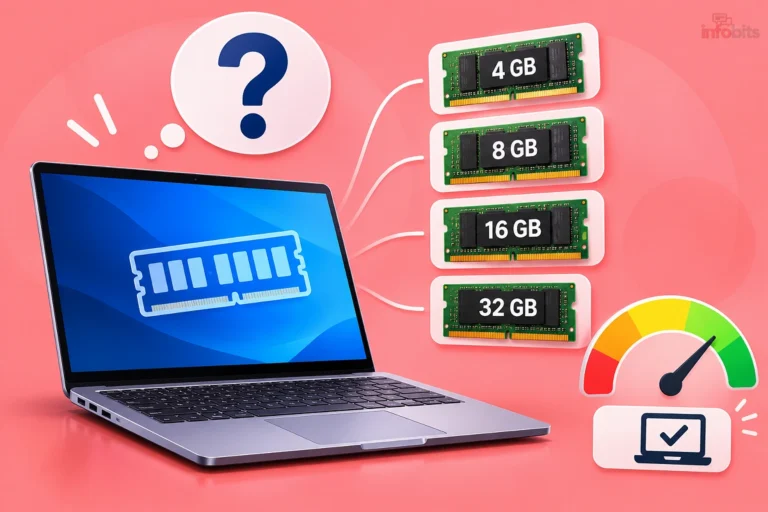
RAM: aim for 16GB. 8GB works for light browsing but feels tight with Windows, many tabs and video calls. If a laptop is only available with 8GB at a high price, skip it.
SSD: 512GB is a comfortable minimum. If it’s lower, plan for external storage.
Processor: Pick a recent generation. Don’t pay extra for a name you don’t need.
Warranty: Check that it’s a full year and sold by an authorised seller.
Display and battery: These affect daily use more than specs on a sheet.
Soldered vs Upgradable RAM: Why It Matters Now
Some laptops have RAM soldered to the board, so you can never upgrade it. Others have slots, so you can add memory later.
Normally, buying a lower-RAM laptop and upgrading later is a smart saving. In a crunch, that logic weakens, because memory itself is expensive. If the RAM is soldered, buy the amount you’ll need for the next four or five years today.
How to Stack Savings in the Sale
Don’t look at the sticker price. Calculate the effective price:
Sale price − instant bank discount − exchange value − cashback = what you actually pay
For example, one report said buyers could claim a 10% instant discount on SBI cards during Amazon’s festival. Terms and caps apply, so read them first.
If you shop on Flipkart, a co-branded card can add cashback. On a ₹60,000 laptop, a 5% rate would be ₹3,000, which is under the quarterly cap on the Flipkart cards. But category exclusions and offer conflicts may apply.
See our Flipkart Axis vs Flipkart SBI Credit Cards comparison before you pay.
For Amazon, see Amazon Pay ICICI vs Flipkart Axis. If you’re thinking about no-cost EMI, read how it really works first.
What About Refurbished or Open-Box Laptops?
Refurbished laptops were built before the sharpest memory hikes, so some sellers say their prices have held up better. That claim comes from sellers, so verify it yourself.
The main problem is warranty and battery health. Buy only from sellers who offer a clear warranty and a return window.
Smart Add-Ons Worth Buying
A laptop sleeve or backpack protects your purchase. A decent laptop backpack like American Tourister Valex+ on Amazon is a small spend that saves you from a cracked screen.
A wireless mouse makes long work sessions easier. A basic Bluetooth mouse from Amazon costs little.
Skip paying extra for a big internal SSD. Storage is expensive right now, so a portable SSD on Amazon can be a cheaper top-up later. Check price history first, because SSD prices are elevated too.
Myth vs Fact
Myth: Prices always crash at Diwali. Fact: The sale discounts a higher base price this year.
Myth: Wait and prices will fall. Fact: Forecasts range from a plateau to relief in 2027–28.
Myth: More discount means a better deal. Fact: An inflated MRP can hide a poor deal.
Myth: 8GB RAM is fine for everyone. Fact: It’s tight for most users in 2026.
Myth: I can upgrade RAM cheaply later. Fact: Memory itself is expensive now, and some laptops have soldered RAM.
Common Mistakes to Avoid
- Comparing only prices. Compare RAM, SSD and CPU side by side.
- Trusting the MRP. Check price history and the effective price.
- Buying 8GB to “upgrade later.” It may be costly or impossible.
- Using a card that doesn’t qualify. Read the offer terms first.
- Buying from unknown sellers. Stick to the brand store or an authorised seller.
- Rushing in the first hour. A few extra minutes of checking pays off.
Warning Signs a Laptop Deal Is Weak
- The “discount” depends on a very high MRP.
- The RAM or SSD is lower than similar laptops at the same price.
- The listing hides the exact processor or model number.
- The seller is unknown, or the warranty isn’t clear.
- The price isn’t lower than it was a few weeks ago.
How to Decide in 5 Minutes
- Write down the minimum spec you need: 16GB RAM and 512GB SSD for most people.
- Shortlist two or three models that meet it.
- Check each model’s price history.
- Work out the effective price after your bank offer and exchange.
- Buy the one with the lowest effective price from an authorised seller.
Troubleshooting After You Buy
- Price dropped a day later? Check the platform’s price-change policy. Many don’t refund the difference.
- Laptop arrived faulty? Report it right away. Laptops are often replacement-only, so check the return terms first.
- Doesn’t the spec match the listing? Take photos and a screenshot of the listing, then raise a complaint.
- Unsure about warranty? Register the serial number on the brand’s website.
- Need a GST invoice? If you’re a registered business, a GST invoice can save up to 18%. Ask before you buy.
Safety Tips for Festive Laptop Shopping
- Buy from the brand store or an authorised seller.
- Avoid offers that arrive through unknown messages or links.
- Keep your invoice and box for the warranty period.
- Don’t share OTPs with anyone claiming to be support.
Final Verdict
The Diwali sale is still a fine time to buy a laptop, if you need one and you check the numbers.
The memory problem doesn’t disappear in a sale. It simply means that “cheap” is relative this year, and that waiting isn’t a sure win. Aim for 16GB RAM, check the real effective price, and don’t pay extra for a spec you don’t need.
If your current laptop works, keep it. If it doesn’t, a well-checked deal now is better than hoping for a price drop that may not come.
Frequently Asked Questions
Yes, if you need one in the next few months and the deal beats the price history. If your current laptop works, you can wait.
Memory prices have jumped because makers are shifting production to AI data-centre chips. That leaves less supply for laptops.
It’s a global shortage of RAM and SSD chips. AI demand is taking much of the supply, which pushes up costs for laptops, phones and servers.
IDC India estimated rises of about 10–12% so far, with more expected. Other reports cite 15–40% for some mid-range models.
Unlikely in the short term. Forecasts suggest prices flatten or stay high, with relief possible in 2027–28.
For light use, yes. But 16GB is a safer choice for most people, especially if you multitask or work online.
It’s when makers keep the price the same but cut RAM or storage. Always compare specs, not just prices.
Some have slots, and many thin laptops have soldered RAM. Check the spec sheet before you buy.
It can be cheaper, and sellers say these units avoided the sharpest memory hikes. Only buy with a clear warranty and return policy.
Some are, but MRPs can be inflated. Check price history and compare the effective price.
They can cut the effective price through instant discounts or cashback. Caps and card terms apply, so read them first.
It’s the sale price minus bank discounts, exchange value and cashback. It’s the number you actually pay.
It depends on the model, price and card offers. Compare both on the effective price. See our Amazon vs Flipkart festive sale guide.
Prime members get early access and may get extra discounts. See whether Amazon Prime is worth it to decide.
For most buyers, 16GB RAM and a 512GB SSD is a comfortable target.
Yes, ask the seller. If you’re a GST-registered business, it can save up to 18%.
Many platforms don’t refund the difference. Check the price-change policy before you buy.
Keep it and revisit next year. A clean-up and a battery or SSD fix may be cheaper than a new laptop.
We hope you are interested in our articles and consider following our Facebook, Instagram, and Twitter pages for regular updates.
Also, share this article with your friends and relatives. Bookmark this page for future reference.
Subscribe to our free newsletter to get similar articles and regular updates directly in your Email Inbox.
Subscribe to be the first to learn about new information
Affiliate disclosure: Some links on this page may earn us a small commission at no extra cost to you. Prices and offers change often, so verify them before you buy. This article is for information and is not financial advice.