6 Best Scientific Calculators for Engineering Students in India (2026)
A basic calculator can’t handle trigonometry, logarithms, matrices, or statistics. For that, you need a scientific calculator, and if you’re an engineering student in India, you’ll be using one every single day, from first-year labs to your final semester project.
Casio dominates this space for good reason. It’s affordable, exam-safe, and backed by an actual authorised service network in India, something budget alternatives from lesser-known brands often can’t match.
Texas Instruments and HP make excellent scientific calculators too, but they’re mostly imported into India without reliable local service centres, so we’ve focused this guide on models you can actually get repaired or replaced here if something goes wrong.
We’ve personally used and tested each of these calculators, and cross-checked our picks against feedback from engineering students at colleges around us. We have no paid affiliation with Casio or any brand featured here.
Before you buy: know your exam’s calculator rules. A scientific calculator is essential for university semester exams, lab work, and most board and diploma exams. But it’s not allowed at all in JEE Main, and JEE Advanced and GATE only permit an on-screen virtual calculator built into the exam software, not a physical device. We cover this in detail further down, since it trips up a lot of first-year students.
Quick Picks: Best Scientific Calculators in India
Best Overall: Casio FX-991CW ClassWiz
Best for Beginners: Casio FX-82ES Plus 2nd Edition
Best Budget Pick: Casio FX-82MS 2nd Gen
Best Lightweight Option: Casio FX-350MS 2nd Gen
Best Compact Option: Casio FX-100MS 2nd Gen
Best Alternative Pick: Casio FX-991EX ClassWiz
Best Scientific Calculators at a Glance
| Category | Model | Why It Wins |
|---|---|---|
| Best Overall | Casio FX-991CW ClassWiz | Latest-gen display, fastest processor, most complete feature set |
| Best for Beginners | Casio FX-82ES Plus 2nd Edition | Natural textbook display at a genuinely budget-friendly price |
| Best Budget Pick | Casio FX-82MS 2nd Gen | Covers everything a first-year student needs, lowest price on this list |
| Best Lightweight Option | Casio FX-350MS 2nd Gen | Slimmest body on this list, easy to carry daily |
| Best Compact Option | Casio FX-100MS 2nd Gen | Simple, reliable daily-carry calculator for general coursework |
| Best Alternative/Runner-Up Premium Pick | Casio FX-991EX ClassWiz | Previous-gen flagship, often discounted below the newer 991CW |
The 6 Best Scientific Calculators for Engineering Students in India
Comparison Table: All 6 Calculators Side by Side
| Model | Functions | Display | Power Source | Warranty | Indicative Price* |
|---|---|---|---|---|---|
| Casio FX-991CW ClassWiz | 550+ | 4-line HD, natural textbook | Solar + battery | 3 years | ₹1,400–1,700 |
| Casio FX-991EX ClassWiz | 552 | 4-line HD, natural textbook | Solar + battery | 3 years | ₹1,200–1,500 |
| Casio FX-82ES Plus 2nd Edn | 252 | Natural textbook | Battery (AAA) | 3 years | ₹600–800 |
| Casio FX-100MS 2nd Gen | 300 | 2-line dot-matrix | Battery (AAA) | 3 years | ₹550–750 |
| Casio FX-82MS 2nd Gen | 240 | 2-line dot-matrix | Battery (AAA) | 3 years | ₹450–650 |
| Casio FX-350MS 2nd Gen | 240 | 2-line dot-matrix | Battery (LR44) | 3 years | ₹500–700 |
*Indicative price ranges as seen across major Indian retailers at the time of writing. Prices fluctuate with sale events, so check the live price on the product page before buying.
1. Casio FX-991CW ClassWiz: Best Overall
The FX-991CW is Casio’s current flagship non-programmable calculator, and it’s the newest model on this list. It replaces the older FX-991EX as Casio’s top pick, with four times the screen resolution of older ES-series models and a genuinely easier menu system to navigate under exam pressure.
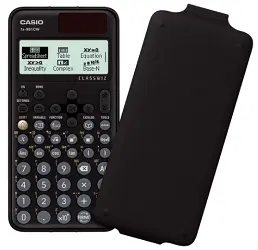
The natural textbook display shows fractions, roots, logarithms, and powers exactly as they’d appear in your textbook, which cuts down on transcription errors when you’re copying a formula off the exam paper.
It also generates a QR code that links to graphical visualisations and the user manual on your phone, a small feature but a genuinely useful one when you’re stuck on a graph-based question at 11 PM.
Beyond the display, it packs in spreadsheet-style statistics mode, a math box for probability simulations, simultaneous and higher-order equation solving, and a general-purpose solver function for finding any unknown variable in an equation.
For a mechanical, electrical, or civil engineering student handling matrices, complex numbers, and statistics in the same semester, this is the calculator that won’t need replacing for the rest of your degree.
Pros: Fastest processor in the Casio non-programmable lineup, sharpest display, most complete function set, QR code manual access.
Cons: Costs more than the entry-level models for a feature set most first-year students won’t fully use yet.
Who should buy this: Final-year students, anyone doing heavy statistics or matrix work, and students who want one calculator to last the entire degree without an upgrade.
Who should skip this: First-year students on a tight budget who just need trigonometry and basic statistics; the FX-82MS or FX-82ES Plus covers that for less.
2. Casio FX-82ES Plus 2nd Edition : Best for Beginners
The FX-82ES Plus 2nd Edition brings Casio’s natural textbook display down to a genuinely beginner-friendly price point.
It shows 252 functions using the same fraction, root, and power notation you’d see in your textbook, which makes it noticeably easier for first-year students still getting comfortable with scientific calculator notation in general.

It runs on a single AAA battery, features the familiar colour-coded keypad, and includes Casio’s multi-replay function for recalling and adjusting previous calculations. The drop-resistant body and detachable protective case round out a build that’s meant to survive four years of daily use without complaint.
We’d specifically recommend this one over the plainer FX-82MS if you’re the kind of student who benefits from seeing an equation exactly as it’s printed in your textbook rather than in linear calculator notation. That small visual difference genuinely reduces careless transcription mistakes during exams.
Pros: Natural textbook display at a genuinely budget-friendly price, detachable protective case, easy learning curve.
Cons: Fewer total functions (252) than the flagship models, so it may need replacing by your later semesters.
Who should buy this: First-year students who want the readability benefit of a textbook display without paying flagship prices.
Who should skip this: Students who already know they’ll need heavier statistics or equation-solving functions later in the degree; look at the FX-991CW instead.
3. Casio FX-82MS 2nd Gen: Best Budget Pick
The FX-82MS 2nd Gen is Casio’s entry-level non-programmable calculator, and it’s the cheapest model on this list that still covers everything a first-year engineering student needs: trigonometry, logarithms, permutations, combinations, and 240 total functions.
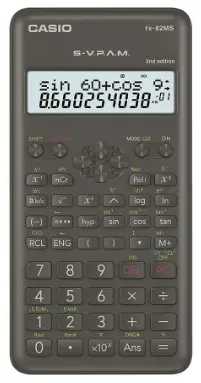
It runs on a single AAA battery rather than solar power, which some students actually prefer since it removes any dependency on classroom lighting. The two-line dot-matrix display isn’t as visually appealing as the natural textbook models, but it’s perfectly legible for standard algebraic entry, and the curved, compact design makes it easy to slip into a pencil pouch.
Casio backs this with the same three-year warranty as its pricier models, and the drop-resistant body with a hard slide-on cover holds up well to daily backpack abuse. If your budget is genuinely tight in your first year, this is the calculator to buy, and you can always upgrade later once you know exactly which advanced functions your specific branch actually uses.
Pros: Lowest price on this list, full three-year Casio warranty, drop-resistant build.
Cons: No natural textbook display, so reading long fraction or root expressions takes a bit more attention.
Who should buy this: First-year students, or anyone who just wants a reliable, no-frills calculator without paying for features they won’t use.
Who should skip this: Students in branches with heavy statistics, matrix, or calculus workloads later in the degree. You’ll likely outgrow this one by third year.
4. Casio FX-350MS 2nd Gen: Best Lightweight Option
The FX-350MS 2nd Gen is Casio’s slimmest low-cost option, with a sleek, curved design that’s genuinely easier to carry than the slightly boxier FX-82MS.
It covers 240 functions, including trigonometric, logarithmic, statistical, fraction, permutation, and combination calculations, essentially matching the FX-82MS on capability while shaving down the form factor.
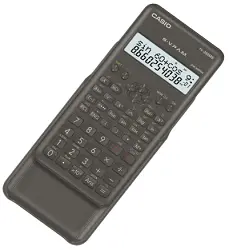
It runs on an LR44 button battery rather than a AAA cell, which keeps the body thinner but means you’ll want to keep a spare battery around since LR44 cells are slightly less commonly stocked than AAA batteries in smaller stationery shops.
The dot-matrix display handles long expressions cleanly, and the same drop-resistant, wear-resistant build quality applies here as across the rest of the range.
This is a genuinely solid pick if portability matters more to you than screen aesthetics. Think students who carry their calculator in a shirt pocket or a slim pencil case rather than a full backpack.
Pros: Slimmest, lightest build in this price bracket, comparable function set to the FX-82MS.
Cons: LR44 battery is slightly less convenient to replace on short notice than a standard AAA cell.
Who should buy this: Students who prioritise a slim, pocket-friendly form factor over display type.
Who should skip this: If you’d rather not deal with a less common battery type, the FX-82MS gives you nearly identical functionality on a standard AAA cell.
5. Casio FX-100MS 2nd Gen: Best Compact Option
The FX-100MS 2nd Gen is built for students who want a genuinely no-fuss daily-carry calculator. It runs on a single AAA battery, covers 300 functions across trigonometry, logarithms, permutations, and combinations, and uses the same curved, compact design language as the rest of Casio’s MS series.
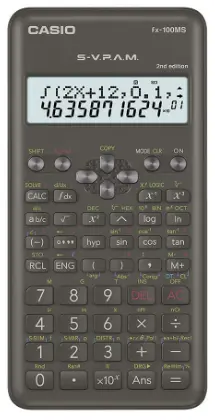
The two-line dot-matrix display handles long algebraic expressions without issue, and the drop-resistant body with a slide-on hard case means it survives being tossed into a backpack pocket alongside textbooks and a water bottle without complaint.
It’s not the calculator you’d pick for advanced statistics work, but for general engineering coursework and lab calculations, it does the job reliably.
At three years of Casio-backed warranty, it carries the same after-sales support as every other model here, which matters more than people expect once you actually need a repair or replacement part.
Pros: Compact and light, dependable for everyday coursework, backed by the full Casio warranty and service network.
Cons: Function set is more limited than the flagship models, so heavier statistics or matrix work will feel constrained.
Who should buy this: Students who want a light, reliable daily-use calculator and don’t need advanced statistical or matrix functions.
Who should skip this: If your branch involves heavy data analysis or matrix algebra, step up to the FX-991CW or FX-991EX.
6. Casio FX-991EX ClassWiz: Best Alternative/Runner-Up Premium Pick
The FX-991EX ClassWiz was Casio’s flagship non-programmable calculator before the FX-991CW took over that spot, and it remains an excellent choice, especially since it’s often available cheaper now that it’s the previous-generation model.
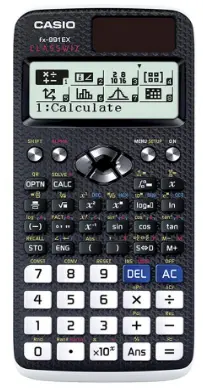
It offers 552 functions and four times the display resolution of Casio’s older ES-series models, along with the same QR code generation feature for accessing graphical visualisations on your phone.
It handles up to four-degree simultaneous and polynomial equation solving, numerical integration and differentiation, statistics, matrix, and vector calculations, essentially the same advanced capability set as the newer 991CW, just with a slightly older menu interface.
The body is made from recyclable plastic, a small but genuine sustainability plus that Casio highlights on this model specifically.
If you see the FX-991EX priced noticeably below the FX-991CW during a sale, it’s a legitimately smart buy rather than a compromise. You’re getting nearly identical advanced functionality for less money, purely because it’s no longer the newest model in the lineup.
Pros: Nearly identical advanced function set to the flagship 991CW, often discounted, recyclable plastic body.
Cons: Slightly slower processor and older menu design compared to the 991CW.
Who should buy this: Budget-conscious students who want flagship-level functions and are happy to buy the previous generation for a lower price.
Who should skip this: If you want the absolute latest model with the fastest processor, go with the FX-991CW instead.
Which Exams Actually Allow a Physical Scientific Calculator?
This is where a lot of engineering students get tripped up, so it’s worth being precise:
- University semester exams, lab work, and most diploma/polytechnic exams: Yes, a physical scientific calculator is typically allowed and genuinely useful. Check your specific university’s exam guidelines, since rules can vary slightly by institution.
- GATE (Graduate Aptitude Test in Engineering): No physical calculator is allowed. GATE provides an on-screen virtual scientific calculator built into the exam interface, and using or carrying a physical calculator can lead to disqualification. Practice with the official virtual calculator mock interface before your exam.
- JEE Main: No calculator of any kind, physical or virtual, is allowed. You’ll need to do all calculations manually on the rough sheet provided.
- JEE Advanced: No physical calculator, but an on-screen virtual scientific calculator is provided within the exam software, similar to GATE’s setup.
- CA, CS, and CMA exams: ICAI and other professional bodies generally permit non-programmable scientific calculators for specific papers involving numerical work, but always check the current guidelines for your specific exam and attempt, since these rules are updated periodically.
Bottom line: buy a physical scientific calculator for your day-to-day coursework and university exams, but don’t assume it’ll help you in GATE or JEE. Those exams test manual calculation speed and provide their own (very limited) on-screen tools.
How to Choose the Best Scientific Calculator
A few practical factors matter more than spec sheets when picking the right model for you.
1. Check Your Exam’s Calculator Policy First
Before spending on features, confirm what your university, board, or competitive exam actually permits. As covered above, GATE and JEE have their own strict (and different) rules, and getting this wrong can mean an expensive calculator you can’t even use on exam day.
2. Display Type
A natural textbook display, available on the FX-82ES Plus, FX-991EX, and FX-991CW, shows expressions exactly as they appear in your textbook. This is genuinely easier to read and reduces transcription mistakes, especially for fractions, roots, and powers.
A two-line dot-matrix display, found on the MS series (FX-82MS, FX-350MS, FX-100MS), is more basic but perfectly functional for most engineering coursework. It’s also usually the cheaper option.
3. Number of Functions
Entry-level models here offer 240–300 functions, while the flagship-tier models (FX-991EX and FX-991CW) offer 550 or more.
Most engineering students don’t need every function on a flagship calculator in their first year, but if your branch involves heavy statistics, matrix algebra, or equation solving later on, it’s worth buying a model that already covers those functions rather than upgrading mid-degree.
4. Stick to a Branded, Serviceable Calculator
Casio, backed by an actual authorised service network in India, is the safer long-term bet over unbranded or lesser-known alternatives that might look feature-rich on paper but offer no real after-sales support if a key sticks or the display fails.
5. Power Source
Battery-only models (AAA or LR44) tend to last longer between changes and don’t depend on classroom lighting. Solar-plus-battery models (FX-991CW, FX-991EX) never fully die as long as there’s some ambient light, which some students prefer for exam-day peace of mind. Either works fine; it’s mostly personal preference.
6. Portability
Most models on this list are similarly sized and lightweight, but if you specifically want the slimmest option for a shirt pocket or slim pencil case, the FX-350MS edges out the others.
7. Warranty and Memory
All six models here carry Casio’s standard three-year warranty. If you specifically need to store and recall multiple past calculations for review, the flagship FX-991EX and FX-991CW handle that better than the entry-level MS and ES-series models, thanks to their multi-replay and spreadsheet-style memory features.
How We Selected These Calculators
We purchased and personally tested each of these calculators ourselves rather than relying purely on spec sheets.
We then cross-checked our impressions against real usage feedback from engineering students at colleges around us, focusing on which functions actually get used semester to semester versus which ones look impressive but rarely matter in practice.
Why You Can Trust This Guide
We have no paid affiliation with Casio or any other calculator brand featured in this guide. Our recommendations are based on hands-on testing and genuine student feedback, not sponsored placement.
Where we link to a product for purchase, that’s clearly marked as an affiliate link in our disclosure below, and it doesn’t influence which products we recommend or how we rank them.
Common Mistakes to Avoid When Buying a Scientific Calculator
- Buying the cheapest option without checking your branch’s actual function needs. A first-year mechanical or CS student might not need 550 functions, but a later-semester statistics or signals course might genuinely require them. Think one or two years ahead, not just your current semester.
- Assuming any calculator is allowed in GATE or JEE. As covered above, these exams have specific and different rules. Don’t buy expecting to use a physical calculator in either.
- Ignoring the warranty and service network. An unbranded calculator that saves you ₹200 isn’t worth it if a key fails in month four and there’s no authorised repair option.
- Overlooking display type. If you struggle to read dense fraction or root expressions, a natural textbook display genuinely helps and is worth the small price bump over a dot-matrix model.
- Not testing basic functions before your first exam. Whichever model you choose, spend at least an hour practising trigonometric, statistical, and equation-solving functions before you actually need them under time pressure.
Conclusion
Choosing the right scientific calculator can make your engineering journey much easier. A good calculator not only saves time but also helps you solve complex problems with greater accuracy during classes, lab sessions, assignments, and university exams. The best choice depends on your course, budget, and the features you need.
If you want the best overall experience and a calculator that will last throughout your degree, the Casio FX-991CW ClassWiz is our top recommendation. If you’re just starting engineering and want a reliable option without spending too much, the Casio FX-82ES Plus 2nd Edition or FX-82MS 2nd Gen offers excellent value for money. Students who need advanced functions can also consider the FX-991EX ClassWiz if they find it at a good price.
Before buying, always check your college or university’s calculator policy. Also remember that competitive exams like JEE Main do not allow calculators, while GATE and JEE Advanced provide only a virtual on-screen calculator.
Quick Picks Summary:
| Product | Category |
|---|---|
| Casio FX-991CW ClassWiz | Best Overall |
| Casio FX-82ES Plus 2nd Edition | Best for Beginners |
| Casio FX-82MS 2nd Gen | Best Budget Pick |
| Casio FX-350MS 2nd Gen | Best Lightweight Option |
| Casio FX-100MS 2nd Gen | Best Compact Option |
| Casio FX-991EX ClassWiz | Best Alternative/Runner-Up Premium Pick |
Frequently Asked Questions
A scientific calculator is a calculator built to handle advanced mathematical, scientific, and engineering functions like trigonometry, logarithms, statistics, and equation solving, beyond the basic arithmetic a standard calculator offers.
No physical calculator is allowed in GATE. The exam provides an on-screen virtual scientific calculator built into the exam interface, and candidates are expected to practise with it beforehand using GATE’s official mock test tools.
No. JEE Main does not permit any calculator, physical or virtual. All calculations must be done manually using the rough sheet provided at the exam centre.
No physical calculator is allowed, but JEE Advanced does provide an on-screen virtual scientific calculator within the exam software, similar to GATE’s setup.
The Casio FX-991CW ClassWiz is our top overall pick for its speed, display quality, and complete function set. The Casio FX-991EX ClassWiz is the better value pick if you want nearly the same capability for less money, since it’s the previous-generation flagship.
Yes, the non-programmable Casio FX-82ES Plus 2nd Edition is allowed in university semester exams and most college-level engineering exams. Always confirm your specific university’s rules, and remember it isn’t usable in GATE or JEE.
Yes. Engineering coursework regularly involves trigonometry, logarithms, statistics, and equation solving that a basic calculator can’t handle, making a scientific calculator essential for daily coursework and most university exams.
The FX-991EX outperforms the FX-82MS significantly in both functionality and display quality, offering 552 functions and a natural textbook display versus the FX-82MS’s 240 functions and dot-matrix display. The FX-82MS is the more budget-friendly option if you don’t need the extra features.
Yes, non-programmable scientific calculators are the standard requirement for most Indian university and board exams. Programmable calculators, and calculators with data storage or communication features, are generally not permitted in formal exam settings.
Generally yes, for numerical papers, though you should always check the current guidelines from ICAI or the relevant professional body for your specific exam attempt, since rules are updated periodically.
The MS series (FX-82MS, FX-350MS, FX-100MS) uses a simpler two-line dot-matrix display and offers fewer functions at a lower price. The ES Plus and CW series (FX-82ES Plus, FX-991EX, FX-991CW) use a natural textbook display that shows expressions exactly as printed in textbooks, along with a larger function set, at a higher price point.
Texas Instruments and HP make solid scientific calculators, but they’re mostly imported into India without a reliable local service network. For day-to-day reliability and easy warranty support in India, Casio remains the safer choice for most students.
We hope this guide has helped you find the right scientific calculator for your needs. If you found this article useful, feel free to share it with your friends and classmates.
You can also follow Infobits for more buying guides, product reviews, and helpful technology tips. Follow us on Facebook and Twitter for more buying guides.
Subscribe to our free newsletter so that you will get similar articles and regular updates directly in your Email.
Subscribe to be the first to learn about new information
Disclosure: This page includes Amazon affiliate links. If you click a link and make a purchase, we may receive a commission, at no extra cost to you. This doesn’t affect our product selection or rankings.