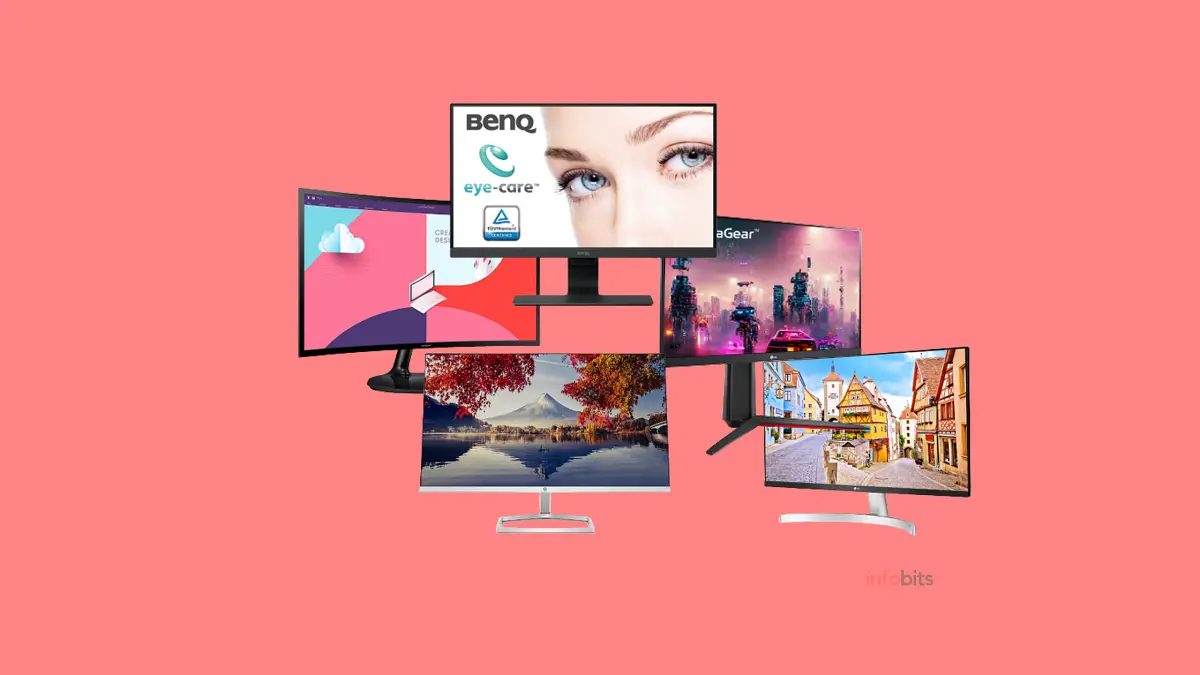
7 Best Monitors Under ₹15,000 in India (2026): Tested Picks for Work & Gaming
If you’re still working off your laptop’s built-in screen for 8–10 hours a day, you already know the feeling by evening. Tired eyes, a stiff neck, and that nagging sense that everything would just feel easier with more screen space.
The good news: you don’t need to spend ₹25,000+ to fix this anymore. The ₹10,000–₹15,000 monitor segment in India has genuinely come a long way, and today it covers everything from sharp IPS panels with proper eye-care features to genuinely capable 144Hz+ gaming displays.
We’ve gone through this segment carefully, comparing specs, real-world usability, and what actually matters once you’re three hours into a workday or mid-match in a competitive game, to put together this list of the best monitors under ₹15,000 currently available in India.
Quick Picks: Best Monitors Under ₹15,000
Best Overall Pick – BenQ GW2790
Best for Competitive/FPS Gaming – BenQ MOBIUZ EX240N
Best for Long Working Hours – Dell S2725HS
Best Budget Pick – Samsung Essential S3
Best for Ergonomics – Lenovo Q-Series 24″
Best Value Gaming Monitor – LG Ultragear IPS
Best Curved/Immersive Pick – Samsung 27″ Curved
How We Selected These Monitors
We shortlisted monitors based on a combination of factors that actually matter in daily use.
Panel type and colour accuracy, refresh rate and response time for anyone gaming even occasionally, eye-comfort features for long work sessions, build quality and stand adjustability, connectivity options, and brand warranty and service support across India.
We deliberately avoided monitors with vague or inflated spec sheets, and prioritised models from brands with an established service network in India, since after-sales support genuinely matters if something goes wrong.
Why You Can Trust This Guide
We’re not a single-product affiliate page. We’ve spent years covering display technology, audio-video systems, and buying guides specifically for Indian readers and Indian pricing realities.
Every monitor below is evaluated on the same criteria, with honest pros and cons, not just marketing copy lifted from product listings.
The 7 Best Monitors Under ₹15,000 in India
| Monitor | Best For | Key Highlight |
|---|---|---|
| BenQ MOBIUZ EX240N | Best for Competitive/FPS Gaming | 165Hz refresh rate, 1ms MPRT, FreeSync Premium |
| BenQ GW2790 | Best Overall Pick | Eye-care tech + 99% sRGB + 3-year warranty |
| Dell S2725HS | Best for Long Working Hours | TÜV 4-Star Eye Comfort + 5-year warranty |
| Samsung Essential S3 | Best Budget Pick | 27-inch IPS panel at an entry-level price |
| Lenovo Q-Series 24″ | Best for Ergonomics | Height-adjustable stand, rare at this price |
| LG Ultragear IPS | Best Value Gaming Monitor | 144Hz, HDR10, AMD FreeSync, 1ms response |
| Samsung 27″ Curved | Best Curved/Immersive Pick | VA panel curve for movies and casual gaming |
1. BenQ MOBIUZ EX240N: Best for Competitive/FPS Gaming
The BenQ MOBIUZ EX240N is a 24″ Full HD gaming monitor that blends performance, comfort, and style into one sleek package. With its 165Hz refresh rate and 1ms MPRT, it’s a strong pick for FPS gamers who want smooth visuals and quick response times without spending a fortune.
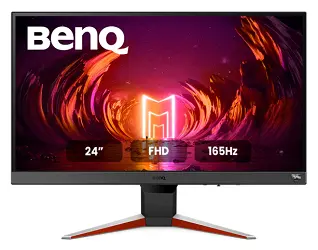
The bezel-less VA panel delivers vibrant colours and deep contrast, making HDR content pop, especially with HDR10 and BenQ’s HDRi image optimisation.
Features like Light Tuner, Colour Vibrance, and Black eQualizer help shadow detail stay visible even in fast-paced scenes, while FreeSync Premium support keeps gameplay tear-free.
The treVolo dual 2.5W speakers add reasonably crisp audio for an all-in-one setup.
Thoughtful touches like the 5-way navigator, Gaming Quick OSD, and Scenario Mapping make customisation easy, and Low Blue Light, Flicker-Free tech, and ePaper mode help reduce eye strain during longer gaming or work sessions.
With HDMI, DP, and headphone ports, connectivity is well covered.
Pros: Excellent refresh rate and response time for the price; genuinely useful eye-care modes; FreeSync Premium for tear-free gameplay.
Cons: VA panel means viewing angles aren’t as wide as IPS; 1080p resolution at 24″ may feel limiting if you frequently work with two windows side by side.
Who should buy this: Competitive and casual FPS gamers who want smooth 1080p performance without overspending.
Who should avoid this: Colour-critical editing or design work, where an IPS panel’s wider viewing angles matter more.
2. BenQ GW2790 : Best Overall Pick
The BenQ GW2790 27-inch FHD IPS Monitor is a strong all-rounder that balances vibrant visuals, eye-care features, and smooth performance, making it ideal for both work and entertainment.
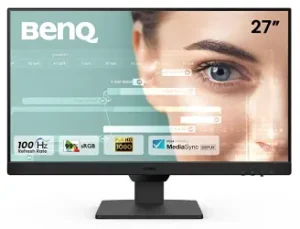
With a 100Hz refresh rate, it offers fluid motion for daily tasks and casual gaming alike, while the 99% sRGB colour gamut ensures rich, accurate colour reproduction, genuinely useful if you do any photo editing or design work on the side.
The ultra-slim bezel also makes it a great pick for multi-monitor setups.
If you spend long hours in front of a screen, the Brightness Intelligence Gen 2 and Low Blue Light+ technology are worth knowing about. They auto-adjust brightness based on ambient lighting, which noticeably reduces eye strain over a full workday.
VESA Certified MediaSync support, dual HDMI, and DisplayPort connectivity round out a genuinely versatile setup, and small touches like ePaper Mode, Coding Mode, and an Input Hotkey for switching sources add real day-to-day convenience. It’s backed by a 3-year warranty.
If you prefer a smaller footprint, the BenQ GW2490 FHD IPS Monitor offers the same core feature set in a 24-inch size.
Pros: Best balance of colour accuracy, eye comfort, and connectivity in this list; genuinely useful auto-brightness adjustment; solid 3-year warranty.
Cons: 100Hz refresh rate is good, but not class-leading for dedicated esports gaming.
Who should buy this: Anyone who wants one monitor that handles office work, content consumption, and casual gaming equally well, our top overall pick for most buyers.
Who should avoid this: Competitive gamers who specifically want 144Hz+ refresh rates should look at the MOBIUZ EX240N or LG Ultragear instead.
3. Dell S2725HS: Best for Long Working Hours
The Dell S2725HS 27-inch FHD Monitor is a dependable, eye-friendly display for work or everyday use. With a 27-inch screen and 99% sRGB colour accuracy, it delivers vibrant, true-to-life visuals for office work, content consumption, or multitasking.
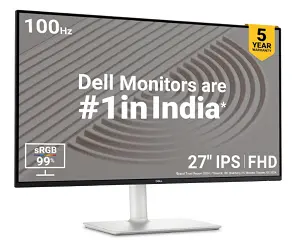
A 100Hz refresh rate and up to 4ms response time keep things smooth whether you’re scrolling through documents or watching videos. The Flicker-Free technology and TÜV 4-Star Eye Comfort rating make long hours in front of the screen noticeably more comfortable.
This is one of the better-rated monitors in this list, specifically for eye strain. 300 cd/m² brightness, a 1500:1 contrast ratio, and 178° viewing angles keep visuals consistent from almost any position.
With dual HDMI ports, connecting a laptop and a second device is easy, and the built-in dual speakers are a nice bonus. The 5-year warranty is the longest in this list and reflects real confidence from Dell in this model’s reliability.
Pros: Best-in-list warranty (5 years); genuinely strong eye-comfort certification; dual HDMI for easy multi-device use.
Cons: 4ms response time is fine for general use, but not ideal for fast-paced competitive gaming.
Who should buy this: Professionals and students doing long daily work sessions who want maximum peace of mind on warranty and eye comfort.
Who should avoid this: Dedicated gamers chasing the lowest possible response times.
If you want a somewhat updated version of this monitor with a 144Hz refresh rate, full ergonomic design, and 1ms response time, go with the Dell S2725HSM (available on Amazon).
Also, it’s another model, Dell SE2725HM, with a tilt-only stand, also available on Amazon.
4. Samsung Essential Series S3 Flat: Best Budget Pick
The Samsung Essential Series S3 Flat Monitor (27 Inch) is a great option if you want a sleek, budget-friendly Full HD monitor with solid everyday performance.

Image from Amazon
It features a 27-inch IPS panel with vibrant colours and wide 178° viewing angles, so the screen looks sharp from almost any position at your desk.
A 100Hz refresh rate and 5ms response time (GTG) give noticeably smoother visuals than a basic 60Hz monitor, whether you’re browsing or playing light games. The FHD resolution (1920×1080) keeps text crisp for long work sessions.
Eye Saver Mode and Flicker-Free technology help with eye strain, and Game Mode optimises contrast for darker scenes.
The super slim bezel-less design looks modern on any desk, and HDMI and D-Sub connectivity keep setup simple. A 3-year manufacturer’s warranty backs the purchase.
Pros: Genuinely good value at the lower end of this price bracket; 27-inch IPS panel is rare to find this affordably; Samsung’s wide India service network.
Cons: Fewer premium extras (no USB-C, no height-adjustable stand) compared to pricier options in this list.
Who should buy this: Budget-conscious buyers who want the biggest practical upgrade over a laptop screen for the least money.
Who should avoid this: Anyone prioritising advanced ergonomics or gaming-specific features should look elsewhere on this list.
5. Lenovo Q-Series 24: Best for Ergonomics
The Lenovo Q-Series display stands out in this list for one specific reason: it’s height-adjustable, which is genuinely rare at this price point and matters a lot if you’re using it for 8+ hours a day.
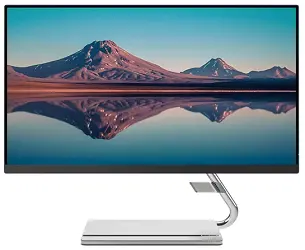
It’s a Full HD IPS 24-inch monitor with a 75Hz refresh rate, AMD FreeSync support, and a relatively fast 4ms response time.
The bezel-less, ultra-slim design has a 178-degree viewing angle and an anti-glare coating, which is genuinely useful if your desk gets hit by window light during the day.
Maximum brightness sits at 300 nits, sufficient for most indoor settings, with support for 16.7 million colours. Two built-in 3W speakers cover basic audio needs, and it connects via one HDMI and one DP port.
It comes with a 3-year Lenovo-authorised onsite warranty, meaning a technician comes to you rather than you needing to ship the monitor anywhere for service.
Pros: Height-adjustable stand is a genuine standout at this price; onsite warranty is convenient; anti-glare coating helps in bright rooms.
Cons: 75Hz refresh rate is on the lower side if gaming is a priority for you.
Who should buy this: Anyone who sits at their desk for long stretches and wants proper ergonomic adjustment without paying a premium for it.
Who should avoid this: Serious gamers wanting high refresh rates, the LG Ultragear or BenQ MOBIUZ EX240N are better fits.
6. LG Ultragear IPS: Best Value Gaming Monitor
If you want a dedicated gaming monitor around ₹15,000, the LG Ultragear is a strong choice. It’s a 24-inch Full HD IPS panel with a wide 178-degree viewing angle, which is a genuine advantage over the VA panels common in this price segment for gaming.
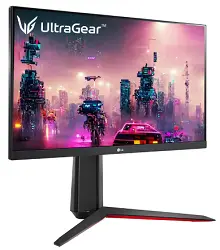
It supports HDR10 and 99% sRGB (Typ.), giving genuinely vibrant colour and contrast for an IPS panel at this price.
The 144Hz refresh rate is excellent for gaming, paired with AMD FreeSync, a 1ms GTG response time, Black Stabiliser, and Dynamic Action Sync. Together, these noticeably reduce screen tearing and motion blur in fast-paced games.
It includes one DisplayPort, one HDMI port, and a headphone jack, and the adjustable base lets you tweak height, tilt, and pivot for a more comfortable gaming posture. It comes with a 3-year manufacturer’s warranty.
Pros: 144Hz + 1ms response on an IPS panel (rather than VA) is a strong combination at this price; full stand adjustability; strong colour performance for gaming and casual content work.
Cons: Single HDMI port may feel limiting if you’re connecting multiple devices (console + PC, for example).
Who should buy this: Gamers who want both high refresh rate performance and IPS colour quality without compromise.
Who should avoid this: Buyers who specifically need multiple HDMI inputs for a multi-device setup.
7. Samsung 27-inch: Best Curved/Immersive Pick
This is Samsung’s 27-inch Full HD curved VA panel monitor, and the curve genuinely does make a visible difference for movies and casual gaming sessions. It’s the only curved option in this list.
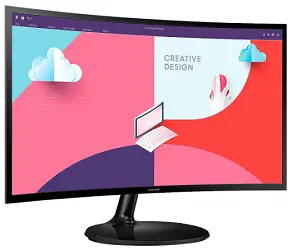
It runs at a 75Hz refresh rate, giving smoother transitions than a standard 60Hz display, with less latency and ghosting during gaming, YouTube playback, or general content consumption.
It includes Eye Saver Mode and Flicker-Free display tech, which helps during extended viewing sessions, plus a 178-degree viewing angle for consistent visuals from most seating positions.
AMD Radeon FreeSync keeps the monitor’s refresh rate synced with your graphics card to reduce visual tearing, and a dedicated game mode resizes content to fill the curved screen properly.
Connectivity covers HDMI and D-Sub, and it’s backed by a 3-year warranty against manufacturing defects.
Pros: The curve genuinely adds immersion for movies and casual gaming, a unique pick in this list; the VA panel gives strong contrast and deep blacks.
Cons: 75Hz refresh rate isn’t ideal for competitive gaming; VA panels have narrower optimal viewing angles than IPS for off-axis seating.
Who should buy this: Anyone who primarily wants an immersive movie-watching and casual-gaming setup rather than competitive performance.
Who should avoid this: Multi-person desk setups where several people view the screen from different angles throughout the day.
Its 60Hz refresh rate model (view on Amazon) with almost the same specifications is also available on Amazon at a very competitive price.
Alternative and Upgrade Picks Worth Knowing About
If none of the seven above quite fit your specific need, a few other models in this segment are worth a look as you compare:
- For a bigger screen on a tighter budget: Some 32-inch Full HD monitors have recently dropped to around ₹10,000–₹11,000, trading a slightly lower refresh rate (typically 75Hz) for significantly more screen real estate, worth considering if screen size matters more to you than gaming performance.
- For serious esports gaming slightly above this budget: If you can stretch a little beyond ₹15,000, several newer monitors now offer 200Hz+ refresh rates with Rapid IPS panels specifically tuned for competitive FPS titles, a genuine step up if gaming performance is your top priority.
- For maximum ergonomic flexibility: A few monitors in this segment now offer fully adjustable stands (height, tilt, swivel, and pivot) rather than just height adjustment alone, worth seeking out specifically if you rotate between landscape and portrait orientation for coding or document review.
We haven’t swapped these into the core 7 picks above since each involves a genuine trade-off (price, refresh rate, or panel type) compared to our main recommendations. But they’re worth knowing about if your priorities lean strongly in one of these directions.
Buying Guide: What to Check Before You Buy
Display Size and Resolution:
Bigger isn’t always better; it depends on your use case.
A 27-inch screen gives a more immersive experience for gaming or media, while a 24-inch screen at the same Full HD resolution actually has higher pixel density, which can look sharper for detailed work like document editing or coding.
Refresh Rate and Response Time:
A higher refresh rate (144Hz or above) gives noticeably smoother motion, which matters a lot for gaming and even helps with everyday scrolling.
A low response time, ideally 1ms, reduces motion blur and ghosting, particularly important for fast-paced games.
Panel Type:
| Panel Type | Strengths | Weaknesses | Best For |
|---|---|---|---|
| TN | Fastest response times, most affordable | Weaker colour accuracy and viewing angles | Pure competitive esports on a tight budget |
| IPS | Best colour accuracy, wide viewing angles | Slightly higher response times than TN | Content creation, office work, mixed-use gaming |
| VA | Deep blacks, strong contrast ratios | Slower response times than IPS or TN | Movies, dark-room gaming, immersive content |
Connectivity Options:
Check for HDMI and DisplayPort, which cover most modern laptops, desktops, and gaming consoles.
If you plan to connect multiple devices regularly, prioritise a monitor with at least two video inputs.
Colour Accuracy and Gamut Coverage:
If you do any photo editing, design work, or simply care about accurate colours, look for monitors with 99% sRGB coverage or better.
Most monitors in this list hit that mark, which is genuinely good for this price range.
Ergonomics and Adjustability:
Tilt is common at this price; height adjustment is rarer (the Lenovo Q-Series is the standout here), and swivel/pivot adjustability is rarer still.
If you’re using the monitor for 8+ hours daily, this is worth prioritising over a marginally better spec sheet elsewhere.
Brand and After-Sales Support
Brands like BenQ, LG, Samsung, Dell, and Lenovo all have established service networks across India, including tier-2 and tier-3 cities.
This matters more than people expect; a monitor that fails outside a major city with poor service coverage becomes a much bigger hassle than the warranty period suggests on paper.
Who Should Buy a Monitor Under ₹15,000?
This budget genuinely makes sense for students and professionals doing daily desk work who want a real upgrade over a laptop screen, casual-to-competitive gamers who don’t need 1440p or above, anyone setting up a dual-monitor work station, and content consumers who want a noticeably better movie and streaming experience than a small laptop display.
Who Should Consider Spending More?
If you specifically need 1440p (QHD) resolution, want OLED-level contrast, are doing professional colour-critical work (photography, video grading), or want a high-refresh 1440p gaming setup, you’ll likely need to push your budget closer to ₹20,000–₹30,000.
Trying to force these needs into a sub-₹15,000 monitor usually means a meaningful compromise somewhere.
Common Mistakes to Avoid
- Chasing refresh rate numbers alone. A 165Hz VA panel and a 144Hz IPS panel will feel very different in practice; panel type matters as much as the headline refresh rate.
- Ignoring the stand entirely. A great display on a fixed, non-adjustable stand can still cause neck strain if the height doesn’t match your desk setup. Check adjustability before buying, not after.
- Assuming all “FreeSync” labels are equal. Basic FreeSync and FreeSync Premium offer different levels of tear-free performance. Check which variant a specific monitor supports.
- Overlooking port count. If you regularly switch between a laptop and a desktop, or a PC and a console, a single-HDMI monitor will become an annoying bottleneck quickly.
- Buying based on size alone for desk-bound IPS panels and VA panels. A 27-inch panel and a 24-inch panel, both at Full HD resolution, have different pixel densities. Sitting close to a large Full HD screen can make individual pixels visible, especially with text.
Expert Tips
- Calibrate brightness for your room, not the factory default. Most monitors ship brighter than necessary for indoor use. Dialling it down both reduces eye strain and slightly extends panel longevity.
- Use the built-in eye-care modes even if you think you don’t need them. Features like Low Blue Light and Flicker-Free aren’t gimmicks. They genuinely reduce fatigue over an 8-hour workday, even if the difference isn’t obvious in the first hour.
- Don’t skip the VESA mount check if you plan to wall-mount or use a monitor arm. Most monitors in this segment support standard VESA mounting, but it’s worth a 30-second check on the spec sheet before buying if you have a specific desk setup in mind.
- Test the actual stand height range before assuming “height-adjustable” solves your ergonomics. Some adjustable stands have a narrower range than expected. If you’re notably tall or short, check the specific height range in centimetres if available.
Conclusion
Finding a genuinely good monitor under ₹15,000 in India isn’t the compromise it used to be.
Whether you want the BenQ GW2790’s well-rounded eye comfort and colour accuracy, the LG Ultragear’s gaming-focused 144Hz IPS performance, or the Lenovo Q-Series’ rare height-adjustable stand, there’s a strong option in this list for nearly every use case.
The right pick really comes down to matching the monitor to how you’ll actually use it day to day, gaming, long work sessions, casual content consumption, or some mix of all three, rather than chasing the single highest spec on a sheet.
Whichever you choose from this list, it’ll be a genuine upgrade over working off a laptop screen alone.
Quick Picks Summary
| Sl.No: | Product | Category |
|---|---|---|
| 1 | BenQ MOBIUZ EX240N | Best for Competitive/FPS Gaming |
| 2 | BenQ GW2790 | Best Overall Pick |
| 3 | Dell S2725HS | Best for Long Working Hours / Best Warranty |
| 4 | Samsung Essential Series S3 | Best Budget Pick |
| 5 | Lenovo Q-Series 24″ | Best for Ergonomics / Best Height-Adjustable |
| 6 | LG Ultragear IPS | Best Value Gaming Monitor |
| 7 | Samsung 27″ Curved | Best Curved/Immersive Pick |
Frequently Asked Questions
Yes. Several monitors in this price range, like the LG Ultragear and BenQ MOBIUZ EX240N, offer 144Hz or higher refresh rates, sub-2ms response times, and AMD FreeSync support, genuinely solid specs for both casual and competitive gaming.
Largely yes, especially monitors with IPS panels and 99% sRGB coverage like the BenQ GW2790 or Samsung Essential S3. For professional, colour-critical work, you may eventually want a monitor with factory colour calibration, which typically appears at higher price points.
Most offer basic tilt adjustment. Height adjustment is rarer at this price. The Lenovo Q-Series in this list is a notable exception. Full swivel and pivot adjustability is uncommon below ₹15,000.
IPS panels offer the best colour accuracy and viewing angles, making them ideal for office work and content creation. VA panels offer deeper blacks and higher contrast, suited to movies and dark-room gaming. TN panels have the fastest response times but weaker colour and viewing angles.
75Hz and 100Hz are noticeably smoother than a standard 60Hz monitor and work fine for casual gaming. For competitive, fast-paced titles, 144Hz or higher makes a more meaningful difference in responsiveness.
Most reputable brands offer 3-year warranties at this price point. The Dell S2725HS in this list stands out with a 5-year warranty, which is unusually generous for the segment.
A 24-inch screen at Full HD resolution has a higher pixel density, which can look sharper for text-heavy work. A 27-inch screen feels more immersive for media and multitasking, but can show more visible pixel structure at the same resolution if you sit close to it.
HDR is a nice-to-have for movies and certain games, but it isn’t essential for office work, coding, or general browsing. Most HDR support at this price tier is HDR10, which offers a noticeable but not dramatic improvement over standard content.
FreeSync (AMD’s adaptive sync technology) is common in this segment and genuinely helps reduce screen tearing during gaming, especially when paired with an AMD graphics card. Most budget monitors don’t carry official G-Sync certification, though FreeSync often works reasonably well with Nvidia GPUs too.
Not inherently, in fact, many people find curved displays slightly more comfortable since the edges sit at a more consistent distance from their eyes. The bigger consideration is viewing angle if multiple people share the screen, since VA-panel curved monitors (like our pick here) have narrower optimal angles than IPS.
Nearly all modern monitors, including every one on this list, are technically LED-backlit LCD panels. “LED monitor” in marketing terms simply refers to this LED backlighting, which is more energy-efficient and offers better contrast than older CCFL-backlit LCDs.
If you sit at the same desk for several hours daily, yes, poor monitor height is a common, underrated cause of neck and shoulder strain over months of use, and it’s genuinely difficult to fix after the fact with a fixed-stand monitor.
Samsung and LG generally have the widest service network reach, including smaller tier-2 and tier-3 cities. BenQ and Dell also offer strong support but may have marginally longer turnaround times outside major metros.
Yes, most monitors in this list support HDMI connections suitable for current-generation consoles, though check for HDMI 2.0 or higher if you specifically want to use higher frame-rate console gaming modes.
With normal daily use, a well-reviewed monitor from an established brand in this list should comfortably last 5+ years before any noticeable decline in brightness or colour accuracy, though usage habits and ambient conditions (heat, humidity) affect this.
If you found this guide useful, follow us on Facebook, Instagram, and Twitter for more honest buying guides, or subscribe to our newsletter for updates straight to your inbox.
Also, share this article with your friends and relatives. Bookmark this page for future reference.
Subscribe to be the first to learn about new information
Disclosure: If you follow our links to a retailer’s website and make a purchase, we will get an affiliate commission on some, but not all, of the items or services we promote. This will cause no price change for you.