Samsung Galaxy Watch 8 Review: Is It Worth Buying in 2026?
Quick Answer: The Galaxy Watch 8 is the most complete Galaxy Watch Samsung has made in years .A slimmer design, a genuinely useful Gemini AI assistant on your wrist, and an AI running coach that actually helps. The catch hasn’t changed much from previous generations: you’re still charging it most nights, and several of its best health features only fully work if you own a Samsung phone.
If you’re already in the Samsung/Android ecosystem and your last upgrade was two or more generations ago, it’s an easy recommendation. If you’re on an iPhone, skip it entirely. The Watch 8 is Android and Wear OS only.
Samsung Galaxy Watch 8: Key Specifications
| Spec | 40mm | 44mm |
|---|---|---|
| Display | 1.34″ Super AMOLED, 438×438px | 1.47″ Super AMOLED, 480×480px |
| Peak brightness | 3,000 nits | 3,000 nits |
| Chipset | Exynos W1000 (3nm) | Exynos W1000 (3nm) |
| RAM / Storage | 2GB / 32GB | 2GB / 32GB |
| Battery | 325mAh (~30 hrs AOD on) | 435mAh (~30–40 hrs AOD on) |
| OS | Wear OS 6 with One UI 8 Watch | Wear OS 6 with One UI 8 Watch |
| Water/dust resistance | 5ATM + IP68, MIL-STD-810H | 5ATM + IP68, MIL-STD-810H |
| Connectivity | Bluetooth 5.3, Wi-Fi, NFC; LTE on select variants | Same |
| Price in India | From ₹20,999 (Bluetooth) | From ₹21,999 (Bluetooth) |
Prices fluctuate across online platforms depending on ongoing bank offers and exchange deals, so it’s worth checking current pricing on Amazon before you decide on a variant.
Design: The Biggest Change in Years
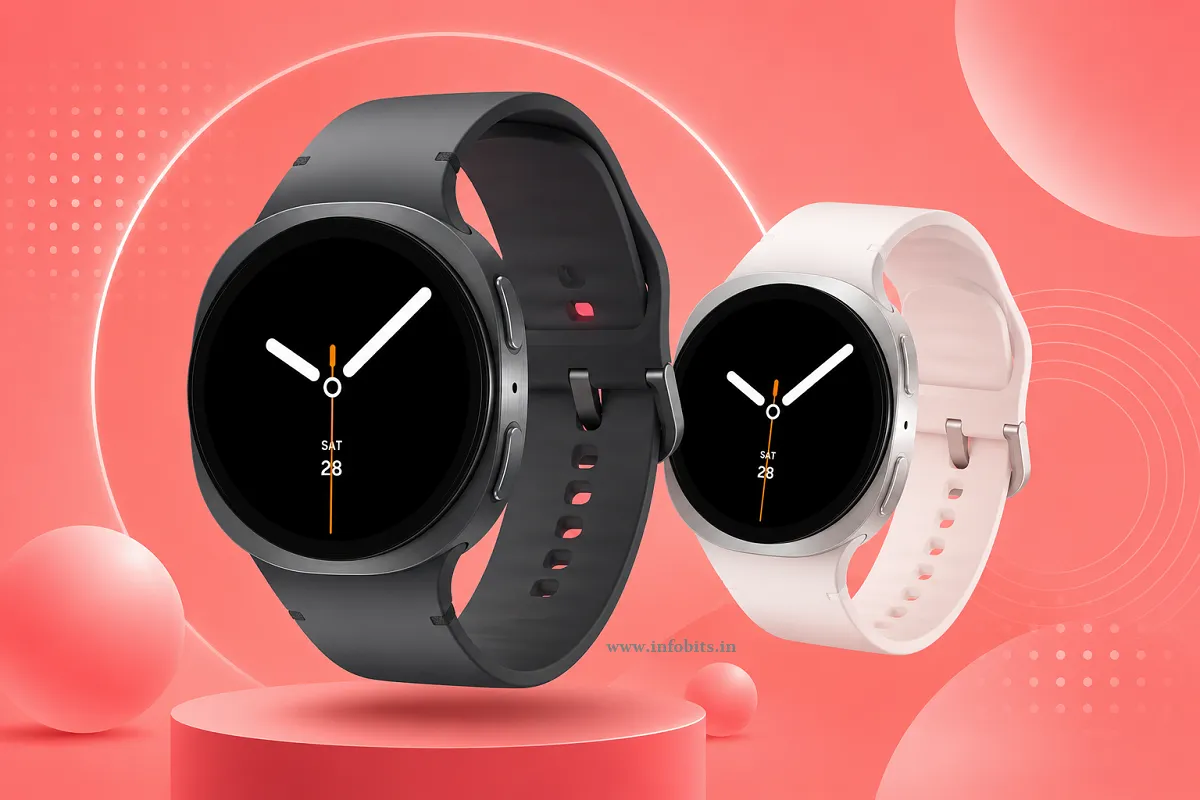
For the first time in a while, Samsung didn’t just tweak the same round watch face. The Galaxy Watch 8 moves to a “cushion” case shape, a rounded-square silhouette borrowed from the Galaxy Watch Ultra. It’s a genuine departure, and after wearing it for a while, it grows on you rather than feeling gimmicky.
It’s also the slimmest Galaxy Watch Samsung has ever made, about 11% thinner than the Watch 7, and noticeably lighter on the wrist. If you found older Galaxy Watches chunky or uncomfortable to sleep in, this is the generation where that complaint mostly goes away.
Samsung has also switched to a new proprietary Dynamic Lug strap system. It looks sleeker and sits flush against the case, but it means you can’t use older universal 20mm/22mm bands from previous Galaxy Watches directly.
You’ll need Samsung’s new strap format or specifically compatible third-party ones. If you’ve built up a small collection of straps for an older Galaxy Watch, this is worth knowing before you upgrade.
Build quality is solid throughout: an aluminium case, Sapphire Crystal glass on the display, and 5ATM plus IP68 water and dust resistance, with MIL-STD-810H military-grade durability testing. It’ll comfortably survive workouts, rain, and the odd knock against a doorframe.
Display: Bright Enough for Indian Summers
Both sizes use a Super AMOLED panel that now peaks at 3,000 nits of brightness. We can say that it is a meaningful jump that matters far more in daily use than it sounds. Under direct outdoor sunlight, which is a real test in most of India for a good chunk of the year, the display stays clearly legible without you needing to cup your hand over it.
The 44mm’s 1.47-inch panel gives noticeably more room for glanceable information ( tiles, notifications, workout metrics ) compared to the 40mm’s smaller 1.34-inch screen. If you regularly check detailed stats mid-workout, the 44mm is the easier size to read at a glance.
Software: Gemini Finally Makes a Smartwatch Assistant Useful
This is the headline feature, and it mostly earns the hype. The Galaxy Watch 8 is the first Galaxy Watch to run Google’s Gemini AI directly on the wrist, built on Wear OS 6 with Samsung’s redesigned One UI 8 Watch interface.
In practice, Gemini handles both simple requests like starting a workout, setting an alarm, checking your calendar, and more complex, multi-step ones, like finding a nearby gym and texting a friend the details, without needing your phone nearby for most of it.
It responds quickly, and unlike older voice assistants on smartwatches, it doesn’t feel like you’re fighting the interface to get a simple task done.
The new “Now Bar” is a smaller but genuinely handy addition. It is a persistent strip showing your most relevant live info (an ongoing timer, your next calendar event, and currently playing music) without needing to dig through menus.
It’s a small UX touch, but it’s the kind of thing that changes how often you actually glance at your watch versus reaching for your phone.
One honest opinion: most reviewers, ourselves included, find themselves using Gemini for quick, simple tasks far more than the complex multi-step ones Samsung demos on stage. It’s useful, but don’t expect to have full conversations with it throughout your day.
Health and Fitness Tracking
This is where Samsung has piled on the most new features this generation, and the results are genuinely mixed; some are excellent, others need more polish.
AI Running Coach is the standout addition. During a run, it checks in roughly once a minute with real-time pace guidance, tells you whether you’re going too fast or too slow against your target pace, and gives contextual coaching cues like reminders to maintain a consistent pace or cool down properly afterwards.
It comes with 160 structured training plans built in. It can feel like a lot of chatter at first, especially on shorter runs, but most reviewers who stuck with it over several sessions found it genuinely improved their pacing discipline.
Sleep tracking has also been upgraded with an AI Sleep Coach that studies your sleep timing, midpoint, and how well it aligns with your daily schedule. Then, build a personalised wind-down checklist, cut caffeine, reduce screen time, and try a breathing exercise before bed.
Accuracy is a mixed bag in testing: some nights it nails your sleep window precisely, other times it can mistake quiet time in bed (like watching TV) for actual sleep.
New health metrics include an Antioxidant Index (measuring carotenoid levels via a sensor reading on your thumb) and Vascular Load, which tracks heart stress overnight to flag whether your cardiovascular system is getting adequate recovery.
Both are interesting additions, though, like most new health metrics on a first release, they benefit from a few weeks of data before the numbers feel meaningful.
Sleep apnea detection is FDA-cleared and available in India, but, and this is an important limitation for Indian buyers, it only works through the Samsung Health Monitor app, which requires a Samsung Galaxy phone to activate.
If you’re pairing this watch with a non-Samsung Android phone, you’ll lose access to sleep apnea detection, ECG, and blood pressure monitoring entirely. Blood pressure monitoring also needs periodic recalibration against a traditional cuff every few weeks to stay accurate, which is worth knowing before you rely on it.
If your workouts and health tracking matter more to you than raw looks, pairing the watch with a compatible chest strap heart rate monitor like Polar H10 (view on Amazon) can noticeably improve accuracy during high-intensity training, since wrist-based heart rate sensors ( on this watch and most others ) tend to lose precision during fast-changing efforts like interval training.
Battery Life: Better, But Still Not the Strong Suit
Samsung claims up to 40 hours with the always-on display off, or 30 hours with it on. In real-world testing, we understand that the 44mm variant gets close to these figures, around 26-30 hours with AOD enabled and moderate use.
The 40mm model, with its smaller 325mAh battery, falls noticeably short of that and remains the weaker choice if all-day-and-night battery matters to you.
Charging is quick: roughly 45% in 30 minutes and a full charge in about 75-90 minutes using the included magnetic charger, so a short top-up while you shower or get ready in the morning genuinely helps if you forgot to charge overnight.
The honest takeaway: this is still a watch you’ll be charging most nights, not one you can wear to sleep every single night without a charging routine built around it. If you specifically want overnight sleep tracking every single night without fail, plan to charge it during your morning routine instead.
Galaxy Watch 8 vs Galaxy Watch 8 Classic: Which Should You Buy?
If your budget stretches to it, the Classic is worth serious consideration. It brings back Samsung’s beloved rotating physical bezel, which makes navigating menus and dismissing notifications far easier with sweaty or wet fingers post-workout, a genuinely practical advantage over swipe-only navigation, not just a nostalgic design touch.
The Classic also tends to outperform the standard Watch 8 on battery life in real-world testing, often exceeding its 40-hour rating even with the always-on display active, and its Sapphire Crystal glass and stainless steel case feel like a more premium, grown-up timepiece on the wrist.
The comparison is straightforward: a higher price and a bulkier, heavier build that some people simply won’t want for daily wear or workouts.
Galaxy Watch 8 vs Galaxy Watch 7: Should You Upgrade?
If you already own a Galaxy Watch 7, we would like to inform you that you can comfortably skip this generation unless the new cushion-shaped design specifically appeals to you, or you want the slightly improved sensor accuracy.
Gemini AI and most of the software-level features, including Bedtime Guidance, are also rolling out to the Watch 7 through software updates, so you won’t be locked out of the headline AI features just by staying on older hardware.
Where the Watch 8 does clearly pull ahead is processing power and battery efficiency, both of which show up in day-to-day snappiness rather than any single standout feature. If your Watch 7 already feels sluggish or its battery has degraded, that’s a better reason to upgrade than the AI features alone.
Galaxy Watch 8 vs the Competition
Vs Apple Watch Series 11: Not a real comparison for most buyers. The Galaxy Watch 8 only works with Android phones, and the Apple Watch only works properly with an iPhone. Pick based on your phone, not the watch.
Vs OnePlus Watch 3: The OnePlus Watch 3 generally offers longer battery life (often multi-day) at a lower price, but falls short of the Galaxy Watch 8’s health-tracking depth, display quality, and the tight Samsung ecosystem integration if you already own a Galaxy phone.
Vs Google Pixel Watch 3: Both run Wear OS with Gemini-adjacent AI features, but the Pixel Watch leans more on Fitbit’s fitness algorithms while the Galaxy Watch 8 leans on Samsung Health. If you value bezel-free minimalism and tighter Google integration, the Pixel Watch is worth cross-shopping; if you want Samsung-specific health metrics like BP and ECG (with a Samsung phone), the Galaxy Watch 8 pulls ahead.
Pros and Cons
Pros:
- Slimmer, genuinely improved design that’s more comfortable for extended wear and sleep tracking
- Gemini AI assistant is fast and actually useful for daily tasks, not just a gimmick
- AI Running Coach with 160 built-in plans is a real, motivating upgrade for runners
- Bright 3,000-nit display stays legible in harsh outdoor light
- Comprehensive health tracking: sleep coaching, antioxidant index, vascular load, sleep apnea detection
- 5ATM + IP68 + MIL-STD-810H durability
Cons:
- Battery life still requires near-daily charging, especially on the 40mm
- Several premium health features (BP, ECG, sleep apnea) only work fully with a Samsung phone
- The new proprietary Dynamic Lug strap system isn’t backwards compatible with older Galaxy Watch bands
- Antioxidant Index and some newer metrics need calibration time before they feel reliable
- Price increase over the Galaxy Watch 7 at launch, though prices have eased since
Who Should Buy the Galaxy Watch 8?
- Samsung Galaxy phone owners who want the full health-tracking suite, including BP and ECG monitoring
- Runners and fitness-focused buyers who’ll actually use the AI Running Coach and structured training plans
- Anyone upgrading from a Galaxy Watch 5 or older, where the jump in design, performance, and battery efficiency is substantial.
- Android users (non-Samsung phones too) who want strong core smartwatch features, keeping in mind that a few premium health features will be unavailable
Who Should Avoid It?
- iPhone users; it simply doesn’t work as a proper companion to iOS; look at the Apple Watch instead
- Heavy sleepers who want zero charging interruptions; the battery life, while improved, still needs a charging routine built around it
- Buyers on a strict budget who don’t need the newest health metrics. A Galaxy Watch FE or older Watch 7 at a discount covers most everyday needs for considerably less
Common Myths vs Facts
Myth: The Galaxy Watch 8 works with iPhones like the Apple Watch works with Android. Fact: It doesn’t. The Galaxy Watch 8 requires Wear OS compatibility and is built specifically for Android phones.
Myth: All the new health features work out of the box regardless of your phone. Fact: Blood pressure, ECG, and sleep apnea detection specifically require a Samsung Galaxy phone paired via the Samsung Health Monitor app. Other Android phones lose access to these three features.
Myth: The Galaxy Watch 8 easily lasts multiple days per charge. Fact: Real-world testing puts it around 26-30 hours with the always-on display active. You’ll be charging it most nights, not skipping days between charges.
Price in India: Which Variant Should You Buy?
| Variant | Approx. Price |
|---|---|
| Galaxy Watch 8 (40mm, Bluetooth) | ₹20,999–₹32,999 |
| Galaxy Watch 8 (44mm, Bluetooth) | ₹28,499–₹41,999 |
| Galaxy Watch 8 (40mm, LTE) | ₹33,999–₹42,999 |
| Galaxy Watch 8 (44mm, LTE) | ₹24,899–₹45,999 |
| Galaxy Watch 8 Classic (46mm, Bluetooth) | ₹33,499–₹54,999 |
| Galaxy Watch 8 Classic (46mm, LTE) | ₹31,349–₹59,999 |
Prices vary significantly with ongoing bank cashback offers and exchange bonuses on Amazon and Flipkart, so it’s worth comparing live prices before buying rather than going by MRP alone.
If you’re buying the LTE variant specifically for calls and standalone connectivity away from your phone, check with your carrier about eSIM support in your circle before committing, since availability isn’t universal across all Indian telecom operators yet.
Final Verdict: Is the Galaxy Watch 8 Worth Buying?
Yes, with conditions. If you’re a Samsung Galaxy phone owner overdue for an upgrade, especially from a Watch 5 or older, the Galaxy Watch 8 is genuinely one of the best all-around smartwatches Samsung has released, combining a real design refresh, a useful on-wrist AI assistant, and health tracking depth that few competitors match.
If you’re on a non-Samsung Android phone, it still works well, but go in knowing you’ll lose BP, ECG, and sleep apnea detection. And if you’re an iPhone user, this isn’t the watch for you at all. Look at the Apple Watch lineup instead.
For most Android users deciding between this and the Galaxy Watch 8 Classic, the extra spend on the Classic is worth it if you value the rotating bezel and slightly better battery life; otherwise, the standard Galaxy Watch 8 covers nearly everything most people need.
Frequently Asked Questions
Yes, for Android users, especially Samsung Galaxy phone owners, who are upgrading from a Galaxy Watch 5 or older. It offers a meaningfully better design, Gemini AI, and deeper health tracking than previous generations.
No. The Galaxy Watch 8 runs Wear OS and is built exclusively for Android phones. It cannot be used as a full-featured companion to an iPhone.
Samsung rates it at up to 30 hours with the always-on display enabled, or 40 hours with it off. Real-world testing on the 44mm model gets close to these figures; the smaller 40mm model tends to fall short and needs more frequent charging.
The Classic brings back Samsung’s rotating physical bezel for navigation, uses a Sapphire Crystal glass and stainless steel build, and generally delivers slightly better real-world battery life, at a higher price and heavier weight.
Yes, but only if it’s paired with a Samsung Galaxy smartphone through the Samsung Health Monitor app. It also needs periodic recalibration against a traditional blood pressure cuff to stay accurate.
Yes, most core features work fine with any compatible Android phone. However, blood pressure monitoring, ECG, and sleep apnea detection are Samsung-phone-exclusive features.
Gemini is Google’s AI assistant, running directly on the watch for the first time in the Galaxy Watch lineup. It can handle voice commands ranging from simple tasks like setting alarms to more complex multi-step requests, mostly without needing your phone nearby.
Most reviewers found it genuinely helpful for improving pacing discipline during runs, offering real-time pace feedback and access to 160 structured training plans. Some found the constant check-ins excessive on shorter runs.
The 44mm offers a larger display, easier at-a-glance readability, and meaningfully better battery life thanks to its bigger 435mAh battery. The 40mm suits smaller wrists and those who prioritise a lighter, more compact watch over battery longevity.
Yes, it’s FDA-cleared and available in India, but it requires the Samsung Health Monitor app and a Samsung Galaxy phone to activate.
It’s water-resistant to 5ATM (up to 50 metres) plus IP68 dust and water resistance, and it’s suitable for swimming. It isn’t rated for scuba diving or high-pressure water activities.
Not directly. The Galaxy Watch 8 uses a new proprietary Dynamic Lug strap system, so older 20mm/22mm universal bands from previous Galaxy Watches won’t fit without an adapter or Watch 8-specific replacement straps.
The OnePlus Watch 3 generally offers better battery life at a lower price, but the Galaxy Watch 8 has deeper health tracking, a sharper display, and tighter integration with Samsung phones.
Yes, the AI Running Coach, dual-frequency GPS, and detailed running form metrics like cadence and vertical movement make it one of the strongest running-focused smartwatches in this price range.
In most real-world usage with the always-on display enabled, yes. Expect to charge it most nights, particularly with the 40mm model. The 44mm can occasionally stretch past a full day depending on usage.
It includes heart rate, SpO2 (blood oxygen), ECG, blood pressure (Samsung phone required), accelerometer, gyroscope, barometer, ambient light sensor, and a new sensor for the Antioxidant Index.
Not essential unless you specifically want the new cushion-shaped design or slightly improved battery efficiency. Most software features, including Gemini, are also rolling out to the Watch 7 through updates.
Yes, on the LTE variants, though eSIM availability depends on your telecom carrier. Check with your provider before purchasing the LTE model specifically for this feature.
The watch, a magnetic charging puck/cable, and a quick-start guide. A charging adapter/brick is typically not included and needs to be purchased separately or reused from an existing one.
It’s a new metric measured via a thumb sensor reading, and like most first-generation health metrics, its accuracy and usefulness improve with consistent use over several weeks rather than being reliable from day one.
We hope you are interested in our articles and consider following our Facebook, Instagram, and Twitter pages for regular updates.
Also, share this article with your friends and relatives. Bookmark this page for future reference.
Subscribe to our free newsletter to get similar articles and regular updates directly in your Email Inbox.
Subscribe to be the first to learn about new information
Disclosure: We will receive an affiliate commission on some, but not all, of the products or services we recommend if you follow our links to a retailer’s website and make a purchase.