How Lightning Damages Home Electronics (and How to Protect Yours)
A loud bang, a flicker, then silence. The TV won’t switch on. The router has no lights, and the AC board may be gone too.
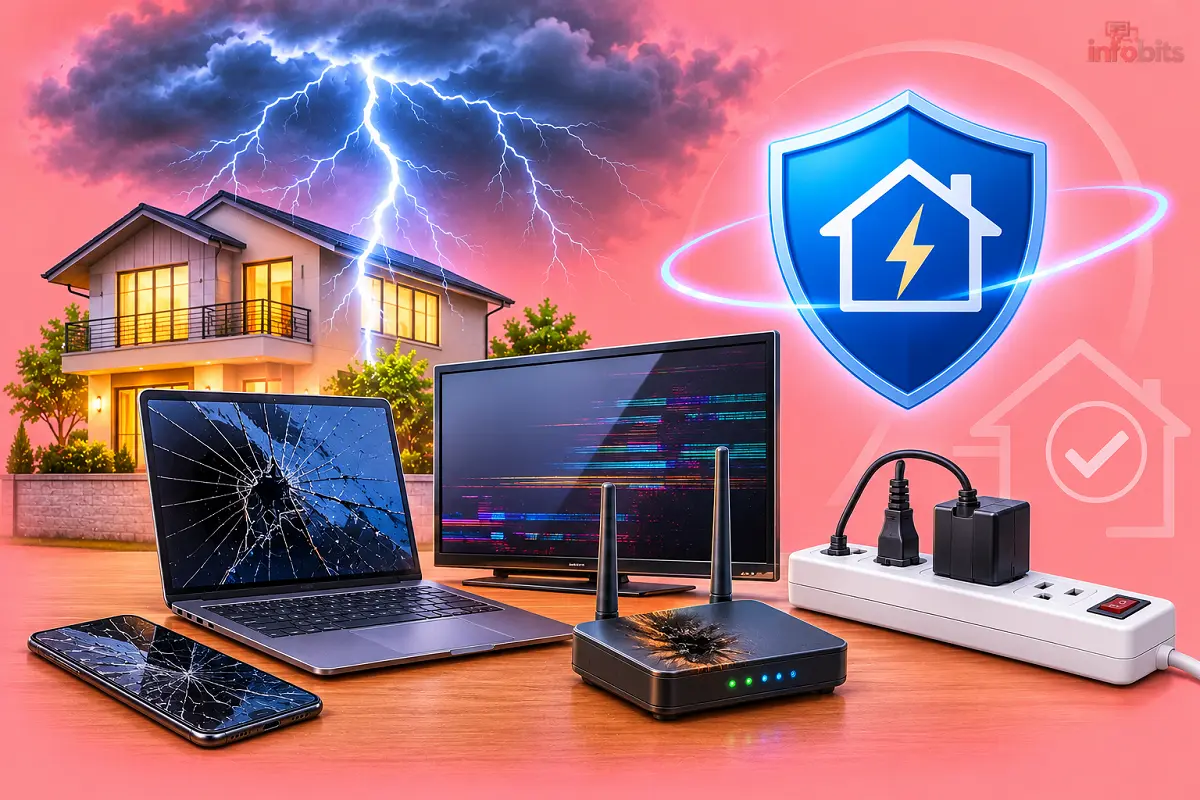
Here’s the surprising part. Your house usually isn’t struck at all. Most lightning damage comes from a surge that travels through wires, not from a direct hit.
This guide explains how lightning damages home electronics, which devices fail first, and how to protect them. It’s written for Indian homes, with our 230 V supply, overhead lines and heavy monsoon storms in mind.
Quick answer: Lightning damages electronics by sending a sudden, massive voltage spike (a surge) through power lines, data cables, antenna cables or the earth wire. The spike overwhelms the tiny semiconductors inside devices and burns them out. A direct hit isn’t needed. A strike on a nearby pole, transformer or line can be enough.
Key takeaways
- A direct hit isn’t needed. A strike on a nearby line, pole or transformer can send a surge into your home.
- Surges also travel through antenna, LAN and phone cables, and through the earth wire.
- Stabilisers and MCBs don’t stop lightning-grade spikes.
- Unplugging is still the most reliable protection. Surge protectors and good earthing add extra layers.
- Most warranties exclude lightning damage, so check your policy and keep proof.
How does lightning reach your electronics?
Lightning is a giant electrical discharge. It can carry tens of thousands of amps. Home wiring was never built for that.
It usually reaches your devices in four ways.
1. A direct strike on your building. This is the rarest route, but the most severe. The current hunts for the quickest path to the ground. Wiring, metal pipes and earth conductors often become that path, and fires can follow.
2. A strike on the power line or transformer. This is the most common route. A hit on an overhead line, pole or local transformer sends a surge down the cable. Every home on that line can feel it.
3. A strike nearby (induced surge). Lightning creates a strong electromagnetic pulse. Long cables behave like antennas and pick up a damaging voltage, even if lightning never touches them.
4. Other cables and the ground. Power isn’t the only way in. Telephone lines, Ethernet cables, coaxial cables from a DTH dish or antenna, and CCTV wiring can all carry a surge. A strike near your earth pit can also push current back up through the earth wire.
What about fibre broadband? The glass cable itself doesn’t conduct electricity. But the ONT or router plugged into the mains still does. Copper broadband and telephone lines carry surges just fine.
What happens inside a device during a surge?
Your supply is 230 V. During a lightning surge, the voltage can jump to several thousand volts for a few millionths of a second. That’s short, but it’s plenty.
Inside your TV or router, the components are built for a few volts to a few hundred volts at most. The surge breaks down their insulation. Chips short out. Tracks on the circuit board can burn through.
Damage often shows up in stages:
- The power supply section fails first, because it faces the surge first.
- Ports such as LAN, HDMI and antenna inputs fail next.
- Some devices survive but are weakened. They may work for weeks, then die for “no reason”.
Why a stabiliser or MCB won’t save you. An MCB trips on overcurrent over milliseconds. A surge is over in microseconds. A stabiliser corrects slow voltage swings, not lightning-grade spikes. We explain this for TVs in our guide on whether a stabiliser is required for an LED TV.
Which devices are most at risk?
| Device | How the surge gets in | Typical damage |
|---|---|---|
| LED / smart TV | Power cord, antenna or DTH cable, HDMI | Dead power board, no standby light, HDMI ports fail |
| Wi-Fi router / ONT | Power adapter, LAN or telephone cable | Dead unit, LAN or WAN ports stop working |
| DTH set-top box and dish | Coaxial cable, power | No signal, box won’t power on, LNB failure |
| CCTV cameras and DVR | Long cable runs, power adapters | Cameras offline, DVR dead |
| Air conditioner | Mains, outdoor unit wiring | Burnt control board (PCB) |
| Refrigerator, washing machine | Mains | Electronic control board fails |
| Desktop PC, laptop adapter | Mains, LAN cable | Dead power supply, adapter or motherboard |
| Home inverter / UPS | Mains, battery leads | Inverter board failure |
| Solar inverter | AC side and DC side | Inverter board failure |
| Smart plugs, smart switches, chargers | Mains | Dead module, burnt adapter |
Note: the farther a device sits from the mains and the more cables it has, the more entry points it offers. A TV with power, antenna, HDMI and LAN is more exposed than a lamp.
Why Indian homes are especially exposed
Lightning is a serious hazard in India. NCRB data for 2024 recorded 2,825 lightning deaths nationwide. In Kerala, lightning activity peaks in the pre-monsoon months (March to May), and storms also build up in the post-monsoon spell.
There are four home-level reasons too.
- Overhead lines. Many neighbourhoods are fed by long overhead lines and pole-mounted transformers. They collect surges.
- Neglected earthing. A surge needs a low-resistance path to the ground. A weak or dry earth pit sends it through your appliances instead.
- Rooftop clutter. DTH dishes, antennas, CCTV cables and solar panels create extra entry points.
- Stressed appliances. Frequent voltage swings already age electronics. They fail more easily when a spike arrives.
Warning signs your electronics were hit
Some signs appear at once.
- Burning smell, smoke or scorch marks near sockets
- A tripped MCB or RCCB
- Dead sockets in one room
- Popping sounds or flickering lights
- A TV with no standby light, or a router with no lights
Others are sneaky and show up days later.
- Random reboots or freezing
- LAN or HDMI ports that suddenly stop working
- Adapters that hum or run hot
- Appliances that die within weeks without a clear reason
If you notice any of these after a storm, treat the device as suspect even if it still powers on.
What to do right after a lightning strike
- Wait for the storm to pass. A common rule is to wait 30 minutes after the last thunder before moving around wiring or going outdoors.
- Check for fire. Look for smoke, a burning smell or hot sockets. If you suspect fire, leave the house and call 101 (fire) or 112.
- Switch off the main MCB and unplug everything. An emergency light helps here. A rechargeable emergency light kept fully charged near the main board makes this step much safer when the whole street is dark. See our picks for the best rechargeable emergency lights.
- Call a licensed electrician. Ask them to check the wiring, earthing, MCBs and RCCB before you restore power.
- Restore power, then plug devices in one at a time. Don’t open devices yourself.
- Document everything. Photograph the damage. Keep bills, serial numbers and the date and time of the storm.
- Contact your service centre, insurer or ISP quickly. Delays can weaken a claim.
- Fix the weak link before the next storm. Usually that means earthing and surge protection.
How to protect electronics from lightning: build layers
No single device is bulletproof. A direct strike can beat everything. So think in layers, from cheapest to most thorough.
Layer 1: Unplug (free, and the most reliable). Pull the plugs of your TV, set-top box, router and PC when a storm approaches. Disconnect antenna and LAN cables too. Do this when you first hear distant thunder or get an alert, not when the storm is overhead. If you use the Damini lightning alert app or your state’s alerts, they give you extra minutes.
Layer 2: A proper surge-protected strip (Type 3). Look for:
- Clear surge protection (usually MOV-based) with a stated joule rating. Higher is better.
- A thermal fuse and a “protected” indicator light
- A three-pin earthed plug and good build quality
A plain extension board is not a surge protector. Also, these strips wear out after big surges, so replace them after a heavy storm. For the TV and set-top box, a good surge-protected power strip (view on Amazon) with a thermal fuse and a clearly stated joule rating is a sensible, low-cost buffer.
Type 3 protection typically costs about ₹300 to ₹1,000 in India. Prices change, so check current listings.
Layer 3: A Type 2 SPD in your distribution board. This protects the whole home. A Type 2 surge protection device (SPD) sits in the DB and diverts surges to earth before they reach your appliances. Brands such as Havells, Schneider Electric and Legrand make them.
Expect roughly ₹1,500 to ₹4,500 plus installation, and have a licensed electrician fit it. A Type 3 unit at your TV or PC then adds the final fine protection. Houses with a lightning rod often add a Type 1+2 unit as well.
Layer 4: Check your earthing. An SPD is only as good as the earth it discharges into. Ask an electrician to measure your earth resistance. For lightning protection earthing, the guidance is 10 ohms or lower, and lower is better.
A simple plug-in socket tester can warn you if a socket has no earth, but it can’t measure earth resistance. A low-cost plug-in socket tester (available on Amazon) is worth keeping at home, because it shows a missing earth or reversed wiring in seconds.
Layer 5: Protect the data and antenna lines. Use a coaxial surge protector on the dish cable and a LAN surge protector on long Ethernet runs. Keep CCTV cable runs short, or protect them at both ends.
A mini UPS keeps your router alive during power cuts, but don’t treat it as lightning protection. If power cuts are your bigger daily problem, a router mini UPS solves that, and we compare options in the best UPS for a Wi-Fi router.
Layer 6: A lightning protection system for houses. A lightning rod (air terminal) with down conductors and earthing protects the building, not your electronics. It also doesn’t replace SPDs. In India, designs follow IS/IEC 62305, so use a competent installer.
Also read our explainer on isolation transformers for a different kind of mains protection.
Which protection option fits your home?
| Option | Helps against | Doesn’t cover | Indicative cost in India |
|---|---|---|---|
| Unplugging | Almost everything, if done in time | Surprise storms | Free |
| Surge strip (Type 3) | Nearby-strike surges at one device | Direct strikes, data lines | ₹300 to ₹1,000 |
| Stabiliser | Slow voltage swings | Lightning spikes | Varies |
| UPS/inverter | Power cuts | Reliable lightning protection | Varies |
| Type 2 SPD in the DB | Whole-home surges | Direct strikes alone | ₹1,500 to ₹4,500 plus fitting |
| Lightning rod + earthing | Building damage and fire | Surges inside wiring | Varies by design |
Quick decision guide
- Flat or apartment: Unplug, use Type 3 strips, and ask an electrician about a Type 2 SPD in your DB.
- Independent house: Type 2 SPD plus tested earthing. Add Type 1+2 if you have a lightning rod.
- Rooftop solar: Ask your installer about SPDs on both the DC and AC side. See our guides on AC solar panels and on-grid vs off-grid solar.
- Rented home: Unplug, use plug-in Type 3 protection, and ask the landlord about earthing.
- Terrace dish or CCTV: Add coaxial and LAN surge protectors.
Common mistakes to avoid
- Relying on a stabiliser or MCB for lightning protection
- Using a basic extension board and calling it a surge protector
- Fitting surge protection without proper earthing
- Forgetting antenna, LAN and phone cables
- Switching devices off with the remote and leaving them plugged in
- Keeping an old surge strip that has already absorbed several big hits
- Plugging everything back in the second the power returns. Wait a few minutes, because restoration can bring another spike
- Grabbing plugs when lightning is directly overhead
Myth vs fact
| Myth | Fact |
|---|---|
| “Switching off the TV makes it safe.” | Standby and “off” devices are still connected. Unplugging is what breaks the path. |
| “Lightning must hit my house to cause damage.” | Nearby strikes and line strikes cause most surge damage. |
| “My stabiliser will handle it.” | Stabilisers aren’t built for lightning-grade spikes. |
| “A lightning rod protects my electronics.” | It protects the structure. You still need SPDs and earthing. |
| “A surge protector lasts forever.” | The protective parts wear out after big surges. |
| “Fibre internet is immune.” | The glass cable is, but the router and ONT adapters on the mains aren’t. |
Who pays? Warranty and insurance
Warranty. Most standard warranties exclude damage from lightning, surges and voltage fluctuations. Read the terms before you rely on one. Our guide on what onsite warranty means explains how service claims work.
Home insurance. Standard policies such as Bharat Griha Raksha list lightning as a covered risk, and they can cover household contents including appliances. But insurers often exclude electrical damage from short-circuit, arcing or excess voltage unless you add an electrical appliance cover.
Portable items such as phones and laptops are often left out of that add-on. Wording differs by insurer, so ask for confirmation in writing.
Whichever route you try, evidence matters. Photos, bills, dates and an electrician’s report all help.
Quick checklist before storm season
- Have your earthing measured by a licensed electrician
- Install a Type 2 SPD in the DB (or ask your society to)
- Replace old or overworked surge strips
- Label the plugs you’ll pull first (TV, set-top box, router, PC)
- Add surge protection to dish and LAN cables
- Keep bills, serial numbers and insurance papers in one folder
- Charge an emergency light and keep it near the main board
- Save your service centre, ISP and insurer numbers
Troubleshooting after a storm
| What you see | Likely cause | What to do |
|---|---|---|
| Router has no lights | Dead adapter or unit | Check the adapter’s rating label, or contact your ISP or service centre |
| Wi-Fi works, but LAN ports are dead | Damaged LAN ports | Use Wi-Fi or another port and get the router serviced |
| TV shows no standby light | Power board damage | Call the service centre. Don’t open the TV |
| DTH box on but no signal | Damaged coax cable or LNB | Call your DTH operator’s technician |
| Some sockets are dead | Tripped MCB or burnt connection | Call an electrician |
| AC won’t start or shows an error | Damaged control board | Contact the brand’s service centre |
Power cuts after a storm are common. If you’re buying a smart plug or protection gear afterwards, see our guide to the best smart plugs in India.
Final Thoughts
You can’t stop lightning. You can stop it from ruining your home electronics. Start with the free step, which is unplugging early. Then add a good surge strip, a Type 2 SPD and tested earthing as your budget allows.
And keep yourself safe too. Never handle cords during a close strike. For phone use, read our guide on using a phone during lightning.
Frequently Asked Questions
Yes. Most damage comes from surges that travel along power lines, cables or the ground after a nearby strike. A hit on a pole, transformer or line can send a spike into every connected home.
It helps against surges from nearby strikes, but it can’t promise protection from a direct hit. Use it as one layer, alongside a Type 2 SPD, good earthing and unplugging.
Unplug before the storm arrives. If lightning is already close, avoid touching plugs and cables. Stay away from wired devices until the storm passes.
No. A stabiliser corrects slow voltage swings, not the extremely fast spikes lightning causes. You need surge protection and earthing for that.
Yes, if the cable is copper, such as a telephone line or Ethernet run. Fibre itself doesn’t conduct electricity, but the router or ONT adapter on the mains still can.
It depends on the path the surge took, which cables were connected, and how sensitive each device is. Devices with several connections, like a TV with an antenna and LAN, often fail first.
Look for a burning smell, tripped MCBs, dead sockets, or devices that won’t power on. Hidden damage can show up later as random reboots, dead ports or sudden failures.
Not reliably. A switch breaks only that circuit, and a lightning surge can still jump the gap or enter through other cables. Unplugging is the safer option.
Most standard warranties exclude lightning, surge and voltage-fluctuation damage. Read your warranty terms, and ask the brand in writing if you’re unsure.
Standard policies like Bharat Griha Raksha list lightning as a covered risk. But electrical damage from short-circuit or excess voltage is often excluded unless you add an appliance cover. Check your policy wording.
A surge protection device (SPD) diverts surge current to earth before it reaches appliances. Most homes benefit from a Type 2 SPD in the distribution board, fitted by a licensed electrician.
A Type 2 SPD in the DB is the usual baseline for flats. Add Type 3 protection at expensive devices like a TV or PC. Type 1 is mainly for buildings with a lightning protection system.
Yes. If a device is plugged in, even in standby or off, the surge can still reach its power supply and ports.
Not reliably. A UPS or inverter mainly handles power cuts, and they can be damaged by surges too. Add proper surge protection and earthing.
Type 3 protection typically costs about ₹300 to ₹1,000. A Type 2 SPD is roughly ₹1,500 to ₹4,500, plus installation. Earthing work costs extra. Prices vary, so check current listings.
Wait for the storm to pass, check for fire, switch off the main MCB, and unplug devices. Call a licensed electrician before restoring power, and photograph all damage for claims.
Yes. Both the DC side (panels) and AC side (grid connection) can carry surges. Ask your installer about SPDs on both sides, plus proper earthing.
No. A lightning rod protects the building structure from a direct hit. Electronics still need SPDs, good earthing and sensible habits like unplugging.
We hope you are interested in our articles and consider following our Facebook, Instagram, and Twitter pages for regular updates.
Also, share this article with your friends and relatives. Bookmark this page for future reference.
Subscribe to our free newsletter to get similar articles and regular updates directly in your Email Inbox.
Subscribe to be the first to learn about new information
Disclosure: If you follow our links to a retailer’s website and make a purchase, we will get an affiliate commission on some, but not all, of the items or services we promote. This will cause no price change for you.
You May Be Interested to Read:
- RCCB vs MCB vs SPD: What’s the Difference and Which Do You Need at Home?
- Type 1 vs Type 2 vs Type 3 Surge Protectors: Which Does Your Indian Home Need?
- How to Earth Your Home Electrical System Properly (India Guide)
- How to Install a Surge Protection Device (SPD) at Home: Step-by-Step Guide
- What Is a Surge Protector? A Complete Guide for Indian Homes & Offices