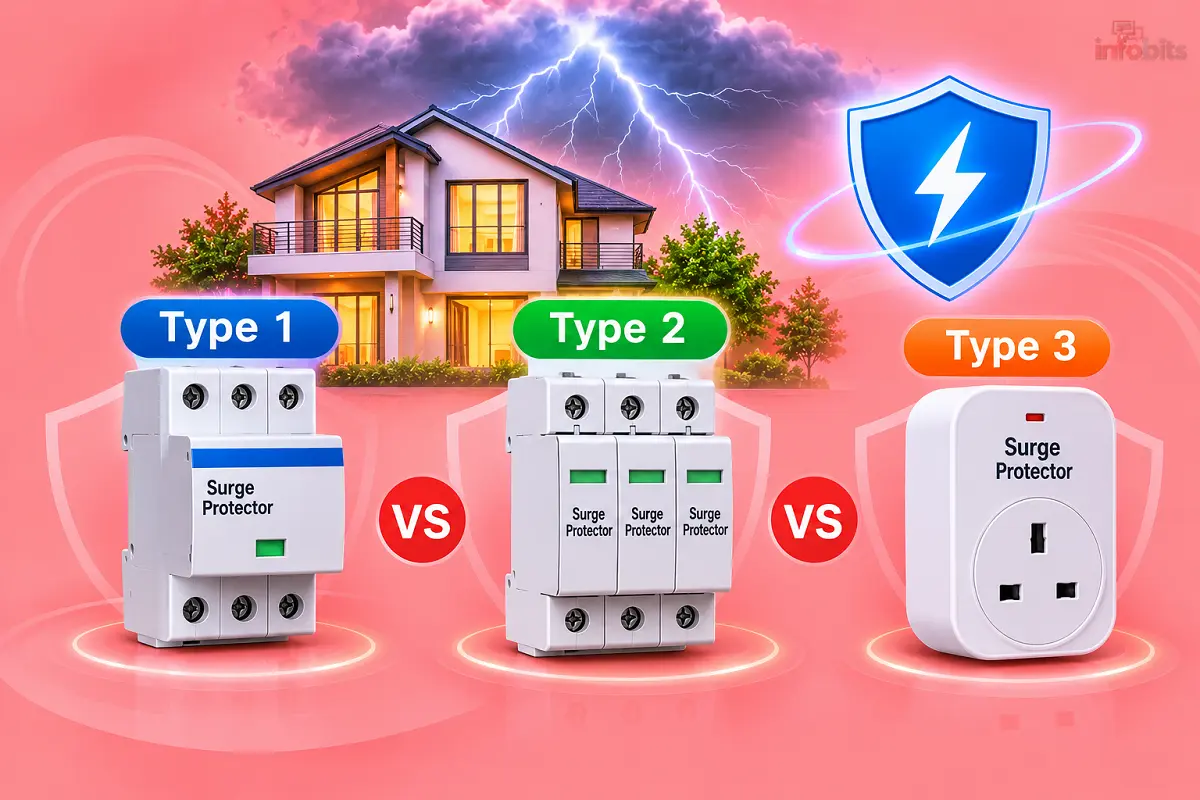
Type 1 vs Type 2 vs Type 3 Surge Protectors: Which Does Your Indian Home Need?
One lightning strike near your street can fry a router, a TV board and a fridge controller in a single second. A surge protector can stop that. But then you search online and run into Type 1, Type 2 and Type 3, and it all gets confusing.
Let me clear it up.
Quick answer: Most Indian homes need a Type 2 SPD in the distribution board (DB). Add a Type 3 at costly electronics like your TV, PC or router. You need a Type 1 only if your building has an external lightning protection system, or you are in a very exposed spot with an overhead supply line.
The three types are not “good, better, best”. They are three jobs at three locations.
What is a surge protector (SPD)?
A surge protective device (SPD) is a safety device that limits sudden voltage spikes. It diverts excess energy to earth before it reaches your appliances. Most SPDs use a metal oxide varistor (MOV) inside.
Think of the whistle on a pressure cooker. When pressure crosses a limit, it releases the excess. An SPD does the same with voltage.
Here is what an SPD does in practice:
- It stays quiet at normal 230 V.
- It conducts within nanoseconds when voltage spikes.
- It goes back to standby once the spike passes.
Where do surges in Indian homes come from?
Surges are not only about lightning. Most come from three places:
- Lightning: A strike on or near the supply line pushes a spike through the wiring.
- Grid switching: Transformer or feeder changes send short spikes into homes.
- Your own appliances: AC compressors, pumps and motors create small surges whenever they switch on and off.
Lightning is the big one in many regions. Kerala has some of the most lightning-prone districts in India, and pre-monsoon thunderstorms there produce the highest lightning flash density, with Kottayam recording the greatest frequency. Nationally, more than 2,500 people die from thunderstorms and lightning every year.
Type 1 vs Type 2 vs Type 3 at a glance
The type number tells you where the SPD sits and what kind of surge it was tested for. It does not tell you quality.
| Type 1 | Type 2 | Type 3 | |
|---|---|---|---|
| Where it goes | Main incoming panel | Main or sub DB | Socket or appliance |
| Built for | Direct or near lightning current | Residual and switching surges | Fine-tuning at the device |
| Old IEC name | Class I | Class II | Class III |
| Typical home use | Homes with a lightning arrester | Almost every home | TV, PC, router, home theatre |
| Rough price in India | ₹3,000–₹8,000 | ₹1,500–₹4,500 | ₹300–₹1,000 |
| Works alone? | Rarely | Yes, for most homes | No, needs a Type 2 or 1 upstream |
Price ranges follow Schneider Electric’s India guide. Branded models and installation labour can vary.
Type 1 SPD: the lightning-current fighter
A Type 1 SPD is built to handle the huge, slow-burning energy of a lightning current. It goes at the start of your electrical system, usually before or at the main distribution board.
You usually need one when:
- Your building has a lightning arrester or Franklin rod.
- Your supply comes by overhead line in a high-lightning area.
- You have a rooftop solar plant with an external lightning system.
Most homes without a lightning protection system do not need a Type 1. It is bigger, costlier and often sold as a combined Type 1+2 unit.
Type 2 SPD: the real workhorse for homes
A Type 2 SPD goes inside the main or sub-DB. It handles the surges that reach your wiring: leftover lightning energy, grid switching and motor surges.
This is the SPD most homes should have. A guide from a recent Indian home-electrical resource calls it the key home device, and Legrand India says the same: most homes benefit from a Type 2 at the DB.
What a good home Type 2 usually looks like:
- Single-phase 1P+N (or 3P+N for three-phase homes)
- Replaceable cartridge and a visible status window
- A discharge current rating of around 20 kA (check the datasheet)
If you want a branded Type 2 for a single-phase DB, look at Havells, Legrand or Schneider models on Amazon and match the pole count and voltage rating to your board.
Type 3 SPD: the last-line guard at the plug
A Type 3 SPD sits right next to your equipment. It comes as a socket module, an adaptor or a surge strip. It trims the small spike that slips past the SPD upstream.
It cannot handle big surges on its own. A Type 3 without a Type 2 behind it is like a raincoat in a flood.
Havells lists a socket module marked Type 2 + 3 (Class II + III), tested to IEC 61643-11, at around ₹820 on its site. That shows how the labels can overlap in real products.
For your TV, set-top box and soundbar corner, a proper surge-protected power strip from a known brand like Belkin, available on Amazon, is a simple way to add that last layer.
Which SPD does your home need?
Find your situation in the table.
| Your situation | What to get |
|---|---|
| Flat, no lightning arrester | Type 2 at your flat’s DB, plus Type 3 for costly gadgets |
| Independent house, underground or bundled cable | Type 2 at the DB, plus Type 3 |
| House with overhead line in a storm-prone area | Type 2 (or Type 1+2 if you have an arrester), plus Type 3 |
| Building with lightning arrester | Type 1 or Type 1+2 at the main, Type 2 further down if needed |
| Rooftop solar with inverter | Type 2 on the AC side, a PV-rated Type 2 on the DC side |
| Rented home, no DB access | Type 3 only, and check that the socket has a working earth |
For solar, the PV-side device must be rated for DC. Havells lists a 1200 V DC Type 2 PV SPD at around ₹1,850.
Five questions to settle it:
- Does my building have an external lightning arrester?
- Is my supply an overhead line?
- Do I live in a high-thunderstorm region?
- How far is the DB from my costliest appliances?
- Do I have a good earth connection?
If the answer to the first is yes, think Type 1. If you answered yes to the rest, Type 2 is non-negotiable.
The 10-metre rule (and why Type 3 still matters)
An SPD protects best close to where it sits. If the cable run from the DB to your equipment is long, the spike can build up again on the way. Schneider’s guidance suggests adding a Type 2 or Type 3 near the load when the distance exceeds 10 metres.
That is why a Type 2 in the DB plus a Type 3 at your TV or PC works better than either alone.
Earthing comes first
An SPD does not destroy a surge. It diverts it to earth. If your earthing is weak, the SPD has nowhere to send the energy.
Before buying anything:
- Get your earth resistance tested by an electrician.
- Check that the earth wire is connected at every point, especially the DB.
- Make sure it follows IS 3043:2018, the code of practice for earthing.
A basic plug-in socket tester available on Amazon is an inexpensive way to spot a missing or wrongly wired earth on any outlet before you plug in your expensive gear.
What a surge protector cannot do?
This is where many people get disappointed. An SPD handles short spikes. It does not fix:
- Low voltage or brownouts. You need a stabiliser for that. Our guide on whether a TV needs a stabiliser covers it.
- Power cuts. You need a UPS or inverter.
- Long-term overvoltage. A broken neutral can push 300–400 V into a single-phase home. This can destroy appliances and also damage the SPD itself.
For fridges and ACs, a digital voltage protector with a delay timer cuts the supply during high or low voltage, which is exactly the problem an SPD cannot solve.
A UPS or inverter does not replace an SPD either. Schneider notes that these systems may not handle high-voltage transients well, and an SPD can extend UPS life.
Myth vs fact
| Myth | Fact |
|---|---|
| A stabiliser protects from lightning | Stabilisers handle slow voltage changes, not fast spikes |
| A surge strip protects the whole house | It protects only what is plugged into it |
| Higher type number means better | Types describe location and test duty, not quality |
| Turning off the TV at the switch is enough | Only unplugging fully isolates the device in a storm |
| Type 1 is always safer | Without a lightning system, it adds cost and little else |
How to choose a good SPD: the specs that matter
Do not buy on price or looks alone. Check these:
| Spec | What it means | Look for |
|---|---|---|
| Standard | The test rulebook | IS 16463 (Part 11), which matches IEC 61643-11. BIS has adopted it as IS 16463 (Part 11): 2016 |
| Uc | Max continuous voltage | 275 V is common for 230 V homes. Higher Uc tolerates swings but lets more through |
| Up | Voltage let through | Lower is better |
| In / Imax | Surge current capacity | Higher is sturdier. Compare like with like |
| Status indicator | Shows if it is still alive | Window or LED you can see |
| Replaceable module | Swap only the cartridge | Strongly preferred |
| Backup MCB | Protects the SPD wiring | Rating as per the datasheet |
For selection principles, the standard is IS 16463 (Part 12): 2017, which is identical to IEC 61643-12.
A word on UL labels. If you import or buy foreign listings, note that the US standard also uses Type 1, 2 and 3 but means something different. UL 1449 focuses on where the SPD may sit relative to the service overcurrent device. Do not mix the two systems.
Beware of unbranded stock. Cheap SPDs with no datasheet, no test claim and no indicator may not react in time during a real surge. In my view, an SPD is only worth buying if you can read its specifications.
How an SPD is installed in an Indian home
A Type 2 install is a short job for a licensed electrician. Do not try it yourself, since the incoming side of a DB stays live.
Here is the usual process:
- Switch off the main supply and confirm it is dead.
- Mount the SPD on the DIN rail in the DB.
- Connect through the specified backup MCB.
- Wire it with the shortest possible leads.
- Connect its earth terminal to the main earth bar with a thick copper conductor (typically 6 mm² for Type 2, 16 mm² for Type 1; follow the manufacturer’s manual).
- Test the earth, switch on and check the status indicator.
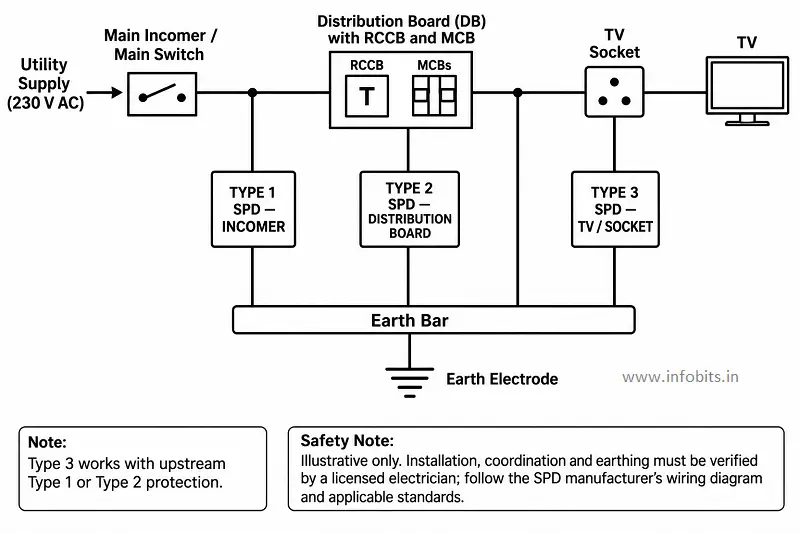
Keep the wires short. Long loops raise the voltage let-through, and that defeats the purpose.
If you want to understand how lightning energy can enter fan and appliance circuits, our post on protecting a BLDC fan from lightning shows a real SPD connection.
Related: How to Install a Surge Protection Device (SPD) at Home: Step-by-Step Guide
What does it cost?
For most flats and houses, the realistic budget is:
- Type 2 at DB: ₹1,500–₹4,500, plus installation
- Type 3 for key gadgets: ₹300–₹1,000 each
- Earthing check or upgrade: depends on your city and electrician
Compared with replacing a TV mainboard, a fridge inverter board or an AC PCB, that is cheap insurance. Many appliance warranties exclude lightning or surge damage, so read yours.
Warning signs your SPD needs attention
- The status window has turned red or changed colour.
- The Type 3 strip’s protection LED is off.
- There is a burnt smell or discolouration near the unit.
- The backup MCB has tripped without reason.
- A major thunderstorm has just passed.
An SPD wears out each time it takes a hit. After a big strike, ask your electrician to inspect it, even if the indicator looks fine.
Common mistakes to avoid
- Fitting an SPD with no earth. It cannot do its job.
- Using only Type 3 strips and calling it done. Big surges will push through.
- Using long wires to the SPD. This raises the let-through voltage.
- Ignoring data lines. Surges can also arrive via a LAN cable or TV coaxial cable.
- Forgetting the SPD after a strike. It may already be spent.
- Confusing surge, sag and outage. Each has a different fix.
Three real-world scenarios
Scenario 1: A 2BHK flat in a city. There is no arrester and the cable is underground. A Type 2 in the flat DB (if the society allows) plus a strip behind the TV is enough.
Scenario 2: A house in a thunderstorm-prone area with an overhead line. Get a Type 2 at the main DB and a Type 3 at the router and TV. Add Type 1+2 if you also have a lightning arrester.
Scenario 3: A rented flat. You cannot change the DB. Use good Type 3 protection and confirm each socket has a working earth. A small router UPS also keeps your internet alive during cuts, and our guide to the best UPS for WiFi router lists tested options.
Expert tips
- Install SPD, earthing and RCCB as one safety plan. Do not treat them as separate purchases.
- Label the SPD’s installation date in the DB.
- Unplug sensitive devices before a very heavy storm if you are away.
- Pick the Type 2 first, then add Type 3 only where it earns its price.
- Re-check your earth resistance once a year, before the pre-monsoon season.
Final Thoughts
Here is how I would think about it for my own home. Type 2 in the DB, Type 3 for expensive gadgets, Type 1 only if there is a lightning arrester. Fix your earthing first, and keep your wires short.
An SPD is not glamorous, but it is the cheapest protection you will ever install for the electronics you already own. For power backup context, see our guides on inverter basics and sine wave vs square wave inverters.
Frequently Asked Questions
Type 1 handles lightning current at the main panel. Type 2 handles residual and switching surges at the distribution board. Type 3 gives fine protection at the socket or appliance. They work as layers.
For most homes, a Type 2 SPD in the distribution board is the core device. Add Type 3 for sensitive electronics. Add Type 1 only if the building has a lightning arrester.
Usually no. It is meant for buildings with an external lightning protection system or highly exposed supply lines. A typical flat or house without an arrester is fine with Type 2 plus Type 3.
You can, but protection is limited. A Type 3 cannot absorb large surges, so it works best behind a Type 2 in the DB. For renters, it is often the only option.
For most homes, yes. If your costly equipment sits far from the DB, add a Type 3 near it for better protection.
Inside the main or sub-distribution board, wired through a backup MCB and connected to the earth bar with short, thick conductors.
Rough ranges are ₹300–₹1,000 for Type 3, ₹1,500–₹4,500 for Type 2, and ₹3,000–₹8,000 for Type 1, before installation. Brand and rating change the price.
No. An SPD diverts surge energy to earth. With poor or no earthing, the energy has nowhere safe to go, so protection is weak and risky.
No. A surge protector handles brief high-voltage spikes. A stabiliser corrects slow voltage drops or rises. Many homes benefit from both for different problems.
No. For outages, you need a UPS or inverter. SPDs only limit voltage spikes.
No. A UPS or inverter provides backup power and may not handle fast surges well. An SPD upstream can also protect the UPS itself.
Check the status window or LED. A colour change or lit fault flag usually means replacement. After a big thunderstorm, get it inspected even if the indicator looks normal.
There is no fixed life. It wears out with each surge it absorbs, so a home in a high-lightning area may need replacement sooner. Replaceable-cartridge designs make this easy.
It is not recommended. The DB incomer is live, and wiring errors are dangerous. Have a licensed electrician fit and test it.
Yes, if you can. It is the only sure way to isolate a device. Also consider disconnecting LAN and TV coaxial cables on sensitive setups.
It helps. Fit a Type 2 in your flat’s DB if the society permits, and use Type 3 for your key gadgets. Ensure the flat has a reliable earth.
Yes. Rooftop solar needs a DC-rated SPD on the panel side and a Type 2 on the AC side. Add Type 1 if there is an external lightning system.
No. Sustained overvoltage is different from a spike and can destroy the SPD too. Use a voltage protection device and have the neutral fault fixed.
No. It is a safety device, not an energy saver. It only reduces your risk of damage from spikes.
Often not. Check whether it names a test standard, shows a protection indicator and comes from a known brand. Unbranded boards may offer little real protection.
We hope you are interested in our articles and consider following our Facebook, Instagram, and Twitter pages for regular updates.
Also, share this article with your friends and relatives. Bookmark this page for future reference.
Subscribe to our free newsletter to get similar articles and regular updates directly in your Email Inbox.
Subscribe to be the first to learn about new information
Disclosure: If you follow our links to a retailer’s website and make a purchase, we will get an affiliate commission on some, but not all, of the items or services we promote. This will cause no price change for you.
You May Be Interested to Read:
- Is It Safe to Use a Phone During Lightning? The Real Answer
- Best Multimeters in India: Digital & Analogue, Tested & Compared
- AC Buying Guide India: New BEE Ratings, GST Cut & What Really Matters
- Best Rechargeable Emergency Lights for Homes in India
- How to Earth Your Home Electrical System Properly (India Guide)